Big Sur 11.6

Any tried Capture One 14.3 on Big Sur 11.6? Does it run successfully or are there any problems.
-

Here, there are only problems. Like,
rotation tool > boom
sliding the exposure slider > boom
just browsing > boom
Totally useless atm.
0 -
Thanks, I’ll hold on. I have a tethered shoot tomorrow.
I know from experience that winding back MacOS to previous versions takes all day. It’s annoying that I can’t take advantage of Apple security updates because Capture One lagers behind.
0 -

Here, there are only problems. Like,
rotation tool > boom
sliding the exposure slider > boom
just browsing > boom
Totally useless atm.
None of those problems here.
Running on a iMac (Retina 5K, 27-inch, Late 2014).
0 -
Running Capture One 14.3.1.10 on MacOS Big Sur 11.6 on a MacBook Pro 16" (2019).
No problems.
0 -
Shane and Mario, I think there are use-cases which are not asking for troubles and others which let me think, the worst programmers of Apple and capture One teamed up for a "craziest bugs" competition. And this time I don't think it's only C1 causing problems as also DxO runs much more hesitant.
Log In to the forum (Safari or Opera):
{"message":"invalid json response body at https://app-co-myaccountspaclientbff-we-live.azurewebsites.net/api/v1/Sso/GetZendeskSsoUrl?redirectUrl=https%3A%2F%2Fsupport.captureone.com%2Fhc%2Fen-us%2Fcommunity%2Ftopics%2F360001066397-Capture-One-21-x-Software-for-Mac reason: Unexpected end of JSON input"}Only possible in Opera. After restart Opera. Restarting Safari: same message.
iMac 2020, 8-core i9, 32 GB RAM, Radeon 575 (4GB): Loads of problems:
selecting 12 – 50 images and "create an album of selected": Crash after 15 albums. After restart 12 albums simply not there any longer. I saw them before, I named them - gone after the crash.
Adjusting crop, transfer adjustment to other variants, after that fine adjusting one image: Boom
Since the update also came Safari 15, and more crashes of C1. And I did a couple of restarts... Yesterday night I imported colour and B/W negative catalogs into a new catalog. Today the Mac was quiet and and after clicking on "all pictures", C1 starts to generate thumbnails – WHAT? Half night in idle mode? 592 of 7459, still 5 hrs to go? "Deactivate idle mode automatically when screen is off" was active in energy settings.
Currently I'm re-thinking which app to use to organise +9000 digitized film images. If it's no longer "working, editing, organizing" but "waiting for the next crash", it first beats the fun out of it and next stage is loosing interest in photographing digital.
0 -
What I fail to understand: Merging one catalog into a new one without changing any other settings or preferences leads to 5 hours HD activity and processing work tp create new thumbnail previews instead of using the "old" ones which are in recently used catalogs already available. I could understand if there was a checkbox to decide wether I needed freshly generated thumbnail previews or not, but what C1 does here is wasting energy and wearing drives.
0 -
Maybe a bit off-topic here but maybe a helpful hint for some people:
I had a lot of problems in the past with my Mac and it turned out that the cause of this was a tool named "Mackup" which symlinks the settings of the applications (~/Library/Application Support/...) to iCloud drive.
In principle a good idea but not very stable and many applications caused trouble with this.
So if you are using Mackup think about uninstalling it.
0 -

No problems here
0 -
That's a view of the catalog I imported into a new one

And here's what the new catalog made out of it. No idea, where Capture One got the parameters for cropping all b/w pictures to the point of becoming useless, but I see it as a reminder as of "how do I consider the DAM part of C1 to be?" USELESS!
 0
0 -
Is it possible to see a comparison of the same images?
Ian
0 -
Sure, but pointless. From 486 digitized films, at least No. 1 ... 276 show this unwanted and hard-to-explain crop. I didn't check each image Croptool is set to "unlimited" (or whatever the translation in English might be).
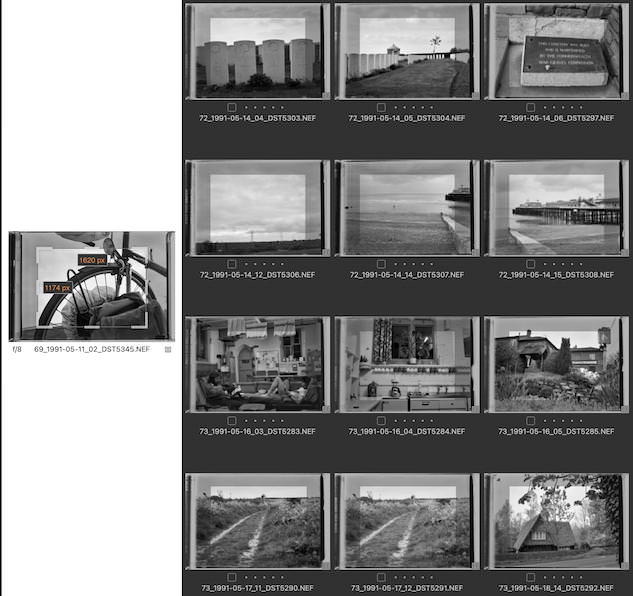
And I for sure will not go through 7000 images to adjust that cropping or risk the next two dozen crashs of this pile of bugs: A DAM which can not import two of it's own catalogs into a new one, is simply unreliable. This and the constant problem of crashing are giving me the best motivation to look elsewhere, I'm fed up with this expensive pita.
0 -
The translation of the setting in the crop tool is "unconstrained" in English - that is, no set to any particular aspect ratio.
It looks as though on import some crop has somehow been applied. Not sure why.
You should be able to reset the crop on all the images once, without doing 7000 of them one by one. Select all the images you want the crop reset on, make sure the Edit Selected button on the tool bar is toggled on, and use the reset button on the crop tool. It will ask you to confirm that you really want to resist all the images, but then it should do them all together.
This is the Edit Selected button I mean.

and this is the reset button on the crop tool.

Ian
0 -

I sympathize Joachim.
I find I can work out what Capture One is doing if something unexpected happens. Usually it will be my error or something I have not thought of in the action taken.
However Photoshop (and so far all similar programs) completely baffle me within minutes unless I am undertaking the simplest of tasks.
I try to avoid them, usually successfully from my perspective although some may think I must be completely incompetent if I cannot understand what has become entirely natural to them. They may be right.
0 -
Thank you Ian and SFA, "Edit Selected" never (!) worked on crops, at least not as long as I know C1 and through all the imported scans (if you want to call a reproduction with a Z 7 in portrait orientation a "scan"). Contrary to DxO, which actually can crop more than one image at a time. Which also considers the orientation of the image - all landscape oriented pictures AND portrait oriented are cropped along their original orientation. Meaning: I imported exclusively portrait oriented images in this project, the turnt most of them into landscape orientation. To my surprise, DxO photolabs is handling cropping of multiple images along their original orientation. On the other side, C1 just crops the portrait oriented pictures also to landscape orientation, same proportion but smaller if I apply the crop with the double sided arrow to other images.
Useless.
And crashing after selecting a couple of images to 6 different collections is another No-Go for a so-called professional software - and I just can't see what I could have done wrong. Except doing the whole work with an app not up to the job.
0 -
Yes, and something I haven't thought of at the beginning was a consistent naming scheme for all pictures. Which in C1 is impossible to correct due to the poor functions and also the unreliable performance. It crashed repeatedly when renaming images. And it crashed the way the files were renamend, but after restarting the app it turnt out the catalog still has the old names and therefore could not find the within C1 renamed files.
I do have a better tool to rename than C1, but then all edits will be lost.
Sorry to hijack this thread with a scan project which already started when I still was on OS-X 10.15. Updating the OS simply didn't help a bit. On the contrary things got worse.
0 -
Thank you Ian and SFA, "Edit Selected" never (!) worked on crops,
No - it wouldn't work to apply a crop to multiple images, but I think you will find that it will work to reset the crop on multiple images.
Ian
0 -
Destroying my work with the original catalog for the sake of Capture One not being able to import it's own catalogs? With 7 or 70 images – maybe. With 7000? Not in my lifetime.
Because after resetting I'd need to crop again, and given the so-far-experience, would also have to face loads of more crashes. Thanks, doesn't sound very tempting to me. If I have to invest this time again, I will not bet on the dead horse of C1's DAM.
0 -
Log In to the forum (Safari or Opera):
Not a Capture One (the software) issue but possibly a Capture One (the web page) issue. Or a Safari issue. Don't know. I've seen this off and on for a year or more. It seems to be caused by a stale cookie. When it happens I open Safari preferences, select the Privacy Tab and click on the Manage Website Data... button. Search for capture, select the captureone.com entry, and hit the Remove (not the Remove All) button.
Yeah, you shouldn't have to do that.
Any tried Capture One 14.3 on Big Sur 11.6? Does it run successfully or are there any problems.
No issues on my end. I'm running an intel iMac.
0 -
The crashes here have a pattern.
Tweaking images that were already edited (before the update) works fine.
Attempting to edit anything on unedited images crashes C1. This includes copying and pasting adjustments.
C1 14.3.1, Big Sur 11.6, M1 Mac
0 -
Not a Capture One (the software) issue but possibly a Capture One (the web page) issue. Or a Safari issue. Don't know.
Don't know either, but the Capture One website and forum is run by who? I don't know any other forums with this kind of continuously annoying issues. You know, Marco, when I buy something in a webshop, and things go wrong with the order and the item arrives too late and is broken on arrival, I'm always tempted to conclude about the quality of the rest. And the bug pile C1 fits to this website very well. It can be an unfortunate row of bad luck but in the meantime I prefer not to waste more time, energy and nerves on it.
0 -
but the Capture One website and forum is run by who?
Don't know. Their support is zendesk. Their payment processor is fastspring. If they are going third party for support and payments I'd not be surprised if they go third party for the web, too.
0 -
Safari also must be involved in this behaviour. LogIn with Safari is often impossible while Opera struggles less often.
I really wonder, if CoVid wit all it's "home-office" regulations and sometimes lack of communication, lack of overhearing other people talk about an issue, lack of coming together for general discussions doesn't play a role in this ongoing weird behaving of software? I'm not talking only about C1 right now. The Windows side of my professional life also comes up with bizarre (I mean, more bizarre than Windows already is) reactions.
0 -
I'm using 14.3.1.10 on a 2019 iMac and an M1 MacBook Air and it's fine. No issues at all.
0 -
14.4 fixes the crashes that occurred when I attempted to edit previously unedited images.
0

Post ist für Kommentare geschlossen.
Kommentare
24 Kommentare