Modifier key for finer adjustments

Please introduce the option to hold down a modifier key while moving adjustment sliders to allow for finer adjustments.
-
How would this work, Thomas? At the moment, if you drag a slider, the handle moves in sync with the mouse pointer. Do you envisage that if the modifier key was pressed, the handle would move slower than the movement of the mouse pointer?
Ian
0 -
Yes, that's it: you hold down a modifier key and the parameter value changes at, for instance, a tenth of the regular speed when you move the slider. It's quite common in music/audio software.
Thomas
0 -

Already exists for most tools.
Using Windows a tool with a relatively high rate of change can be slowed down using the Alt key.
If the rate of adjustment is, by default, a fine resolution the Shift key makes it less fine.
This applies to both sliders and the direct entry numeric fields where they exist.
There may be some tools where the adjustment modification option is not available because, for example, it would not be logical or the available resolution of adjustment would not make sense.
I assume this is the same (possibly with a different modifier key) for Mac.
0 -
@SFA – If so, it doesn't appear to work here (on Mac), I've tried all the combinations I can think of, with different parameters too.
0 -
For a specific tool or have you already tried multiple tools?
The feature has been around for a very long time. For as long as I have been using C1 as I recall, although I did not discover it until about V8 from memory.
0 -
As I wrote above I've tried with different parameters. It should work with Exposure, I assume, if it worked.
0 -
Yep, it works with Exposure and all of the other tools I have tried where a Slider of some sort is available with an associated numerical value field.
Using the Exposure field for example,
If I place the cursor over the slider handle and drag the handle the numeric values change by a non-linear amount as it moves away from the centre. If I hold down the Alt key and drag the handle the numbers change at about 1/10th of the rate. The cursor moves away from the handle as this happens and required greater movement distance for the amount of change.
With cursor on the slider handle and using the trackpad zoom/scroll feature plus the Alt key the values change by .1 as one zooms. This, as I recall, is in line with the value changes available using Keyboard shortcuts or the recent Speed Edit facilities.
With the cursor clicked into the numeric value field and using the UP and DOWN arrow keys the value changes by .1 with each click in line with the Speed Edit functionality. Using the Shift key as a modifier the values change by 1 (effectively 1 stop) with each click.
Since V20 and the introduction of the scrolling area for tools the use of a mouse wheel (or equivalent on a trackpad) has slightly changed the options for how the mouse activity can be applied (See the Preferences). Perhaps this might be influencing what you see?
It may also be a possibility that the "mouse" functions (or the driver for whatever device one is using to emulate a mouse type activity) is not offering the same results as I see using Win 10 or Win7 before that. They can sometimes have some seemingly rather perverse ways of setting functionality. Also I have no idea what one might expect of them using a Mac.
ETA. The Alt key will also work with things like the selection points on a curve and allow finer resolution of movement.
0 -
This part, which is also mentioned in the manual (28.6), works here too: "With the cursor clicked into the numeric value field and using the UP and DOWN arrow keys the value changes by .1 with each click in line with the Speed Edit functionality. Using the Shift key as a modifier the values change by 1 (effectively 1 stop) with each click."
But as far as I can see, no modifier keys work when moving the sliders.
0 -
What settings do you have for the Preferences?
0 -
What part of the preferences would this be? I haven't found anything related to this.
0 -
General Tab.
"Viewer" and "Tool Tabs" sections are the ones I was thinking of that may have some connection to the way the functionality works in some situations related to the use of a mouse (or equivalent). The implication of the settings may be a little wider than the naming categorization suggests.
However, it may also be the case that the Mac and Windows OS's do not offer the same facilities. Indeed the Preferences settings available may be different!
I have no way of checking that. Sorry.
0 -
Thanks. I had these settings – I just tried changing them, but it makes no difference.
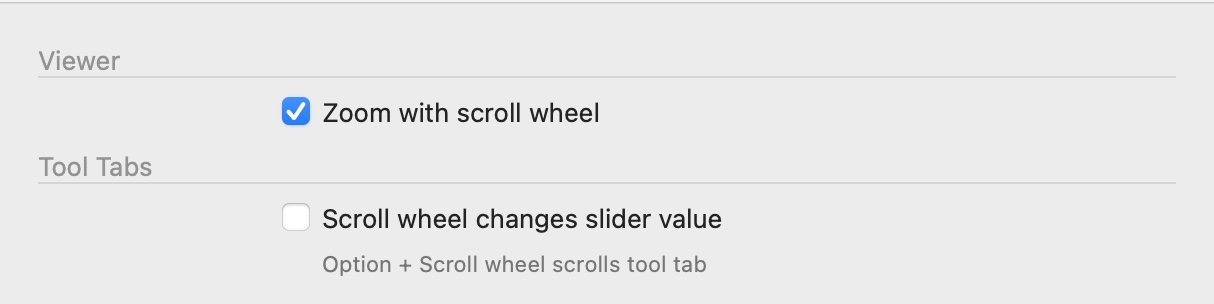 0
0 -
My settings are the same.
I have an additional option for the Viewer related to the use of Touch. I'm not sure why.
Maybe because I sometimes connect a Touch capable screen and that has been identified at some point in the past so the option appears.
One difference might be the controls available for the driver the runs my touchpad. I'm not using a mouse or other input, just a touchpad.
That said, on this machine I cannot recall whether I have ever assessed the settings available beyond discovering what is different to my older machine. Having taken a look it seems that the controllable functionality is simpler and now mostly based on gestures. A few more things to try to remember.
I have not found anything that looked like it might be some special setting that could influence how sliders work, other than for the availability of Touch screens and I do not have that connected.
0 -
I'll see if support can clarify how this is supposed to work, and if it's supposed to work on Mac.
0 -
After more than a month, I finally got a reply from support saying that the above is Windows only.
0 -
I still miss this option.
0

Post ist für Kommentare geschlossen.
Kommentare
16 Kommentare