GPU acceleration still not working

Capture One for windows still does not use the GPU to export photos and the latest version is even slower than the previous ones. Anyone have any idea to use GPU in Windows systems?
-

Hello name
You need to tell your graphics card that the program will work with it and only with it.
By default the option is chosen by the system but you can force it.
If you have Nvidia you can do it in the following steps.
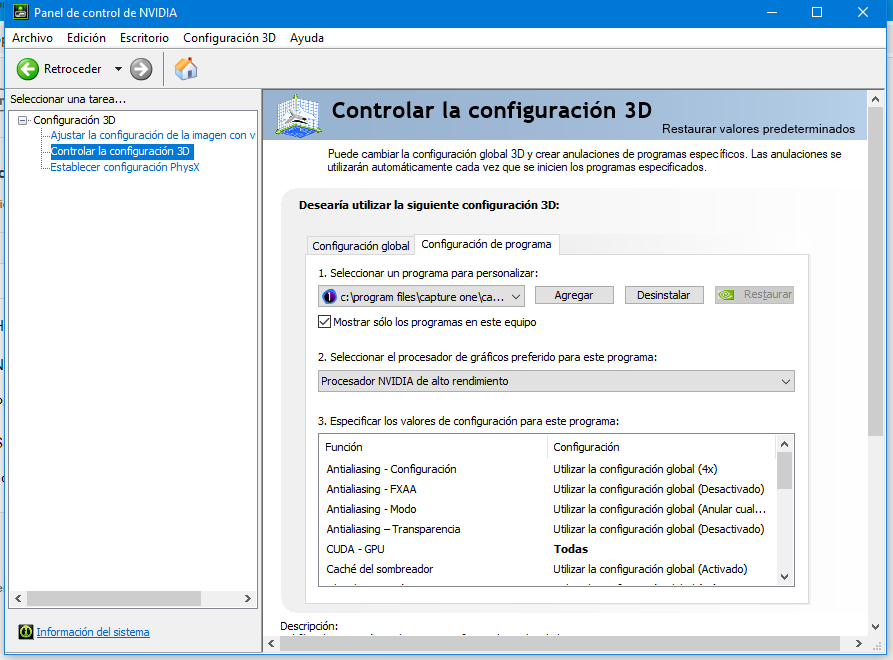
1º In the control panel of the graphics card, in the option "control the 3D configuration"
2º Enter the tab "Program settings"
3rd From the list offered in "Select a program for ..." Select Capture One 21
4th In "Select the preferred graphics processor" select your graphics card
5th Restart the computer.
I guess if you have another brand of graphics card it will have a similar method.
 0
0
Post ist für Kommentare geschlossen.
Kommentare
1 Kommentar