Layer Panel Icons To Represent Actual Mask Type Properly Based on the Content
Implemented
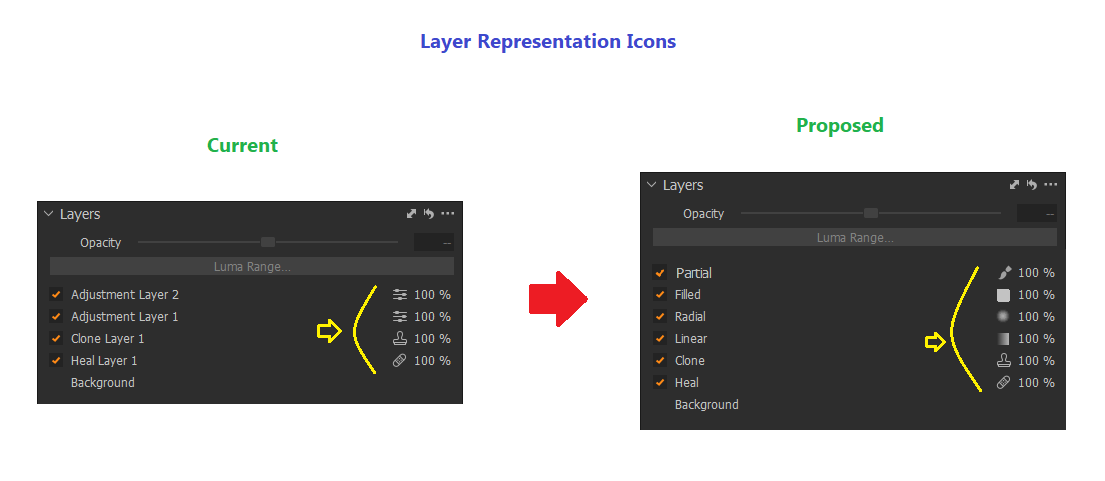
Mask type icons in layer panel do not represent the actual content correctly except Heal and Clone. Same Icon is added for Empty, Raster ( Partially or Fully Filled ) content and Gradient masks where as for Heal and Clone respective icons are clearly showing what type of layer they are.
When Empty or Filled Masks are created default Names and Icons are same. Unless use Display Mask (M) option no way to know it is empty or filled.
As contents of layer can be recognized either it is Gradient or Rasterized partially or fully filled or empty etc..., appropriate icons can be added to represent it properly.
Below is the mockup I created as reference...
-
Offizieller Kommentar

Hi Prasad,
Thank you for your feedback on Capture One - we appreciate the time you’ve taken to contribute towards the development of the software.
I have forwarded your suggestions to improve mask type icons in the layer panel to our Product Management team.
Hopefully, your feedback contributes towards a future version of Capture One.
Whilst we cannot comment on future releases, we take all suggestions on board.
Post ist für Kommentare geschlossen.
Kommentare
1 Kommentar