Blurry images in main viewer

As many users post before.
I have a problem, in the main viewer my images seems to be blurry. When I export them in JPEG, no problem at all. Even it's too sharp.
Very hard to work on Capture One right now, I had to switch back to LR.
I have tried everything to fix the problem nothing works.
I am on mac.
Any solution?
-
Check your preview size in the preferences, it should approximately match your screen resolution.
Then regenerate the previews.
0 -
I have already tried but the preview when I zoom at 50% it's working , at 100% is okay as well.
The problem comes with the general viewer not in the thumbnails or anything.
I have seen many people who has the same problem.
0 -

What are the pixel dimensions for your screen?
What size do you have set for the Preview files in your preferences?
Were the problem Preview files created with the same size requirement set?
0 -
My screen is a EIZO CS2420 1920 x 1200
I have set the preview at this resolution, I clicked on regenerate again but it changes nothing.
0 -
Catalog or Session? The reason I ask is that if this happened to me when using a Session I might quite Capture One, use Finder to kill the existing previews, then start Capture One to let it rebuild them. But... if I'm in my main catalog with 50K images I might not want to do that.
In that case I might select the fuzzy images and export them "with adjustments", delete the images from my catalog, them import them back "with adjustments".
I don't know that either of the above would fix the issues. They are just things I might try to work around what sound like a Capture One bug.
1 -
If you are running the screen at its native 1920 x 1080 you are seeing the same number of pixels on your 24" screen as I see on my 15" screen.
Viewing distance might become a significant factor related to how the image presents itself when the screen area involved at 24" diagonally is approaching or possibly exceeding double what I have at 15" diagonally.
If I slightly zoom the screen whilst displaying a decently sharp image on the screen I can quite quickly get to a point where the re-sized image looks blurred.
In C1, if you use its zoom capability, the image at over 50% will be recalculated based on the original file so long as it is available. That would mean that the revised "zoomed in" version will not be based on the original preview file but rather a new calculation, held in memory, created using the full resolution original file. And so, as you have found, the perceived sharpness may well be improved.
0 -
I have no problems in Lightroom only in Capture One....
Some others users have this problem.
I don't think it's a normal problem on a professional software.
I have already tried without the screen plug in my Mac... it's the same problem.
0 -
I work in Catalog mode.
0 -
Here the screenshot of blurry image : https://drive.google.com/file/d/19zytpYuJsxCbXmyWPcSUSxeUozRrsCzb/view?usp=sharing
Here the image exported
https://drive.google.com/file/d/1wMDMmEOBfNk-Fm6ZrHx8L60EZSfkQyHk/view?usp=sharing
Never met a problem like this before. This is like I can't trust the preview and my settings at all because they look so different between the preview and final image.
0 -
In that case you may want to use the "Submit a request" feature of the Community to create a Support Case and obtain a personalised response from the Support Team.
0 -
This is what I did, I am waiting for the answer.
0 -
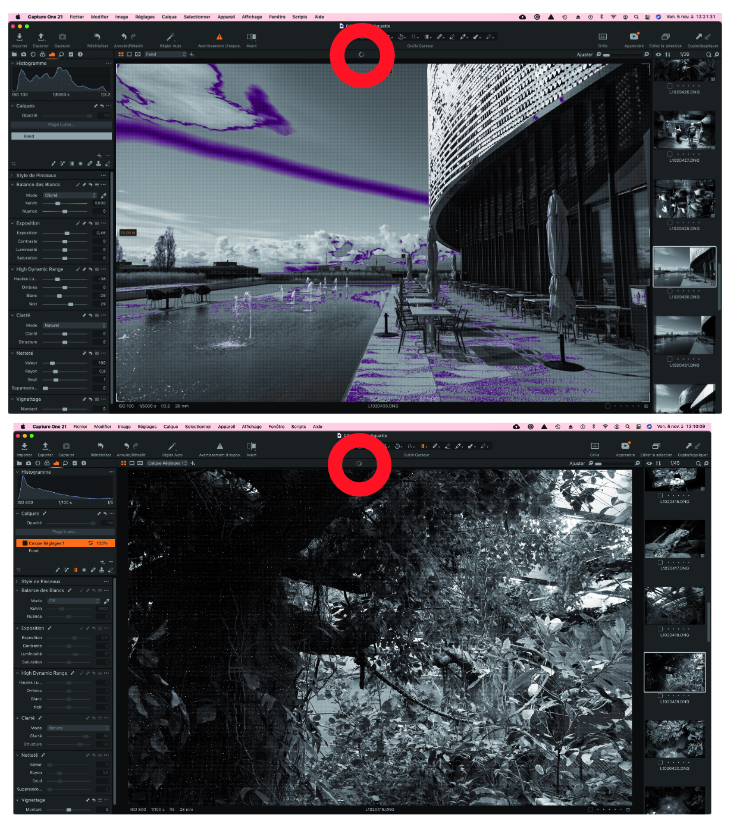
Hello... I have the same problem. Every time I make a command the little wheel turns (red circle on picture01 and 02) and the image becomes bizarre (see attachment. You have to zoom to see the default). Once the software has done the job (small wheel stops), the image becomes normal.
Other problem: I can't manage no longer export the DNG photos, for example,
I select all my processed photos, I ask for Export, and Capture One only takes one photo.Thanks for Help! renek(a)
 0
0 -
@renek(a)
For the first issue (working progress wheel running), I have the same with large files (e.g. TIFF files 300 MB). It takes from 2 to 5 seconds to stop working and display a clear view.
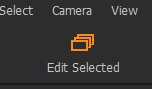
For the second issue, you should check that the main menu icon "Toggles between edit primary and edit selected variants" (3 stacked sheets) is ON (turning to orange color).
0 -
For the second issue:
 0
0 -
@Mymy13 Did you find a solution to this annoying blurriness/muddiness in the viewer?
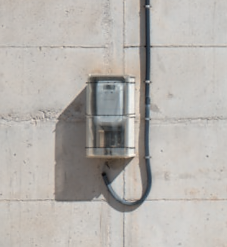
Viewer:
Exported JPG:
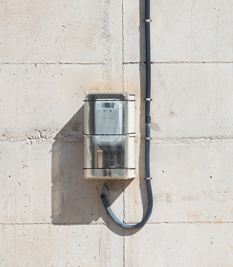
EDIT: to all the tortured souls with blurry viewer images. The solution (for me) was to trade performance for quality. As a result, my viewer images are now as sharp as my exported images. To do this, as other users have mentioned in other threads, I had to essentially disable the use of pre-rendered preview images by changing preview size to something like 1440px and re-generating preview images. On my 2560x1440px display, this essentially tells C1 to compute the image in most workflows and NOT use the blurry preview image. The downside is, as mentioned, that I need some more patience for my CPU and GPU to catch up when zooming in and out. But I am happy with at for now.
0 -

I'm sick of Capture One. There is ALWAYS something going wrong. Can you please get your act together? You have ONE job, making reliable software.
0

Post ist für Kommentare geschlossen.
Kommentare
16 Kommentare