New export mess ?

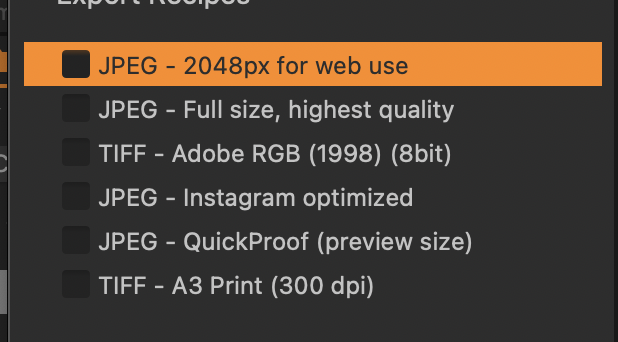
Before the export was easy, JPEG in a reasonable size 2-5 MB and done. Now some "news" happened and you export 300 kB web JPEG or full size 30 MB (even if you set 20-30% quality) or some unusable tiffs etc.
How can I easily export normal average JPEG (not web or instagram and not 30 MB ?)
-
You know that you can add and define your own recipes, I assume.
I don't think they have changed the jpg creation algorithm.
Can you make a specific example? ALso note that the estimation of the file size in C1 differs from the actual file size when exported. Also, jpg is a compression algorithm and complex/busy images can have bigger file sizes than simpler ones.
0 -
For most purposes, I don't use 100% on the JPG quality slider. Most of the time I use a recipe with it set to 85. This results in a file approximately one-third of what I get with the "Full size, highest quality" recipe (so in my case with a particular image I'm looking at, its estimated size is ~5MB compared with ~16 MB). I don't see a difference looking at the 85% compared with the 100% image. Perhaps for a large print it might be worth using the 100% setting.
The quick and easy way to set up a recipe for the 85 setting is
- select the "Full size, highest quality" recipe
- go to the ... symbol at the top of the Export recipes tool and choose Duplicate Recipe
- this will create an identical recipe called "Full size, highest quality copy"
- in the Export Format and Size tool change the Quality slider from 100 to 85.
- right click the recipe name and rename it from "Full size, highest quality copy" to "Full size, quality 85"
If you leave that as your selected recipe, that's what you should get by default when you export. (And the beauty of the system is, that you only have to go to the trouble to set this up once - after that you just make sure the recipe you favour is selected and checked.)
Ian
0


Post ist für Kommentare geschlossen.
Kommentare
2 Kommentare