Linear / Flat response to File Import (Comparison to Lightroom)

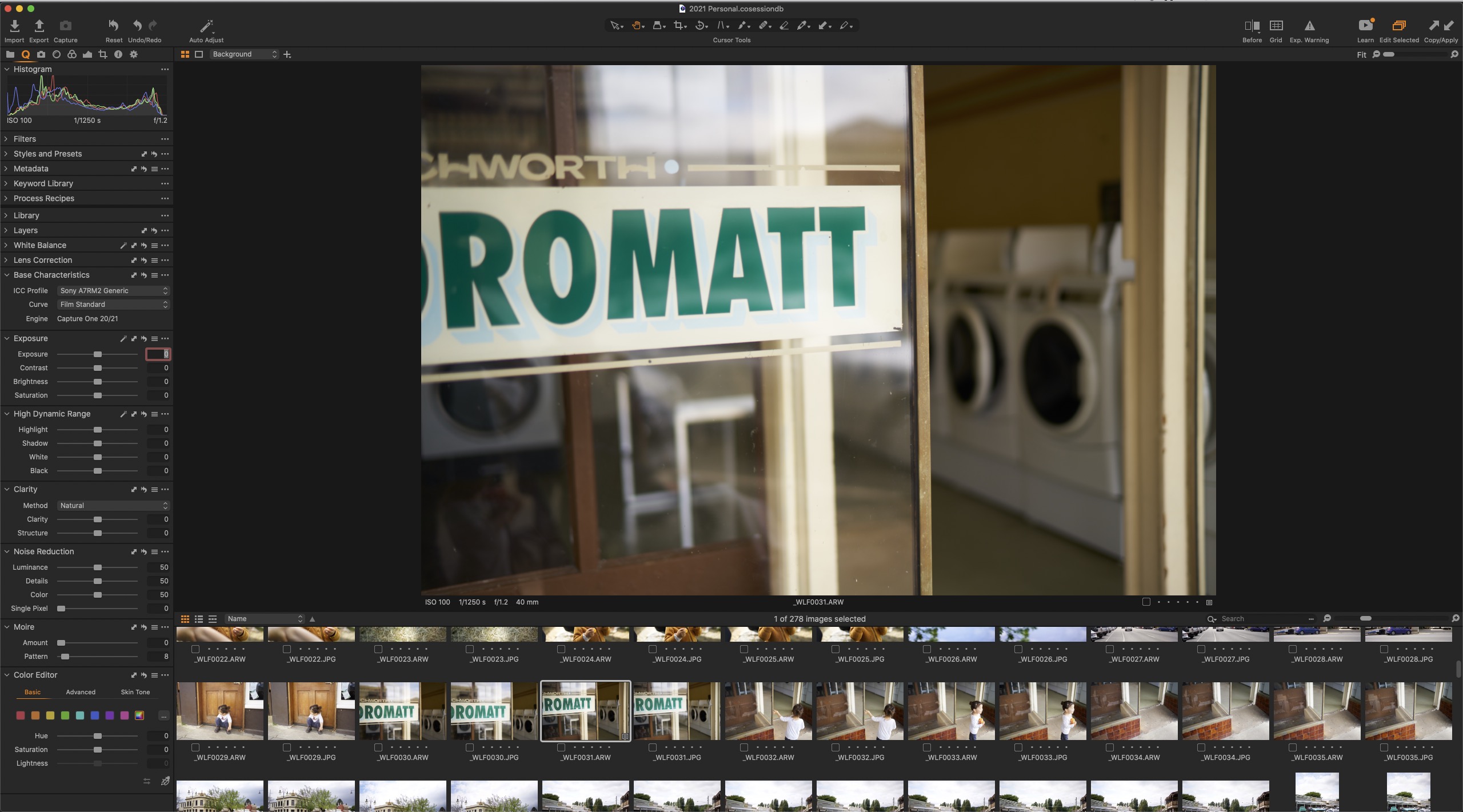
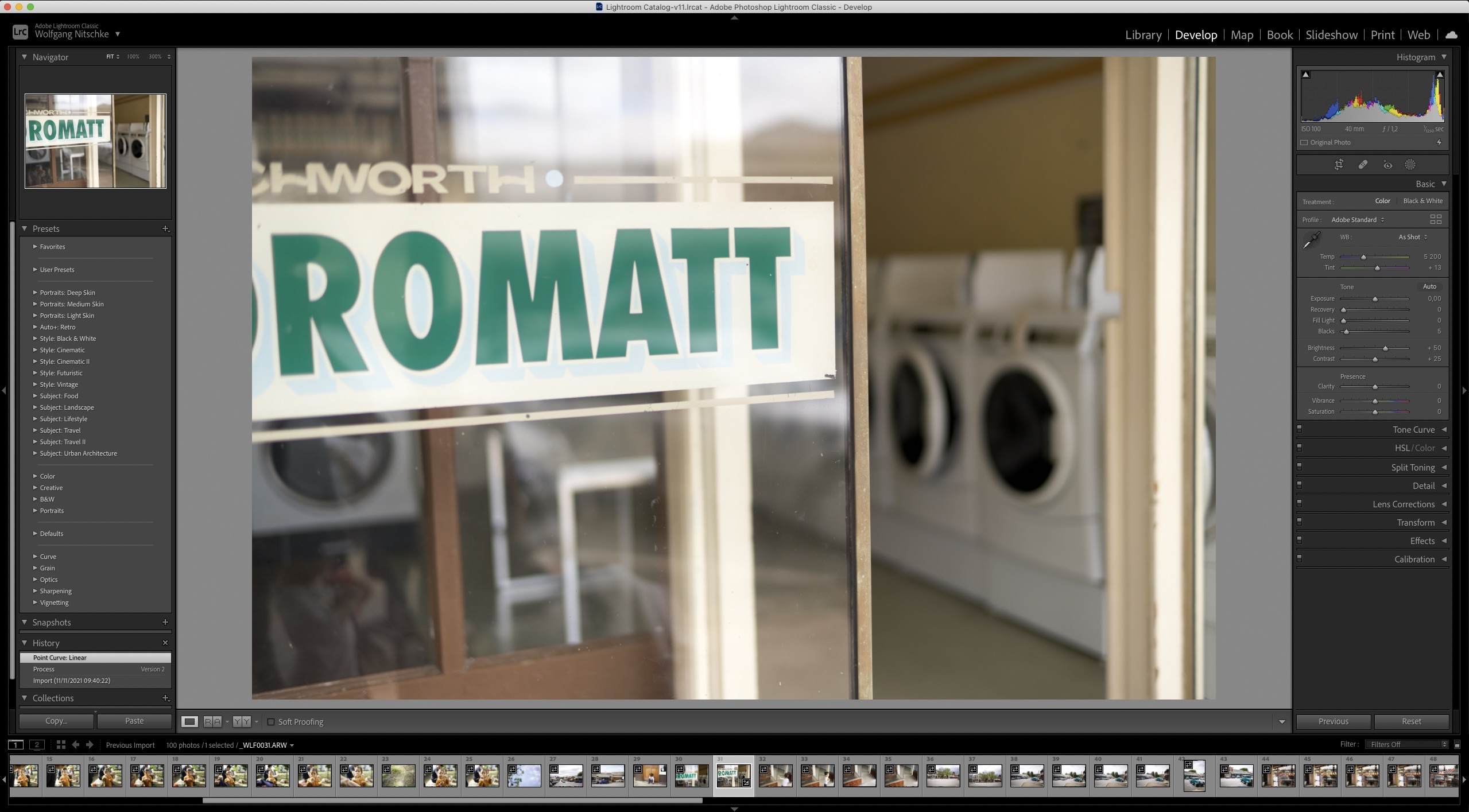
I've attached two screenshots - one with C1 and one with Lightroom. I love the whole file management in C1 (except keywording and some other aspects like changing the date/time being impossible). But all in all the workflow and sessions are brilliant and just what we need! Adobe really gets my head in with their forced cataloguing system. Which is why I am still with C1
But increasingly with every new version C1 adds more and more contrast to the read out of RAW files and increasingly I find myself using Adobe Bridge to bypass Lightroom and use the Adobe RAW Converter instead... why?
Because I must say that I simply expect that a RAW processor reads out a flat linear profile of a RAW file and provides me with the flat response rather than adding a contrast curve ... to add insult to injury C1 provides me with no way to undo the artificial curve — even if I choose a linear profile or ETERNA it always has too much contrast
Two things C1 should really change
1. Out of the box Adobe comes out flatter — at least give us the CHOICE to have a really flat profile!
2. In addition in Adobe I can go to the curve section on Version 2 and remove the curve altogether creating as close of a lInear response as possible. It tells me what 0 contrast actually is. This is a much better base to apply my changes to a file. C1 should provide us with the absolute 0 point - Adobe's 0 is probably an interpretation too. If c1 says what actually 0 contrast is it would be a real differentiator.
-
CSP,
I am pretty sure your eyes could see the mailboxes next to the entrance, after having adapted to low light, and the structure on the wall, after some time the iris could close. But both at the same time I have some doubts, and whereever your eyes have looked, either into the shadows or into the brightest part, your mind had the impression of a very contrasty scene. So I am having a problem when referring to something like "as my eyes have seen it" and a split second literal image of that scene.
Adjustments need to be made, there is no single "true" image of that scence but many variants you can (and different people will) develop the image into.
The point is, for me, the starting point, and tools which play nicely with this starting point.
On a side note, I was very impressed with the Lab lightness curve in Affinity, when I onced used it, it seemed to not change any hue at all, contrary to the Luma curve in C1.
Wolf,
I have read the linked page when you linked it first time, and also followed the referecned link to Jim Welninski's site, very interesting.
The LR histogram looks pretty stretched, including some highlight and shadow clippling, there is certainly something very different happening than with the C1 image. For me, the C1 image is a better starting point as it gives me more leeway to do some "positive" development.
Nikolai,
Imagine a professional model shooting with a big team, tethered with C1 and the photographer and assistent and client, and the models, are looking at a series of flat linear dull images, can you? I can't. And I believe this professional usage of C1 cannot be called "mass-market".
Cheers,
BeO0 -

A week ago I was visiting a coastal location on a day which was dull and very cloud but with some late afternoon low sun the other side of the clouds from where I was viewing them.
We think of the natural colour of clouds as more or less monochrome - so shades of grey with edges and thinner sections being influenced by the ambient sunlight temperature of the moment.
The clouds I was observing were very definitely deep blue.
Or were they?
Whatever information was passing through my light receptors my brain was telling me that these things it understood to be clouds were very definitely dark blue and not the expected shade of grey.
0 -
It would be interesting to compare the C1 "Exposure Evaluation" tool's Histogram for various "Base Characteristics" tool Curve settings (maybe ICC profiles as well?), compared to the regular Histogram tool that adds information about edited changes over and above the Base Characteristics. Also compared to LR of course.
Also taking into account Lens Corrections.
0 -

beo, as the camera can handle the dynamic range and our eyes have 5 stops more this scene was no challenge. there is something what I would call the closest to our human vision version of a white building on a sunny day but this is nothing absolute of course. I do not see a true linear curve as a great solution what I would prefer is something which shows me the full dynamic range with contrast just a little on the lower side. even with studio shots this would be helpful not everybody likes mushy light, I love my small backt fresnel.
0 -
CSP - I am a photographer, not an engineer nor a software developer, I've trained myself in digital dark room techniques but I don't intend to be a jack of all trades.
What I do expect is that a professional tool you spend thousands of dollars on in its lifetime perhaps even ten thousands of dollars, I expect that such a tool provides what it is intended for. If there are several starting points, well maybe then provide several ones not just one pretty bad one and 2 that are manipulated.
The thing I really don't understand are fanboi's who are trying to defend a bad result and ask the user to do the work a software was supposed to do in the first place. I never quite understood why some people seem to defend "their favourite tool" above all.
The purpose of a RAW converter is to provide an (or maybe a range of) accurate readings of a file. The C1 Linear reading is anything but FLAT (!) - and if this is one starting position, it is a pretty bad one.
0 -
SFA,
I'm sure they were. :-)
CSP,
I guess "full dynamic range" actually means high contrast. If the scene recorded actually had high contrast.
Anyway, the monitor (and the color space used to show an image) are probably the limiting factors here. If one wants to see all information from the raw file on the monitor (assuming high DR scene/image), the software has to squeeze the high and low values, the tones, tints and shades somehow. This also applies to colors, they have to be converted into the colors the monitor (wide gamut) or selected color space (srgb, adobergb) can show, here is where the rendering intent set in preference comes in.
And if one sets the levels white point and black point in order to get rid of the exposure warnings, again, the values have to be squeezed somehow.
If the image captured a scene with low contrast, it can be debated where to put the values, e.g. the histogram to the left (C1), or to the right (LR), or the average of all pixels in the middle (Wolf).
The real thing seems to be (1) a relatively flat starting point as an option, and (2) as you mentioned, that the tools play nicely with the selected "squeeze" method (curve, camera profile, rendering intent). And it seems that C1 does not do perfect here. For example, as I said, the Luma curve is not equally good as the lightness curve in Lab (Affinity), and you mentioned the C1 exposure slider.
@Wolf, I really don't grasp where you read fanboy blablba here in this thread. This, and the fact that you see the options provided by C1 (or LR, or any other) as manipulation (which actually is needed as otherwise you would see only half of your raw data on your monitor), and none of them provide "what they are intended for" shows that travel in a completely different universe. Bon voyage, this is not the level on which I want to discuss.
0 -
I guess "full dynamic range" actually means high contrast. If the scene recorded actually had high contrast.
yes, when a camera can capture 15 stops I want to be able to see this information on my screen.
Anyway, the monitor (and the color space used to show an image) are probably the limiting factors here. If one wants to see all information from the raw file on the monitor (assuming high DR scene/image), the software has to squeeze the high and low values, the tones, tints and shades somehow. This also applies to colors, they have to be converted into the colors the monitor (wide gamut) or selected color space (srgb, adobergb) can show, here is where the rendering intent set in preference comes in.
true but this is why i think a curve is not enough to handle such needed adaptive compression. it is interesting that c1 added a "auto tone curve" button but after many years it still has no function, maybe they tried to accomplish something in this direction but failed ?
If the image captured a scene with low contrast, it can be debated where to put the values, e.g. the histogram to the left (C1), or to the right (LR), or the average of all pixels in the middle (Wolf).
correct but AI could probably solve this too by recognising the subject in the image.
The real thing seems to be (1) a relatively flat starting point as an option, and (2) as you mentioned, that the tools play nicely with the selected "squeeze" method (curve, camera profile, rendering intent). And it seems that C1 does not do perfect here. For example, as I said, the Luma curve is not equally good as the lightness curve in Lab (Affinity), and you mentioned the C1 exposure slider.
.. but this would mean that c1 needs to redesign color handling and other important algorithms doubt we will see this. the affinity raw tool is actually really good but they never added promised functions like easy copying or remembering adjustments.
1 -
The thing I really don't understand are fanboi's who are trying to defend a bad result and ask the user to do the work a software was supposed to do in the first place. I never quite understood why some people seem to defend "their favourite tool" above all.
wow, never thought that I could be considered even approximated a fanboy :-)
0 -
The last one is a good one, CSP, you made my day ... I can't stop laughing/smiling... :-)))
Affinity: Somehwere in the forum years ago I showed that the LAB Curve adjustment (specifically darkening a water image for print preparation) with the Lightness channel did preserve the blue hues phenomenally, much better than the Luma curve in C1 or any other adjustment I tried. This was a Sony arw file, but I don't remember other details.
Triggered by this discussion here I had a quick test with a different image (I am shooting nef files nowadays). I must say that I like the C1 Luma curve much better this time compared to Affinity, Luma lowers the saturation a bit but I don't see hues shifting. But as said, this is just a quick test, whereas with the former arw file I tried a lot more intensively as I tried to solve a specific problem.
Anyway, as I said, I voted for this request, another, maybe flatter linear curve might be a good addition.
0 -
Forget whether or not you guys are fanbois or not but what I do find is that the discussion is going around in circles trying to explain why C1 does things the way they do … for example because of a majority preferring a film like curve…
Someone smart once said: The majority rarely right.
I do not have an issue that C1 provides a “Film Like” starting point if that’s what “the majority” wants.
I just asking that for those who are pros it would be beneficial to also have a flat curve starting position.
This isn’t an “either or” discussion — stop falling into the tyranny of the “or” and start embracing the genius of the “and” is all I have to say to this!
Providing a flat curve next to a film like curve would take an engineer 2 seconds of his or her time, but would save photographers aggregated over a career months of their time
0 -
WoN
Indeed the majority is rarely right ... except that they are the majority on whatever the subject may be at that time.
To go against the majority in many matters can be an expensive exercise that few can afford.
Someone smart has probably already worked out how to manipulate "things" to their own satisfaction. Pick and choose what is "right" and what is not.
Might it be important to ask why sensors do not create the colour interpreted "flat" output that would give everyone (except those who are colour blind in some way) a colour correct starting point from which to create an image that they like?
As a corollary to that, should all sensors have the same specifications if they are all to produce a "standardised" output as the basis for a "flat" data file start point?
0 -
Linear Scientific. This is a completely linear curve response used for ICC profile creation. This film curve should be used with care as there is a risk of overexposure in the highlight areas. Unlike Linear Response, there is no roll-off towards the maximum values, so specular highlights will have a distinct hard edge as values decrease. This is only available for some camera and digital back models.
0 -
CSP:
I do not see a true linear curve as a great solution what I would prefer is something which shows me the full dynamic range with contrast just a little on the lower side.
Yes. Your monitor cannot show the full DR of your sensor data, so a true linear curve cannot show all values of your image, provided the specific image has captured high DR (and when I think about it, I tend to overprotect my highlights so I tend to underexpose instead of ETTR).
So, applying a curve (or use of the HDR tool) to compress the DR is helpful / needed at some point in the editing workflow, be it as a default or by you defining your own curve.
When I use the Linear Response curve, I adjust the exposure and use the levels tool to stretch the values (my underexposed raw files don't have a high DR), and thats my starting point, mostly followed by a Luma curve adjustment and some saturation boost. When I have tackled this I look for color adjustmenst, if needed or desired.
Your point about some "tools not playing nicely with the Linear curve" (something like that) triggered more internet research in me and I found a very interesting article about darktable tools (modules), some of them working in a linear RGB space, some in non-linear RGB or Lab. The article also deals with some general shortcomings of tools working in non-linear workspaces.
There seems to be an attempt by a major developer (since 2 years), maybe accompanied with a shift in mindset by the darktable dev community, to rewrite modules to work with linear RGB.
As of today it seems to be a mix of modules, some are designed to work in the linear space, so the image processing pipeline is ideally split into a linear ("scene-referred") pipeline (order of tools), and into a the "display-referred" pipeline after applying a curve (filmic RGB). The tools designed for non-linear workspaces should be applied then (if at all).
Search for /darktable-3-rgb-or-lab-which-modules-help/ on the site pixls.us if you are interested. If you have experience with darktable, especially in the last 2 years I would be interested to hear your opinion.
0 -
Maybe we should request a camera ICC profile optimized for the Linear Response curve, as it has been asked in the comments section of
If Niels is still around, he might have forgotten.. :-)
0 -
beo,thanks for the link I have no experience with darktable but I would appreciate such an openness but c1 does not only not explain how their internal color processing works they avoid any discussion about it. when you ignore the color voodoo BS they use for marketing it seems c1 is kind of stuck in a concept which was ok in the 90ies but sadly nothing has changed since they started as a company producing scanning backs. when the first ccd sensors became available they just adopted their scanner icc profiles to make it work and this is where we still are 25 years later - a constant workaround to deal with the shortcomings of this approach. their new pro std profiles for example do solve some issues but introduce new and ugly side effects. but congratulations they managed to turn this disadvantage into something user see as benefit and love it.ist´t it funny how their own tutorial shows the color shifts i describe :-)) when you look what kind of photographer they feature it is clear none has the need for color accuracy or does even have a clue what this means (except macnally maybe ) and this also means there is zero chance that they will address this. professional and other user which are not interested in this kind of cooked look have many better dng profile based options.when you do shoot in controlled environment you could use a profiling tool like Lumariver to build profiles with low contrast and take into account that a contrast correction is applied later, asking for linear c1 profiles falls short in my opinion because they would again have to be tuned to work in a variety of conditions with the known compromises. after many years trying to build useable profiles for c1 i´m also disillusioned, the only thing which worked for me are repro profiles and even here color rendering with adobe dng profiles seems slightly more accurate at least to my eyes.This is not related to the c1 hue shift but maybe you find it interesting.0
-
Permanently deleted user
I expect that such a tool provides what it is intended for
Let's be completely clear about this, WoN - just because YOU aren't satisfied (for whatever convoluted reasoning), that doesn't mean that the tool fails its intended purpose.
The thing I really don't understand are fanbois who are trying to defend a bad result and ask the user to do the work a software was supposed to do in the first place.
And what I don't understand is users who clearly don't understand the software, accusing those who do of being "fanbois".
What is at fault here is your expectation and your lack of understanding. Not Capture One's implementation.
Capture One has never made any secret about its belief that its colour profile implementation is its USP (the "Capture One Look") - they aren't interested in colorimetric accuracy- and they aren't going to change now simply because you haven't cottoned on to how they do things.
(And before you level a tedious "fanboi" accusation at me - I've been fighting Capture One for years over their profiles.)
0 -
Capture One has never made any secret about its belief that its colour profile implementation is its USP (the "Capture One Look") - they aren't interested in colorimetric accuracy- and they aren't going to change now simply because you haven't cottoned on to how they do things.
hm, did you ever use a phase one camera or did you process such files with this software ? because than you would know that this c1 look BS is just for what they see as second class customer !
0 -
CSP, thanks.
The Adobe paper was a nice read.
What I understood from one of the darktable articles I've read is that their exposure module should be executed before the input/camera profile module (users can change the module order in the pipeline), profiles for either before or after exposure correction is also a topic in the dcptools link. Interesting read as well.
0 -
at the end we are photographers so it would be the duty of the developer to come up with better solutions but unfortunately those running this company do not really care so this suggestion will be treated like the other 99.99%. beside bragging about their market leading tonal and color rendering I have never heard any technical profound explanation why this is the case. with the upcoming HDR tool a somehow flater curve or better an option to make our own tone curve like it is possible with adobe and others would be a smart addition in my view.
0 -
CSP
a problem with c1 is that the gamma adjustment is split between the filme curve and a second adjustment which is applied with the profile so you never get a true linear rendering.
This contains a good explantion about the split of curves:
http://www.lumariver.com/lrpd-manual/#c1_curves
THe key takeaway for me is that each camera profile in C1 works best only with one of the base curves, and that is certainly not the Linear Respone curve.
0 -
the split is a workaround to minimise the negative side effects . offering .dcp support would be the far better option for us...
0 -
.dcp can also support dual illuminents like daylight and incadescent?
Let's hope this will be implemented in C1 before the last incadescent bulb will be blown and replaced by LEDs...
0 -
no chance, as this would mean they have to rewrite the raw processing part and maybe even more. for most of their user this does not play a roll anyway as they suck up all the marketing color voodoo BS they claim. i rather see adobe improve the dng profile concept or maybe at some point when they have lost a big chunk of their market share and everything is already copied from LR they will offer a magic c1 profiling tool at extra charge of course...
0

Post ist für Kommentare geschlossen.
Kommentare
53 Kommentare