Layer processing order

Hi,
i am a bit confused about the processing order of multiple layers:
I can move the order of the layers by drag and drop. I assumed that this would also change the order of editing. However, this does not always seem to be true.
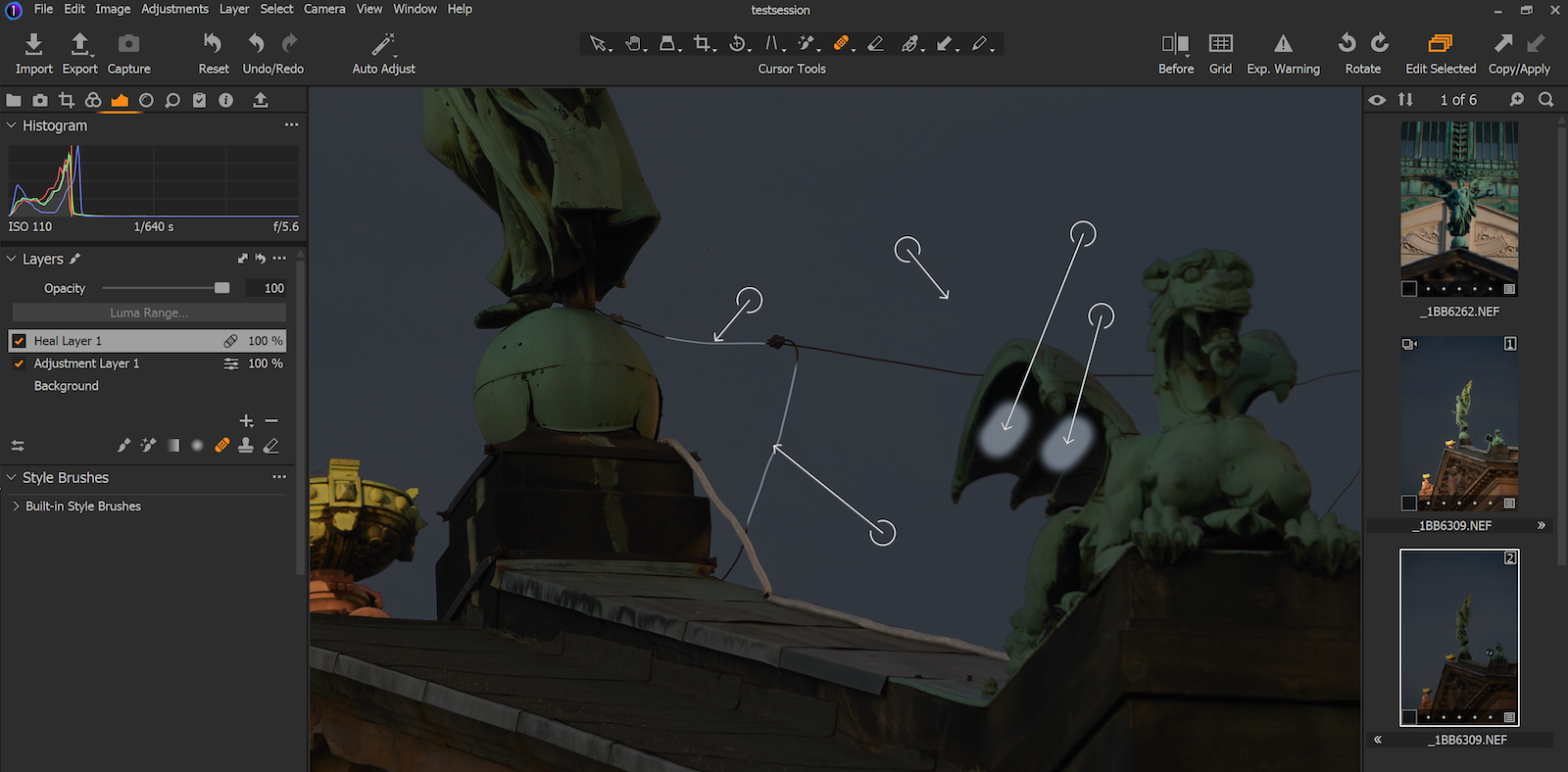
For Example (see Image below):
The sky was extremely darkened with an Adjustment Layer (use of Magic Brush)
When I work with a Healing Mask Layer afterwards, I have the following effects:
No matter where the Heal Layer is placed, it always works with the unmodified original.
Everything that is processed in the Heal Layer and that is not contained in the Adjustment Layer mask is processed untreated. Everything that is also contained in the Adjustment Layer mask is copied with the change. (Therefore, the bright spots appear in the example image).
Is that the way it's supposed to be?
If so, that would mean that you should always apply a Heal Layer first.
Do you have similar experiences with it?
Greetings
Thomas
-

AFAIK layer order has no relevance except as a user interface convenience.
The way I see it, the Heal target area brightness is based on the brightness of the Source area,
but that Source area is read from the same layer that the Target area is on.So in your case, the target areas under the dragon's wing are on the Background layer,
so the sky Source areas used will also be from the background layer, which is much lighter than your darkened sky layer.Likewise with the power lines, since I guess they where
not included in the magic brush sky mask and are still on the background layer.So yes, using the healing brush first should avoid any crossover mask/exposure confusion.
0 -
Hello gb
thank you for your answer. You are right.
That was not clear to me that the display of the order has no effect on processing. Why can you change it at all? And how can I still see afterwards which layer is my first change?0 -
I guess that if there are a lot of layers you might want to keep
the most active ones together just for ease of access.
Best to logically rename the layers for easier recognition.0 -

I have not been able to find any information on the subject, but my experience is that the cure works perfectly when used directly on the background and does not work if it is used on a layer.
Some time ago I asked here about the importance of the order of the layers and unfortunately I did not receive any answer.
0 -
I have not been able to find any information on the subject, but my experience is that the cure works perfectly when used directly on the background and does not work if it is used on a layer.
Some time ago I asked here about the importance of the order of the layers and unfortunately I did not receive any answer.
0 -

Agree with what everyone has said mostly. My only input would be not to expect multiple 'automatics' to safely transform stuff in conjunction.
Also a manual cloning layer reduces the scope of the more automagical healing stuff. In the OP's case rather clone the power line correction and the bright spots on the statue. Then the auto heal element has less scope to throw up anomalies. Wasn't entirely sure what the OP wanted to do.
Layer order doesn't seem to be (always) logical. I tend to put gross change layers nearest to the background layer and build up more subtle stuff layered successively on top - always labelled. The harder I work a particular tool the more likely it trawls up something that I'd thought I'd successfully hidden earlier. YMMV
0
Post ist für Kommentare geschlossen.
Kommentare
6 Kommentare