Remove Purple Fringing

I have a question about C1 regarding the removal of purple fringing.
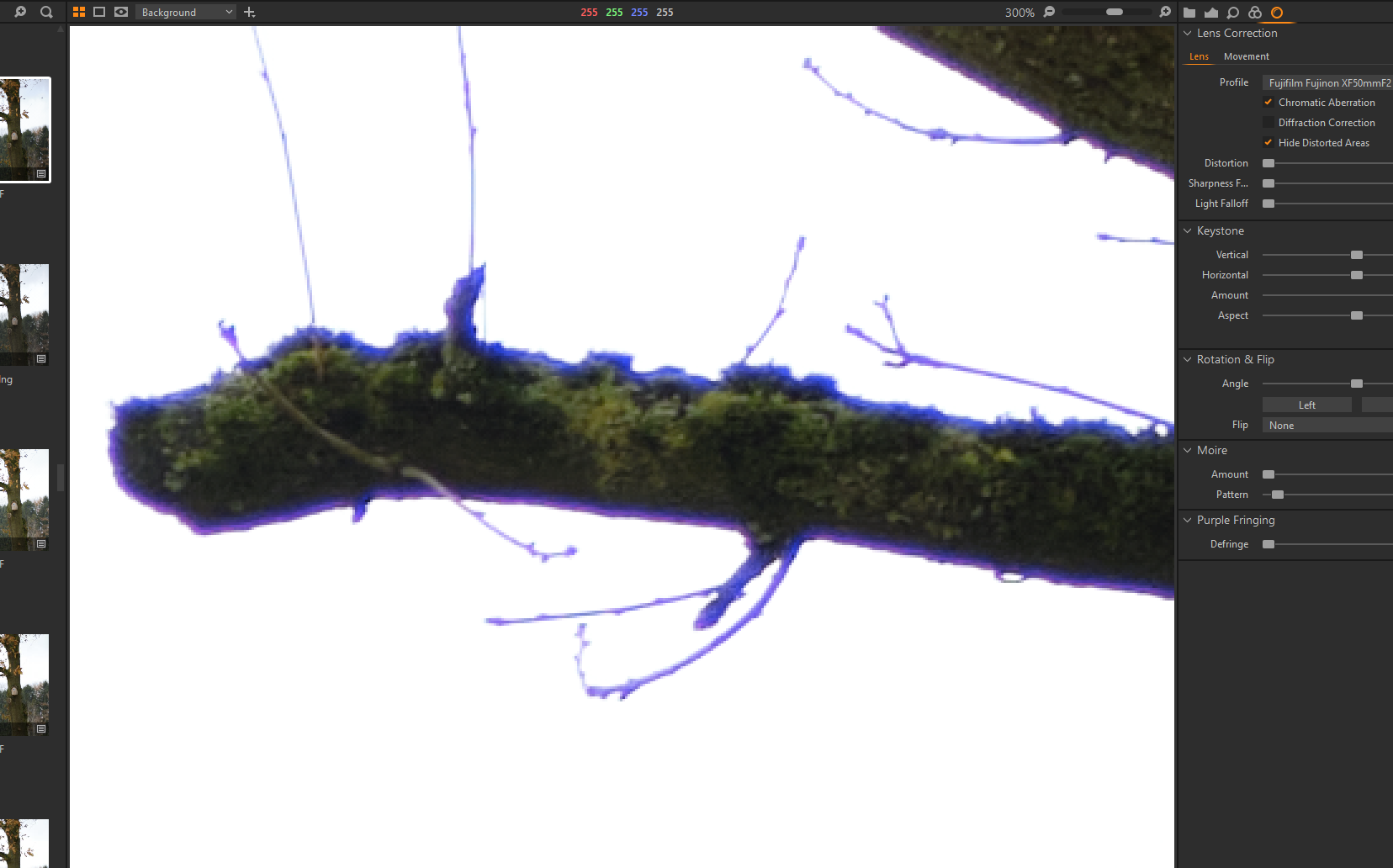
See screenshot 1: purple fringing in a Fuji RAF file. I am not able to correct this purple fringing properly in C1; purple Fringing tool at 100%, in lens Corrections the Chromatic Abberation tool checked and an Analyze performed. All this is not enough for a good correction.
In Lightroom, however, the purple fringing has completely disappeared with a little adjustment! See screenshot 2 for this.
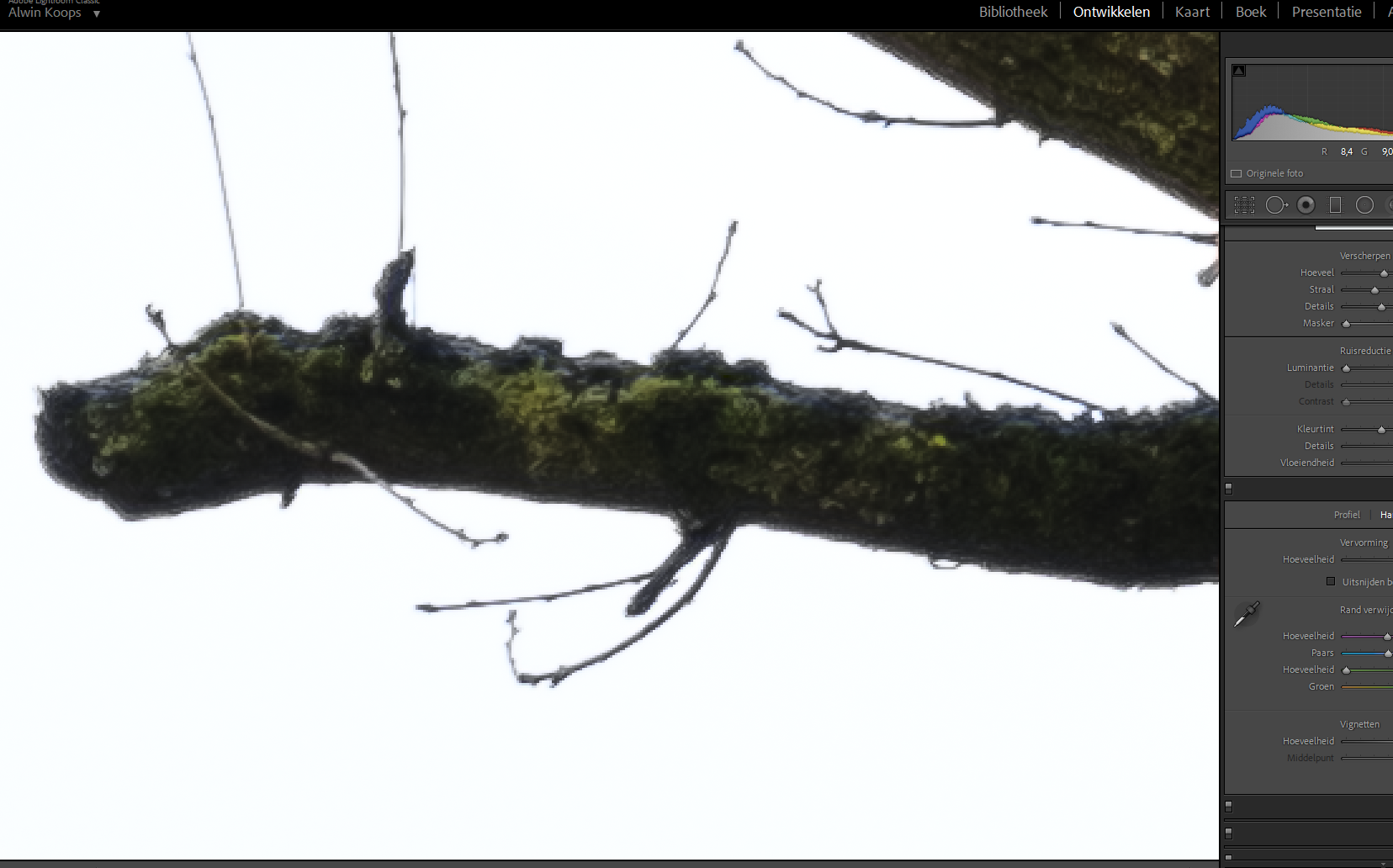
So I thought to have a solution for this by first opening the RAF file in Lightroom, applying the purple fringing correction, and then exporting the file as a DNG file without further processing.
I then opened the DNG file again in Lightroom for verification and the pruple fringing has indeed disappeared, which seems logical since this is the corrected DNG file.
However, when I open the corrected DNG file in C1... then the purple fringing is right back as in screenshot 1! So the DNG file which no longer contains purple fringing (corrected in Lightroom) suddenly has the purple fringing back in C1!
How is that possible?
-

Lightroom does the same as Capture One : Non-Destructive RAW edits. The edits are not applied/saved to the RAW files itself but rather kept in the application's database (catalogue) or in sidecar files. In the case of DNG the edits are saved as additional metadata within the file. The embedded raw file within stays untouched.
My guess: Capture One has no support for the Lightroom specific metadata describing the purple fringe correction settings applied in Lightroom. And even if it did, it would then apply its own fringe correction (with the C1 engine) and not the LR correction you're after.
The FAQ list of what gets imported when you import a LR catalogue here, does not mention lens / fringe correction.
I think your best bet on carrying over the edit from LR to C1 is exporting as TIFF.
0 -
Did you click on the the three-dots button to the right of the CA checkbox? I never saw a big improvement but who knows...
Maybe you can get rid of this CA using the Advanced Color Editor, globally or masked, and define a preset or style for future images, in case this is an issue you often have.
0 -

Crikey Alwin, I have an old fully manual lens that, used via an adapter, has a very dramatic Purple Fringe result in specific circumstances - but nothing quite like your example.
I suspect that the solution is a colour selection (as suggested by BeO) and probably de-saturation - which I suspect is what the LR result you have offered is doing on your behalf.
Long before my Capture One days started I had to fix the worst of the result from my lens using a 3 colour selection and desaturation. With certain subject matter, the purple firing effect could turn into a halo effect with a range of pink tones. By selecting for 3 areas of that colour range and desaturating each I could remove the problem areas (usually) without affecting anything else in the image. Or at least nothing that worried me.
There may be some other tricks as well. Are you able to share a sample file that people could experiment with?
0 -

In your first screen shot the purple fringing slider is at zero. ?
0 -
gb, I'm getting old :-) he was even telling he used "Analyze" but I was suggesting the 3 dot button next to CA (read: Analyze), and I did not see the defringe slider being at 0. Maybe he set it back to 0 because even 100 didn't help?
0 -
Yes, just the wrong screen shot I guess.
0 -
Alwin, does the manufacturer's lens profile work any better?
0 -
In the screenshot the Purple Fringing slider is indeed at 0% but of course I have tried 100%. As I said that does not make a big difference, the purple fringing wil be a little les but it's impossible to get rid of it in C1 by just using this slider. I have to work with layers, pick the purple color and desaturate, and so on.
Not only in Lightroom but als in the new DXO Photolab the purple fringing is very easy to correct in the chromatic abberation tools in the software. No need for layers, masking, color picking and so on. Just a few seconds of work.
Compared to Lightroom, but especially to DXO, the correction possibilities for chromatic abberation and purple fringing in C1 are really very weak I think.
Other then that, I really like C1! :)
If somebody is interested I can put the RAF file for download on Dropbox?
@gb: the manufacturer's lens profile does not make any difference
0 -

The purple fringing tool is pretty much worthless to me. I think it might remove something (tiny, tiny amount), but whatever it is, it is basically worthless to me. Might as well not even have the tool for all that it does.I gave up on it a long time ago.
0 -
Alwin, may as well post a link to the RAW.
0 -
I would be interested to take a look at the RAW file.
0

Post ist für Kommentare geschlossen.
Kommentare
11 Kommentare