How to integrate/migrate my current image organisation into C1 catalogues and/or sessions?

After a long time of having C1 (Express Fuji version) installed, and updated, I decided to have a look at using it seriously. For other reasons I have spent the last few years learning and applying darktable, in both Windows and Linux versions, while retaining the image folder and file organisation I had developed through my use of LightRoom, from V.1 to V.6 - using multiple Lr catalogs. Since those Lr catalogs could be built to reflect the file organisation in Windows, there was no 'migration' involved in replacing Lr with darktable (aside from accepting that their respective sidecar files are mutually incompatible).
I was able to add/import new images, using either Photomechanic (Windows) or Rapid Photo Downloader (Linux), up to darktable 3.6.1, from which time on those 2 excellent tools were unnecessary.
So now, for my largest and most important image collections, from one of those Lr catalogs, I have an image folder organisation that, for images up to the end of 2019, is of the form: <pictures><Lr Catalog Name><year><decriptive event name>, and, from 2020 onwards, of the form <pictures>Lr Catalog Name><year><month><day>. (Image file names were as per the camera assigned name up to end 2019 and from there on with a name created by concatenating a unique and descriptive 'job-code' with the last 4 numeric digits of the camera assigned filename).
So far I have about 1 TB of image files across my total portfolio.
My reading of how C1 catalogs work is that it would require replication of that amount of data to import and store/backup my raw images. That amount of 'inflation' creates a lot of storage space issues, since I keep at least 2 (and usually 3) independent backups of my data and the 'working copies' are always on Raid 1 drives. i.e. I would need to add about 8 to 10 2TB drives to my computing resources. That's not attractive right now.
Is there some way I can import my images into C1 catalogs, without having to replicate the image files, in much the same way I have done when importing the "LightRoom" files into darktable?
-
Yes, just select the option to leave the images in their current location when "importing" the images into the catalog. C1 then actually only creates references to the files and creates a shadow folder structure in the catalog.
0 -

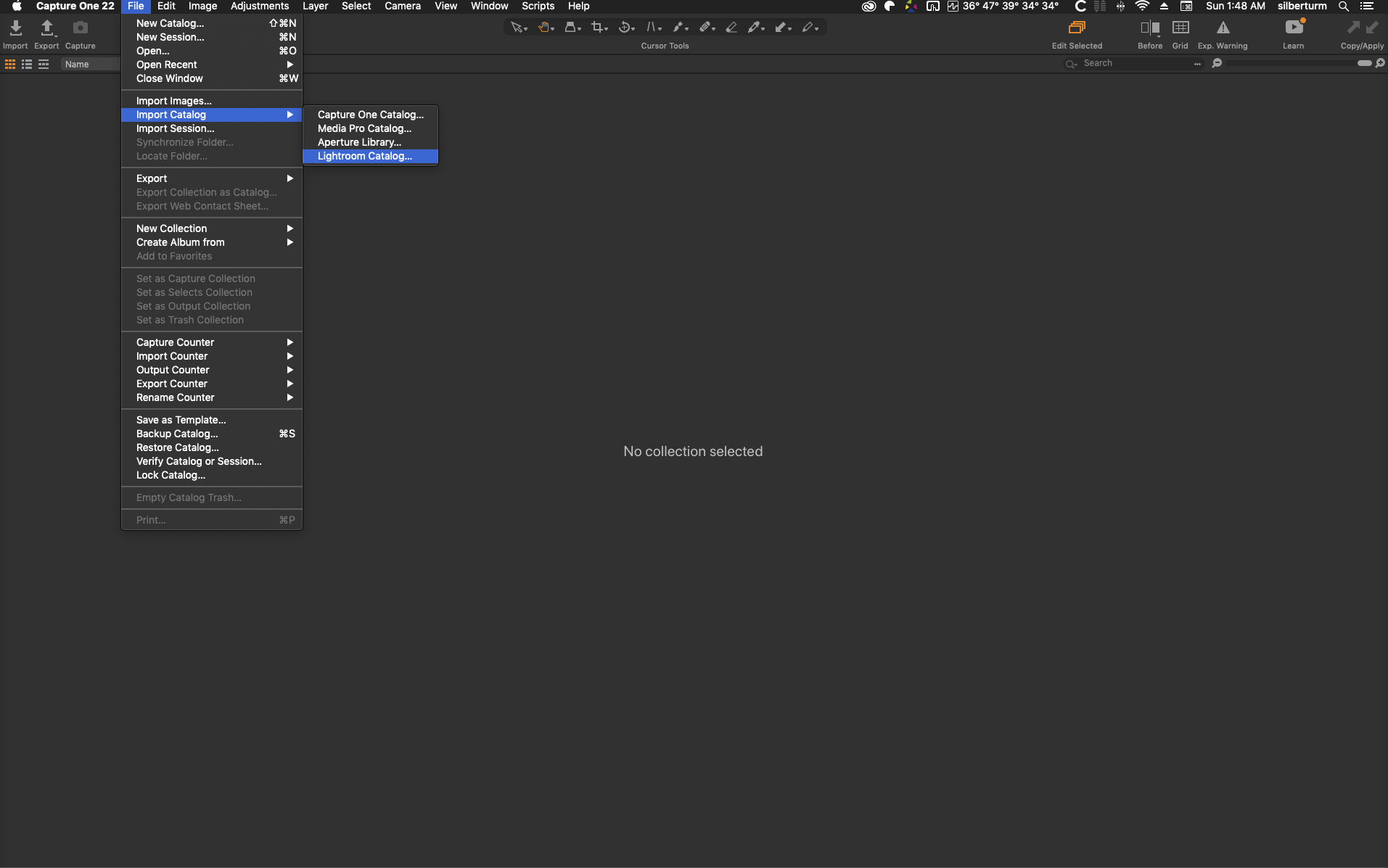
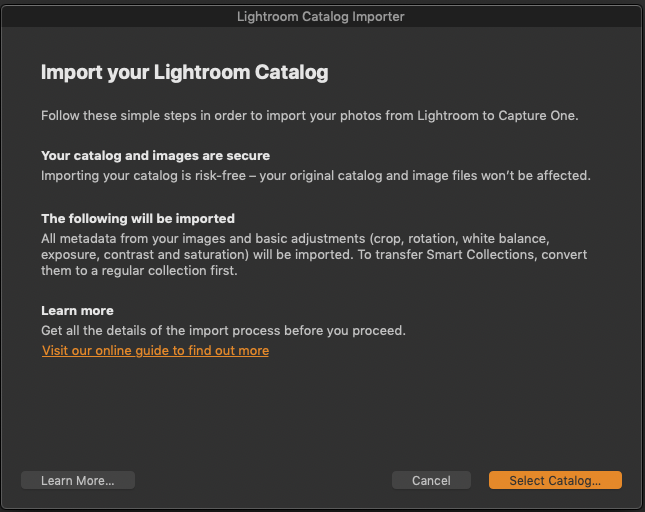
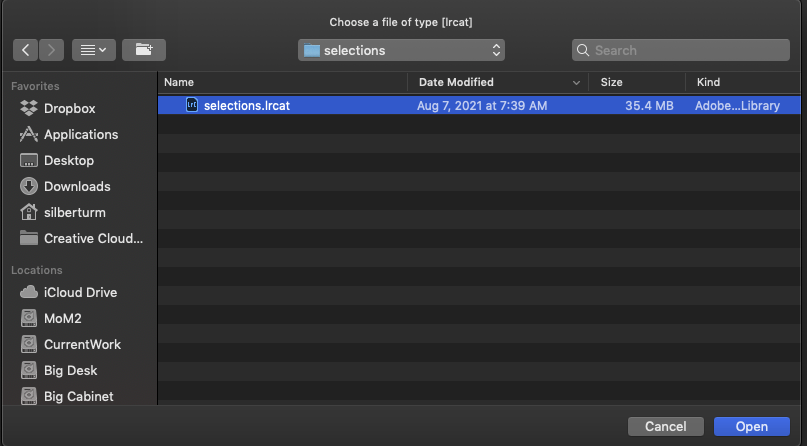
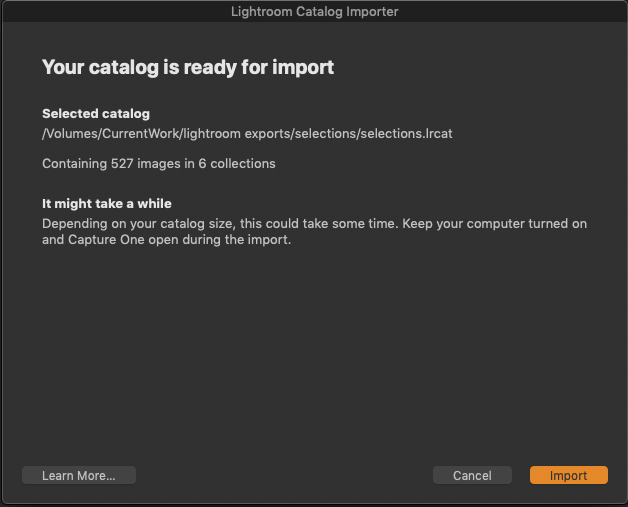
...if you have one or several existing Lightroom catalogs of all your files already, the most streamlined way to transfer your images in their respective directory structure would be to directly import the lightroom catalogs into Capture One rather than importing the files directly. That way a fair amount of the most common adjustments made in Lightroom would even be preserved in C1.
I attached a few screen shots illustrating the steps to follow:
 0
0 -
...I just imported a LR catalog of a little over 120,000 images mostly 61MP images from A7RIV, with about 7000 240MP pixelshift images also from the A7RIV and another 4000 panoramas stitched in Lightroom. They are all DNGs and it took about three hours to import them and then about three days for C1 to create the preview files.
I was away during that time, but by the time I came back it was all done and now it works quite well, though I still take the precaution to make a backup every time I quit the program as the catalog file occasionally corrupts. Since I mostly work on largish archives of analog film that I digitize with the Sony, the catalogs, both in LR as well as in C1 have worked really well for me to help me organize the archives with minimal effort. It's also much easier to be able to make selections inside an archive when you have access to the full data as opposed to selecting images on a contact sheet the way I used to do it.
I was actually pretty happy with LR, as it is on the whole a lot more stable than C1, but when it comes to grading analog film, the tools proposed in LR are too basic, to get good results.
I am working on a Mac of sorts, with an i9 processor, 64GB or Ram, two WX9100, two 2TB SSDs for all the project files and catalogs and four 12TB HDDs for all the source files.0

Post ist für Kommentare geschlossen.
Kommentare
3 Kommentare