The upgrade is painful (again)

Having been using Capture One 20 for some time, with some personal customisations, I made the mistake of upgrading to 22 - due to no Canon R3 support. OMG, this has cost me hours of frustration. Nothing is simple, nothing is very intuitive. So frustrating.
To get the R3 files sorted, I went back to Lightroom. That's been upgraded a load since I last used it a couple of years ago. But everything is intuitive and after about 5 minutes, you are all set with a workflow. LR also now supports my XF150, so I have to decide on simple edits / workflow / storage, but lacking in refined colour management. Or hours and hours of frustration trying to think like the madness behind this programme.
Rant over.
-
Now that you blowed off steam...
I can't see what has changed in the workflow between v20 and v22 with one exception, that is the export window and the removal of the processing tools, which have been re-introduced in a slightly different manner (but you might need to add the tools manually).
Actually I consider the workflow and customization features of C1 as one of its strenghts.
Is there something specific we can help you with?
0 -
Ok, I will work through them. Some maybe glitches and others maybe simple to sort when you know how, but a pain in the A to try to work out.
When transitioning to the latest version, I now need to reconstruct all my own personal adjustments to the layout (for moving through edits). Why doesn't that come with it? (Thanks for upgrading to XYZ, would you like to continue with the same custom keys and layout, or would rather pull your hair out trying to work out how to put it back to how you like it?)
Or does it and it's not obvious how to do that? I can see how my key selects has been saved, but not the layouts.
I have G set to enlarge the image to become Viewer. Double click sometimes does the same, sometimes not. It seems to depend on which session I am using. That's much more annoying than it should be.
Right click on image in the viewer, should show image options. It now shows the option to change the colour of the panels around the image (Dark, Very Dark, etc). Something is broken clearly.
I have always found the session folders (capture, selects etc) completely redundant, and no-one I speak to understands the difference between sessions and catalogues. I just want to see the sessions, or folders on the left. Going back for years ideally.
There does not appear to be an image reject option, or a move to trash in a simple way. Y (yes?) moves it to selects, but why not (N) No, or X to move to Trash. Delete from Disc is too agricultural. I want to quickly go through a number of images, with a rating or No to throw it in the trash (X ideally). At the end, I review the trash and then scrap that.
Export. I just want to export a file roughly 30% of the original size as a JPG. But I have to create some sort of recipe. Ok, maybe recipes would be helpful at some stage in the future - but initially, just make it simple.
Why doesn't it learn where I want to import my files to, or export them to. It's not intuitive to see where I can change that.0 -
And it would be nice to have a roll back option. At least forced windows updates allow that until they sort the glitches out for a while.
0 -
I am willing to try to help with your points, if you are willing to sit on your A and take some time to learn and figure out. I personally think it is worth the effort. As my grandma used to say, no master ever just fell from the sky.
When transitioning to the latest version, I now need to reconstruct all my own personal adjustments to the layout (for moving through edits).
The menu > Windows > Workspace has an option to save a workspace, give it a name. If you have done this in the past then your workspace (layout, tools) should have been saved and I would expect that it is still there after the upgrade.
I have G set to enlarge the image to become Viewer. Double click sometimes does the same, sometimes not.
The standard of G is to show/hide the viewer. Maybe you have reassigned this key in menu Edit > Edit keyboard shortcuts.
Double-click on an image in the browser shows this image in the viewer, but double click on the image in the viewer switches between zoom level fit and 100%. Which session doesn't matter. Check out if you are doing correct.
Right click on image in the viewer, should show image options.
Right-click action depends on the active cursor tool, e.g. if you have the brush then brush options should open. If you have the arrow then image options opens. But if you right click on the background of an image then the background color should open, similar in LR.
I have always found the session folders (capture, selects etc) completely redundant, and no-one I speak to understands the difference between sessions and catalogues.
Then you have spoken to people who have not even tried to learn something about C1, not even to see a video about catalogs and sessions.
I just want to see the sessions, or folders on the left.
Menu>View > Customize tools > Place left .... ?
Going back for years ideally.
Session are not meant for years. Study the difference or stay with catalogs as in LR and just don't care about sessions.
There does not appear to be an image reject option, or a move to trash in a simple way.
I tag my rejects with a red tag, assigned to the minus key. Once I have finished culling I delete them from disk ( browser, filter for red, select all, menu>image> delete from disk, or image>move them to the trash, whatever you prefer, or assing a keyboard shortcut)
Export. I just want to export a file roughly 30% of the original size as a JPG. But I have to create some sort of recipe.
Yes, recipes are wonderful, from day one, if you take 10 minutes to learn them.
1 -
Well BeO, thanks very much for taking the time. It's very helpful, not least because I kinda have to spend the time on this product, learning it's idiosyncrasies, if I want to choose ultimate image quality over time / effort / sobbing into my keyboard.
If it wasn’t for ultimate image quality (having spent so much on the XF system), then I wouldn’t be having this chat.
Despite having spent a great deal of time in the first place moving to C1, I would 100% not bother with C1 if I was using a 35ml camera exclusively, because image quality would not trump ease of use.
Having almost only used C1 for the last couple of years, my recent experience of looking with fairly fresh eyes at both LR / C1 still ended up with LR making you immediately feel like you know what you are doing and C1 fighting you each step of the way.
I think your grandmother’s view of life is at the very heart of the problem I would like to identify. I don’t want to once again, spend hours learning all the little nuances to this new version of the programme, at least not immediately. In my own time, I will continue to invest effort to get the best out of the programme – but can’t we meet halfway with new upgrades, or new features? Make it easy to use in the first instance, then draw me in to other features.
If you have invested 100s of hours learning C1, it’s gonna be hard to empathise with my point here. You can’t unlearn what you have learned and take an objective view of the weakness of the software. The weakness of the software comes across in several of your answers, which on the surface are hugely condescending, or arrogant:
E.G: Then you have spoken to people who have not even tried to learn something about C1, not even to see a video about catalogs and sessions.
How do you know who I have spoken to about this? I have looked at the videos, spoken to excellent practitioners and experts, a great deal of them think it’s a bit overcomplicated and un-necessary.
Your last comment nails the issue for me
Yes, recipes are wonderful, from day one, if you take 10 minutes to learn them.
What if I don’t want to learn them right now, I just want to bluntly export an image? The software makes it really hard to do that. And that’s the case for lots of features. 10 minutes to learn this, 10 minutes to learn that.
To conclude, I am going to work through your points to get past this frustration. But C1 (and perhaps you) would likely benefit from getting off the high horse and thinking about the simple folk, who could become clients, if the software put them first and the software geeks with time on their hands second.
Of course, you can serve both equally well – but the balance is wrong right now.
0 -
Hi Justin,
When I first looked at LR I felt very restricted, and I didn't like the image quality (except for noisy images), but this is few years back. And actually I found that LR was not much easier to learn than C1. Maybe, as you are used to LR (I assume) you underestimate the effort which you spent to learn LR.
In C1 there is a "simplified" workspace, which doesn't make C1 a LR clone but maybe gives an easier start into C1.
But I kinda understand what you mean, because I currently evaluate darktable as an additional raw developer. Now, that is a steep learning curve, at least when you come from C1.
Sessions and catalog, my comment was not about it not being "overcomplicated and un-necessary" but rather that nobody understands the difference. There are many differences, in my eyes very obvious, but whether or not you need sessions is totally up to the way you would like to work, nobody is forced to use both, it is an additional possibility. If you use both together, there are indeed some shortcomings, based on the way I would like to work with both.
But yes, not everything in C1 is gold, far from it. And LR seemed to have a much better local adjustments / layers than it used to have, and probably the color masks restriction or how it is called may even exceed C1 from the usability standpoint, as C1 only has Luma Range as parametric restrictions.
I am a normal user, if you think I am sitting on a high-horse or not is not very relevant, this is the type of reaction easily provoked for high-horse rants.
Anyway, have fun, Merry Xmas and a good start into the New Year.
1 -
Thanks for your balanced comments in return. I would say that I have spent as much time on LR as C1. Because C1 wasn’t processing Canon R3 files, I went back to LR (after a multi year absence) and despite being heavily upgraded, it just took no time, no googling, no help forums or therapy to use it. I then upgraded C1 and it’s either not working properly, or I am up to my eyeballs in trying to work around stupid processes.
So here are other issues, or things that don’t seem to make sense as I work through a few more files this AM.
The double click in browser to move to viewer didn’t work again after import. Then I closed / opened the software again and it worked. Double click from browser moves to viewer. Double click on viewer does nothing. It should surely go back to browser? Or Zoom perhaps.
Using a red flag is a work around to just moving the image into the trash in my mind with a single button (It worked for Aperture and LR). In the past, I thought I made that the X key. I just want to move the image to the trash folder without having to flag it, then select all flagged images, them delete them.
When I tried to work out how to customise that, it ended up with all the images in the Selects Folder, also being in the Trash Folder. When I tried deleting them out of the trash folder, it killed them in both folders. What I managed to do to make that happen, I have no idea. Why that's even something that you can customise to happen, god knows.
Now the X button is moving files to the Trash folder, but it wasn't before. I have not changed any customisation, so not sure why that's happening now.
I can use the delete button in the browser to delete an image, but I can't use the same button when I am looking at an image in the viewer. If I then hit G and go back to browser, I still can't use the delete button until I have clicked off the image and then back onto it. Hang on, once again - that's sometimes the case and sometimes not. I can't seem to work out what causes it to do that or not.
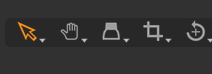
Click on the Crop cursor tool, crop the image and press enter to resize. then the highlighted cursor tool moves to the hand tool. Why? Surely it should move to the select tool, or not move at all.
When using the same feature from within the Lens tools, hitting return does not resize the image as it does when resizing from the cursor tools. Hmm, hang on. It seems to be doing it now.
Some images in browser show the crops applied, some don’t.
Rotation and Flip Auto Adjust works sometimes and not other times. Even when there is an obvious vertical or horizontal line which should make it simple. This same function in LR works without any issues. The auto adjust function within Rotation and Flip half the time, when it 'works' just gets it wrong. Ie not aligning the eyes on a portrait for example. Again, LR was bang on every single time.
I am going to stop there though, before I try to export an image. Life is too short to have to deal with that crap today!
0 -
Double cl
ick on viewer does nothing.
That depends on the cursor tool. The arrow does nothing, only right click. I never use it, my main tool here is the hand which does what I want.
Using a red flag is a work around
I don't even use the trash, never did, I don't see any advantage for me to move images into the trash folder on the file system, which is what the session does. I set the filter to exclude red tagged images, go through the images in the viewer (I like the select next when function and often show 4 images at a time), tag them red, blue (for good images) or leave the color empty. Star ratings I do at a later stage.
it ended up with all the images in the Selects Folder, also being in the Trash Folder.
Probably you redefined what your session folder should be (right-click on a real folder in the folder section of the library tool, then Set as Selects folder, or maybe it was a wrong default setting or came through a bug. In this case you would see icons on the right side to indicate that (I don't have that, see screenshot). And probably you (or maybe a bug) defined your selects folder and your trash folder to be the same physical folder on the file system. C1 should not allow this but I think it does, having the side effect you mentioned.
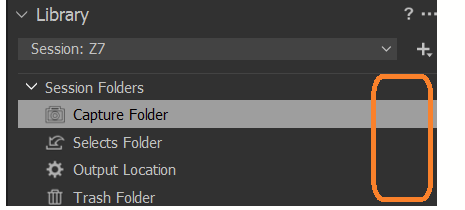
I don't use the redefining feature of these folders because I don't shoot tethered, and even then you don't have too. Actually I don't even use the Selects folder, I exclusively work with color and star ratings when I use a session. I use Capture, Output and Favorites for sub folders beneath Capture.
I use sessions for a specific shoot, do the culling, rating, editing, later import the images with adjustments to one of my main catalogs. Some of the images I edit later in the catalog only. Here's where I have my history.
Click on the Crop cursor tool, crop the image and press enter to resize. then the highlighted cursor tool moves to the hand tool. Why? Surely it should move to the select tool, or not move at all.
As the hand tool is my default tool I never noticed this as a problem. Actually I never used return before but H for the hand tool. You can use V for the Selects tool if that's your default tool.
Some images in browser show the crops applied, some don’t.
I have never observed this. I am still on v20 though, only tried and / or beta tested v21 and v22.
Rotation and Flip Auto Adjust works sometimes and not other times.
That's a brand new function (for non-Phase One cameras) in v22. AI based, I guess this will improve over time. That's one of those features I never had, hence I don't miss it.
0 -
It's interesting to hear what you use - and whilst it maybe intuitive to you after throwing hours of time at it, but it strikes me as your way of working around a set of processes which are not intuitive.
As noted, LR in comparison 'just works' and it's not full of little traps that cause frustration. The balance for me with C1 is very much skewed towards over complex, frustrating processes which are great after hours spent working through the weirdness.
It's impossible to have perspective on this, once you have spent ages in the programme. But for me, two upgrades (LR / C1) resulted in very different outcomes. One is simple and intuitive, the other is completely mental.
If C1 want to draw clients in. Then focusing on trying to simplify default processes, would be a good start
0 -
More CraptureOne from this morning.
System Folders does not allow you to search for and open sessions. So you can see the folders in a Session, but not open them. You have to go up to library and search for them, or open them from File Explorer. So why is System Folders there and what is it bringing to the party?
I have found a random CaptureOne Cache folder on my desktop (where I just exported a JPG). It must have come with the export, but looking at the export (recipe). I can't see what's created it.
0 -
I understand that you find C1 not intuitive but if you want to work with it because of image quality, or other reasons, then it might be helpful to spent some time with the video webinars and documentation, alongside real-life testing.
If you have a session (and I suspect that a catalog might be better suited for you, at least for the time being, it's much more like LR) then you can browse the system folders, and as soon as you click on a system folder which contains files recognized by C1 as images, C1 will create a CaptureOne sidecar folder, create previews and all this stuff in sub folders of this sidecar folder.
You cannot see these images in "All images" unless you set a system folder as a "Favorite".
0 -
Yea. You are probably right BeO. I guess I have to do this work on C1. In the mean time, I will add 'Crapture One' anomolies as I see them. Partly as therapy, but also perhaps someone will take note.
0 -
:-) Most likely it will remain a therapy for you only, C1 will not take note, as this is a user to user forum only.
There is one exception, this is the Feature Request topic (in addition to the submit a request link). Requests there will be seen by C1 staff (most of them at least) and usually picked up / transferred to product management or developers, and users can discuss and vote for the requests too.
0 -

Justin,
I think it's a matter of perspective and personal preference.
I bought LR V1 and got as far as V1.4 before I abandoned it.
I disliked having to use a catalogue when my favoured application at the time just allowed me to access the files I wanted to work with directly. And had more functionality (but no DAM functions) and produced better results.
I took another look at LR around the time of the V3 launch but still did not like it much.
Just after that I looked at Capture One and found it much like my existing favoured application in many ways but with better immediate image quality with no effort. About a year later I decided to take a proper look at what the DAM potential of Sessions offered and realised I have missed a lot of things that would have been useful. So I took a little time to think them through for my needs.
When Catalogue features were introduced a year or two later I looked at them but have not adopted them.
Upgrades for me have been quite painless - possibly because my "personalisations" have never been extensive. They exist, but they are not extensive, not critical to usage and so when, as is inevitable, something new is introduced and changes are required, it's not usually a big deal to incorporate the change and save the new personalisations.
Most things carry over from one version to the next and in recent years the updates have resulted in version related saved folders of settings so that should the need arise to fire up an earlier version and revisit some work for an old session or catalogue everything will be available just as it was. This is likely to be very helpful to some commercial, multi-user Studios where there might be a client-driven need to support multiple versions of the application. However, it can have its uses outside that situation.
There are a handful of things that are related to dynamic user config files that will typically be created afresh after a new version installation or some major change in a version's mid-life. The most obvious of those is that the "Recents" list will be empty so far a short time, if working on recent sessions or catalogues rather than new ones, it may be necessary to identify the session or catalogue required by navigating to it's database file and clicking on it to open it.
All of that being said, I will fully admit that I feel the same about Photoshop and its clones as you do about C1. I have spent hours trying to make it seem intuitive and I think I understand the underlying concepts to do that but I never get more than 3 layers of adjustments in before they seem to stop doing anything like I expect them to do.
Maybe it's all down to the way that an individual's brain works. There is no reason to suppose that it should be possible for everyone to feel comfortable and capable with everything around them.
0 -
SFA, I take some of your points. But there are so many weird things in the upgrade, that just don't work sensibly, that I cannot believe that it's just the way my brain works. It's about simplicity and the default being sensible decisions, not having to search for ways to solve issues. Lots of the programme elements are great, but it's just too much wasted time trying to solve things that should be simple. I do think that some elements are just anomolies in the upgrade, but a lot is just a process that's not sensible.
Having returned from the studio and opened another session this evening, double click doesn't move from browser to viewer again. FFS
0 -
Again, when opening an old Session and upgrading it. Now the double click does not move from Browser to Viewer. But it does with some sessions. Can't work out why...
When selecting export, the left hand menu is split into two. So you have to scroll up to get to location (which is hidden under the export recipes menu. Pointless additional action it seems
0 -
Maybe you like the Export tool tab better, the successor of the Output tab. You have to add it via right mouse click on the tool tabs.
0 -
So filtered by Rating in the browser and you bring a TIFin from editing in Photoshop. It puts the TIF on the top of the browser despite not having a rating. Perhaps it would make more sense to bring it back into the programme with the same rating that it went out. The default should surely not be to ignore the browser filter... that makes absolutely no sense
0 -
Ooh, bring a TIF back from the Trash Folder and it then lines up in Rating order / Name order. That makes sense. So why not when coming back in from PS..?
0

Post ist für Kommentare geschlossen.
Kommentare
19 Kommentare