"Locating" source folder for RAW files does not work for RAWs in Trash

I’m working with catalogues and RAW files stored in a separate folder structure outside the catalogue. After renaming this top folder structure, C1 marks the files and folders as “missing". No problem. I can fix this by “locate” the folders:
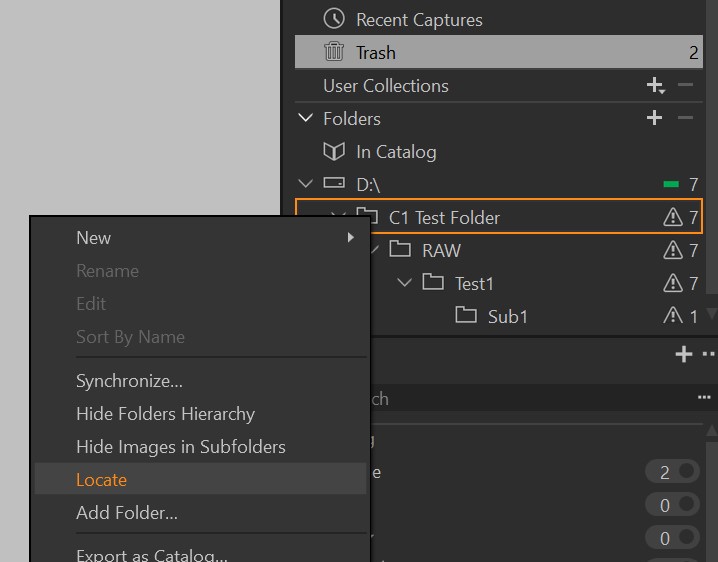
But this does not work for RAWs in the Trash. After locating the folders the Trash-files keep beeing "offline". There is no function to locate them:
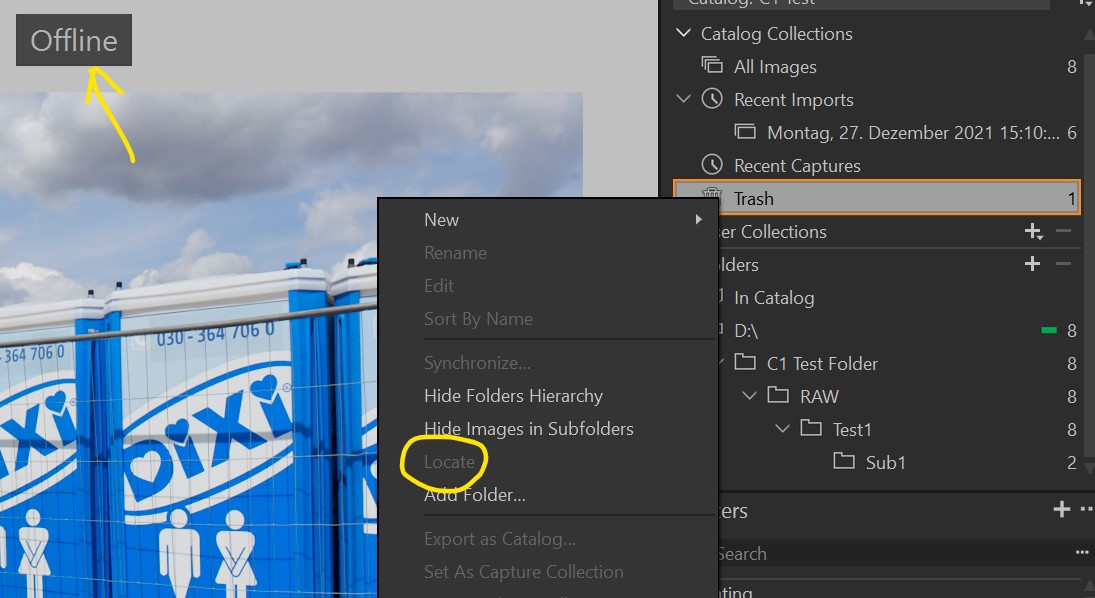
What can I do to make it properly working with renamed folders?
(C1 v22)
-

They recommend to do any file operations directly in C1
0 -
Unfortunately C1 is not able to do "any file operation". And renaming the top folder by C1 may work for this particular catalogue, but other catalogues can (or will) be affected by this operation, too.I have all my RAW files for all the catalogues stored in this separate folder structure outside C1 (\RAW\project1\....).
Does anyone have another idea?
0 -

Move the file out of Trash?
If it is still an active file, what is your objective for putting it in Trash?
0 -
Select the thumbnail, then menu Image>Show in library or Image>Locate gets you closer to the original image.
But I guess you want to know a general procedure, especially if you have many images in the trash? The trash in a catalog is (unlike the trash in a session) not a folder, so you cannot "locate" it. The trash has references to images in their original folder.
It seems C1 is not updating the reference to the Windows-Explorer renamed and C1-"located" top folder hirarchy. Avoid the situation by either not renaming folders for catalogs having tagged images as trash, or by renaming the top folder with the C1 library tool (right click on the top folder) as already mentioned by Maciej.
0 -
If you delete or move any image or image folder, or (change the hirarchy with drag&drop) which is known to C1 in a catalog, the best is you do this with the library tool in C1. The folder you see there are a shadow of the folder on the file system (from imports or "Add Folder" action) but once created in the catalog they will not update automatically, that's the reason you had to "locate" the top folder. If you do any file or folder operation with the lib tool it will pass this to Windows which does the needful on the file system level, and the catalog shadow will update too.
0 -
Ok, so C1 seems not to be able to fix the reference of pictures put in the trash after renaming folders outside the catalog. As I mentioned before, renaming the folders in the C1 library tool is not possible in my case, because it effects other catalogues.
Why do I even have photos in the trash? – because clearing the trash is the last action I do in a project, before finishing it. I have many catalogs on which I work at the same time. After importing new pictures I delete them from flash card and quickly sort out many of them (= trash in C1). Later sometimes I restore some of the deleted pictures again.
I’m used to have my pictures stored in different subfolders beneath one top project folder. So if C1 has problems with folder structures outside the catalog, what about storing files inside the catalog? This seems to work!
I add my own folders beneath the catalogs' top folder. With this, the “locate” function works fine after renaming the upper folder structure or moving the whole catalog: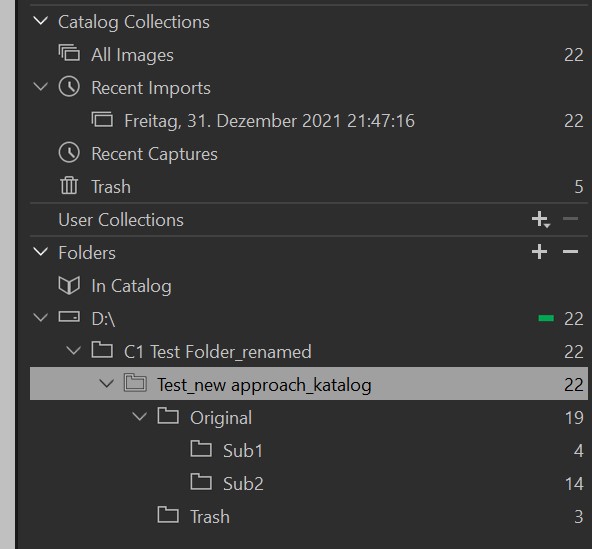
Thanks!
0 -
Happy New Year!
So if C1 has problems with folder structures outside the catalog, what about storing files inside the catalog?
I think C1 has no problems with folder structures "outside" the catalog, and the folder structure you show here in the "Folders" section of the library tool actually is a folder structure outside the catalog (on Windows systems at least). Inisde the catalog "(In Catalog") in above screenshot is empty.
"In Catalog" means the folder "Originals" which is parallel to the catalog database file. I think there is nothing special about this folder when you import the images "references" other than it is located next to the catalog file.
And if you want to use the same folders in different catalogs, I think you should NOT place the catalog files (.cocatalog) in the same folder because then the Original folder, but also the Cache and Adjustments folders would be shared amongst them and I doubt that they can easily be distinguished eg. for backup purposes.
0 -
I think C1 has no problems with folder structures "outside" the catalog,
besides this Trash reference issue of course.
I wonder how your new idea works, as I see 3 images in your Trash folder and 5 images in the standard Trash collection and don't know what you want to do here.
If you can't make it work maybe you can consider tagging your "to be deleted maybe later" images and don't use the Trash, or just don't rename the top folder until all Trash images are deleted. Or, use sessions for your project until it is finished and after that import them into a catalog.
0 -
Happy New Year, too!
The possibility to import pictures directly into the catalog (Import => Import to "Copy to catalog") has the problem with not having influence on the folder structure, which I like to have.
Maybe my wording was not clear enough. With “inside” the catalog I mean my own created folder structure located in the same folder as the C1 catalog files and folders. So the RAW files are no longer located in a separate folder path beside the catalog.
My old structure was like this:
catalog: C\...\pictures\catalogs\project1\...
RAWs: C\...\pictures\RAW\project1\...My new structure is:
catalog: C\...\pictures\project1\...
RAWs: C\...\pictures\project1\RAW\...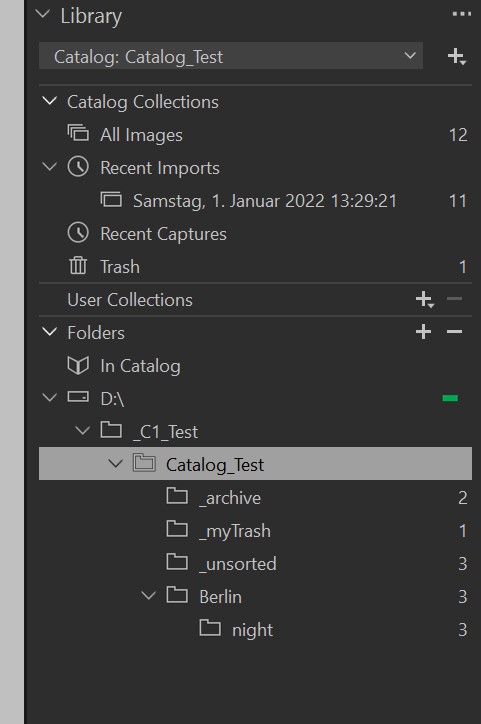
In this case Catalog_Test is the top folder generated by C1, where the .cocatalogdb and the folders Adjustments, Cache and Originals are set up. Below Catalog_Test I have my own folders. So I can move (or rename) the whole catalog including all related files.
I wonder how your new idea works, as I see 3 images in your Trash folder and 5 images in the standard Trash collection and don't know what you want to do here.
The screenshot was captured during some tests. The sub folder “Trash” in my last post (with 5 items in it) was the folder created by me.
Unfortunately, even with my new solution, C1 has problems with the Trash files. At first I thought it was resolved by my new method, but it wasn't. So it is better not to use the C1 Trash. That's why I create my own trash folder. Emptying of the trash now takes two steps: Delete the files from _myTrash (=> move to the C1 Trash) and then "Empty Catalog Trash". But that's ok for me.0 -
Christian,
I think the basis of your problem is that your desire to have your own control over the folders is in conflict with the concept of having a catalogue to control the folder - or at least the edits related to source images.
That would be compounding the administrative effort if you need to manage the folders outside the catalogue AND share the same original image files with more than one catalogue.
It is somewhat like the concept of keeping a guard dog but barking yourself.
When I started with C1 (version 5) I came via another quite similar application that had no DAM facility (And LightRoom that forced used of a catalogue which I disliked). So I managed everything at the OS level using 2 co-existing applications and after a year decided that was not getting any easier.
I decided to find out what Sessions would do (Catalogues did not exist in C1 at the time) and realised I was making work for myself by doing things my way instead of the C1 way. Sessions or catalogues the same comment applies.
Indeed the same comment applies to any application.
If I needed to do what you seem to need to d I think I would stand back and review the process, as I did after a year of using sessions, with the objective of finding a better way to approach the entire requirement and cut the amount of time spent barking by transferring that responsibility to the dog I had available for that task..
0 -
Hi Christian,
You don't like sessions instead of catalogs?
If you have one catalog per project then you don't have catalog functionality over all your projects, then you could use sessions instead.
They have the advantage that the image references are relative to the session db file (not absolute) so you can move the session top folder around or rename the top folder without having to "locate".
They also have the advantage that the settings (adjustments) and keywords are stored in files (.cos files) instead of the catalog db, so the session db file can go broke without losing too much.
0 -
Ah yes, one image in more than one catalog is getting complex indeed, especially if you are moving catalogs (or sessions) or images around. What is the use case for this, Christian?
0 -
one image in more than one catalog
This is not my intention. What makes you think that?
I just want to have control over the files and folders in the catalog, and I like to sort my files by putting them into different folders (including drag & drop).
What I really hate about sessions is the fact that C1 ...
1. ... shows me the whole Windows OS file system in the library tool.
2. ... puts (and displays) its own folder CaptureOne in every folder I put pictures in.
3. ... does not show me the number of pictures in a folder, as it is done with catalogs.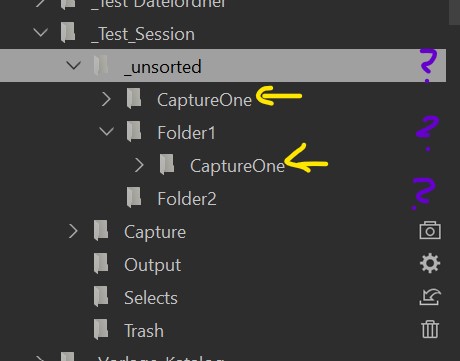
I have been working with C1 since 2014 and until I got along very well with catalogs. They have a clear folder structure and information of the number of files in them. Exactly what I like. I only move folders when I've finished a project and want to archive individual RAWs. At the moment, the only added difficulty was that I wanted to reorganize my file system.
0 -
Hi Christian,
It was my probably wrong interpretation of this:
renaming the folders in the C1 library tool is not possible in my case, because it effects other catalogues.
Anyway, it doesn't matter with your new project based structure, each image and each folder being exactly in on project/catalog.
Sessions have a defined folder structure too, you put every image in Capture, and if you like you can define sub folders beneath the Capture folder and add them as a Favorite. You don't have to use the "System Folders" part of the lib tool, and if you don't visit other folders no CaptureOne sidecar folder will be created.
But indeed the Session Folders and Session Favorites in the lib tool don't show the number of images.
Anyway, it seems you have figured out your preferred setup and also found a solution for how you can work with the trash images, so you you're probably a happy camper now.
Cheers
BeO0

Post ist für Kommentare geschlossen.
Kommentare
14 Kommentare