Customisable Catalog Background Colour / Customisable Capture One Interface Colours

I know you can change the viewer background, but unfortunately not the browser background colour…
This is possible in sessions, but why not in my catalogs?
Even better would be several customisable templates for the whole GUI, like in Media Pro, depending on the usage. Dark for a studio shooting, light for your office and black for example for presentations.
I really like the C1's dark, professional looking interface, but sometimes, it's better to see images on a white background.
Hope you can think about my wish for the next update. Please;-)
-
This is possible in sessions, but why not in my catalogs?
How do you do that? Is this a Mac specific functionality?
but sometimes, it's better to see images on a white background.
For brightness and contrast, maby also for color assessment, I find it extremely helpful to see an image with a white border but middle-gray background, and the image being shown quite small.
The white and gray gives you good reference brightnesses and it it better to look at the small image (or from far away) because you can better grasp the image as a whole, and also because the brightness receptors are most dense in the central part of your eye which means the angle of view when looking at the whole image shouldn't be too big.
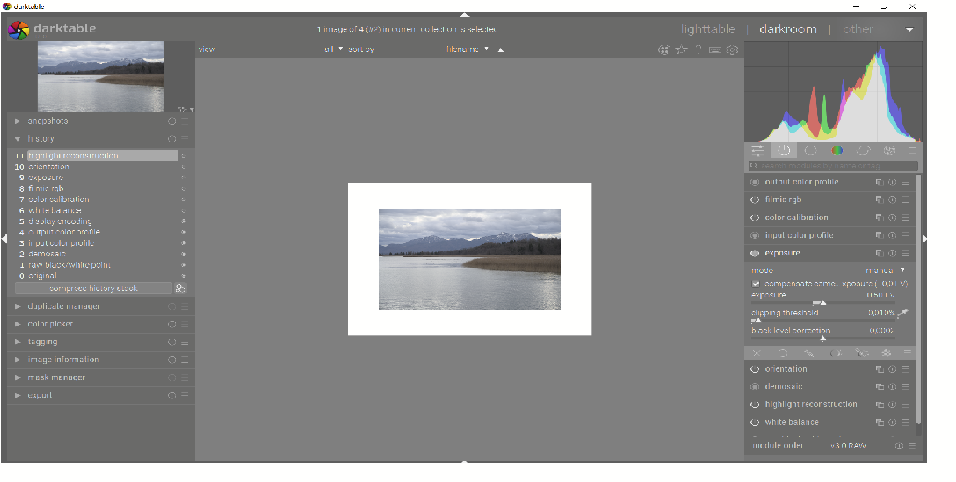
I support every improvement in C1 which brings me closer to the gorgeous color assessment mode in darktable. I vote for your request.
0 -
Hi BeO, I haven't installed C1 under windows on my Intel Mac, so I don't know if there is something more to see in the Mac version.
I just came across via another topic (Creating an Album from the selection of images) showing a white browser background. Usually I'm working with calalogs only and was surprised, when I saw it's possible in sessions.
Bothered me again, to send another Feature Request;-)
Best would be a light table feature to make arrangements, with any background colour… Back in my Apple Aperture days there was a workaround / script to combine it with Adobe InDesign.
0

Post ist für Kommentare geschlossen.
Kommentare
2 Kommentare