Catalog Addition

I am a new Capture One user. Why when I add an image to an existing catalog e do all of the previous images in that catalog get deleted from the catalog? I dragged a new file into a catalog (form Mac finder window) and all of the previous images and the work I did is gone without warning.
Is there a way to add more images to an existing catalog without loosing everything previously there? Or, am I doing something wrong?
Thank you,
Rob
-

Most of the time though it will be missing from the Lightroom catalogue because you have moved the file or folder to another location. The common cause is when you back-up files to an external hard drive or you rename a folder. Monkey.cool
It gets replaced by the Lightroom rendering that happens to be set as default settings. This is totally wrong, too much explanation but not straight to the point. LOL sorry but you only need to look at the "profile" select Adobe Neutral. it will give you a raw uncooked image.
-1 -
@Rob - please ignore the spurious reply about Lightroom!
When you add images to a catalog, they will appear in Recent Imports in the Library. Because the most recent import will be selected at that point, only the images in that import will be shown in the browser - in my screen shot, that would be the 25 images on 2 July 2022. But the other images are still there - for instance I can see the 6 images from 16 May by selecting that.
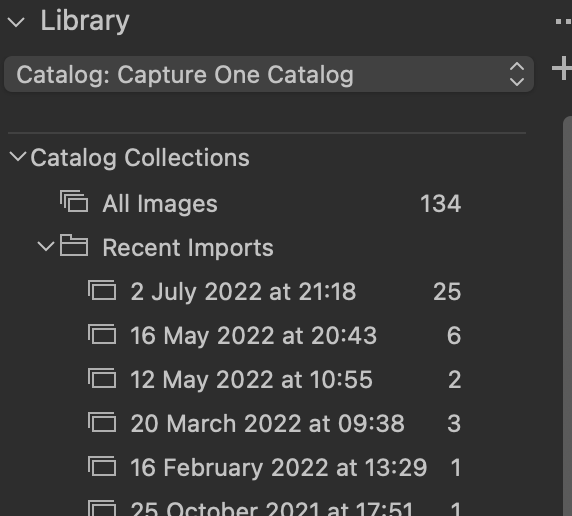
Even better, perhaps, I can select All Images (just above Recent Images) and see all the 134 images in the catalog. Once the catalog has a large number of images in it, you almost certainly don't want to be looking at All Images all the time. You have choices such as
- looking at just one of your import sets at a time
- looking at the images in the actual folders they reside in (further down the Library in the Folders section)
- organising images using albums, smart albums, etc. With a large catalog, this becomes very useful - for instance my main catalog has about 45,000 images in it, but I have a smart album called Butterflies, and I can quickly see all butterfly images I have taken over the years.
Hope that helps!
Ian
0

Post ist für Kommentare geschlossen.
Kommentare
2 Kommentare