Can't modify certain images : Red cross symbol error

Hi everyone,
I'm struggling since a few days with a problem I don't understand.
I closed my catalog and when I re opened it, some images had a symbol on them. It is now impossible to retouch them.
I try to import the files again,
I switched from a catalog to a session and then a catalog again.
I don't understand what's going on... I only have this problem with these images, the rest are working.
All the images are scans from a V800, .tiff
Does anyone know how to fix this ?
here's the symbol on miniatures : 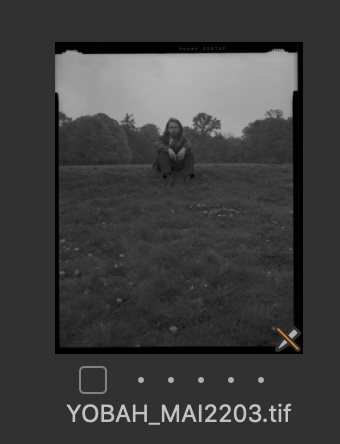
-

There are some limitations on the size and the colour space of images Capture One can process.
The minimum side is 512 pixels, and grayscale space images are not supported.
How did you scan your negatives ? RGB or grayscale ?
0 -
Thanks for your help Robert !
I just converted them to RGB and now it works ( the scans were in greyscale)0 -
Pleasure !!
0 -

@ Robert: Maxbe you can help me also. I have the same problem but my files are RGB files. It works on my internal HD but not on my RAID. Lightroom and Photoshop are running with files on my RAID therefore it should be an C1 issue. Thanks in advance!
0
Post ist für Kommentare geschlossen.
Kommentare
4 Kommentare