No Library

When I restarted Capture One a week ago the library was apparently empty - or at least its contents were (and still are) hidden. I can work with the two folders I have been using recently (going to file/recents) but can't access any others. I think they are all there, hidden, because when I back up the two catalogues I am working with the back up takes the usual length of time. But how do I find them? And what will happen if I try to import new RAW files to work on? I have asked Customer Support for help but none has been forthcoming so far as it is based in Ukraine.
-
Perhaps we need a bit more information to help you.
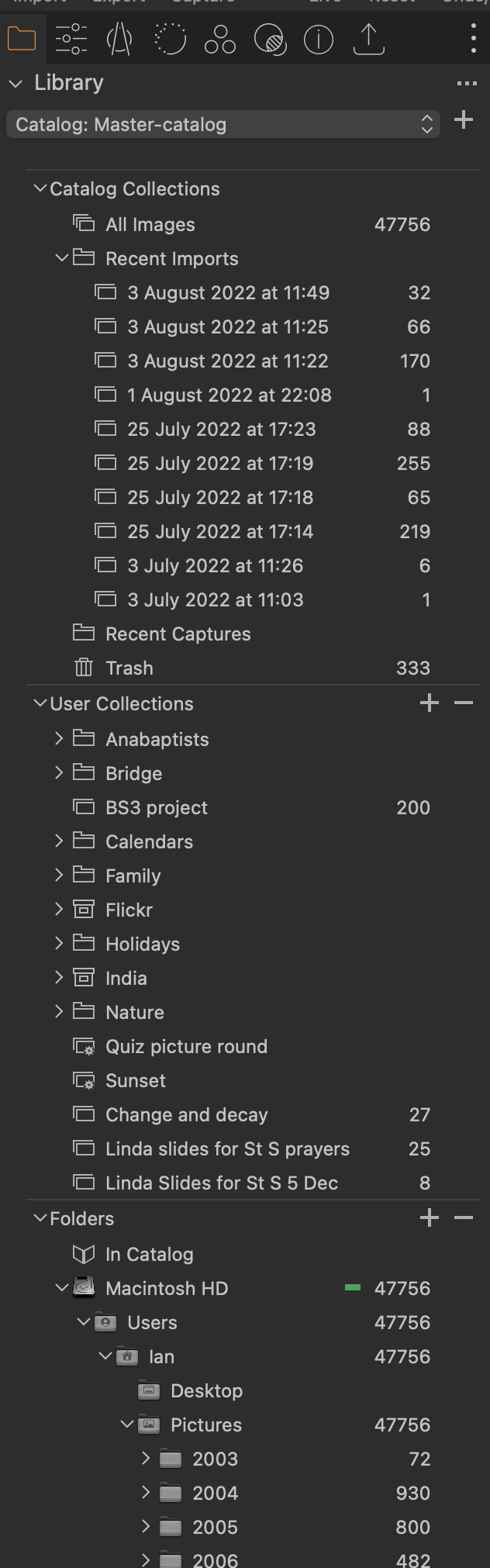
In the Library tool (see my screenshot)
- Do you see all the sections I do, that is Catalog Collections, User Collections, and Folders?
- If you do, is there anything at all in any of them, and if so what?
- Can you perhaps provide a screenshot of what you do see in the Library tool?
Ian
 0
0 -
Thanks Ian for responding. Normally I would see much the same as in your screenshot but the problem now is that none of it shows. I can click the library tool and it will go red but there is just an empty space under it.
0 -
So when you click the > symbol or ∨ symbol next to Library, nothing happens?
Ian
0 -
Problem solved! The > symbol did show when I right clicked and gave me the invitation "Add Tool". I hadn't explored what that meant, but, taking the hint from you, I got a long list which included the word Library. Clicking on that restored everything that was missing. So many thanks.
Ian.
0 -

The same thing just happened to me. Following Ian's lead I found Library in the Add Tool drop down and previous imports now show as they had previously done. Thanks.
0

Post ist für Kommentare geschlossen.
Kommentare
5 Kommentare