Can't move pictures between sessions

Hey,
I recently switched from Windows to Mac. On Windows, I was able to move pictures (with their edits) from one session (not catalog) to another session by dragging the pictures from the grid view of session A onto the folder icon (Select, Capture etc) of session B. As simple as that.
Now, when I try this on Mac (OS version 12.5.1, C1 version 15.3.2), I can't drag any picture outside the window of session A. As soon as I try to move a picture outside the window of session A the mouse "snaps back".
So: Is this normal behaviour (therfore Mac behaves differently than Win)?
If so: What other way can I choose to move pictures between seesions (besides export/import as EIP)?
If not: Have I done it the wrong way?
Cheers,
Oliver
-

I tried the dragging images from the grid to finder, finder with icons, across mountpoints and across displays and did not experience this problem. However, here is a link with steps to fix the problem, the first being to relaunch finder from the Force Quit dialog box
Link: https://osxdaily.com/2015/09/07/drag-and-drop-not-working-mac-os-x-troubleshooting
To relaunch Finder, click on the Apple icon upper left then on Force Quit. Select Finder and the button lower right changes to relaunch. Click relaunch and Finder will restart. To be sure of the process I relaunced Finder with C1 and Safari running, no problems.
Hope this helps
0 -
Hi Gerald,
thanks for your answer!
Sure, I can give it a try but I think I did describe my problem not detailed enough: It’s not an issue with the Finder. But an issue having two C1 instances running at the same time with holding each a session. And then drag pictures from the grid view of the first session onto the folder symbol (e.g. Capture) of the second session / instance. The aim is to move pictures directly from one session to the other with their edits. So no other apps are involved, only the two C1 instances.
0 -
Just tried it swith two C1 sessions opened both on same mount point and different mount points. I was able to drag an image with edits from one session to another's Library Select folder with no problems. Edits (default auto correct) was moved with the image to the different session. My guess is still an OS or device issue which is discussed in the osxdaily link. Using a pen tablet and a mouse also using mouse to drag across screens and the selected image did not jump back to the grid. Worked with Adobe Bridge as well. Still sounds like a system issue or mouse issue.
0 -
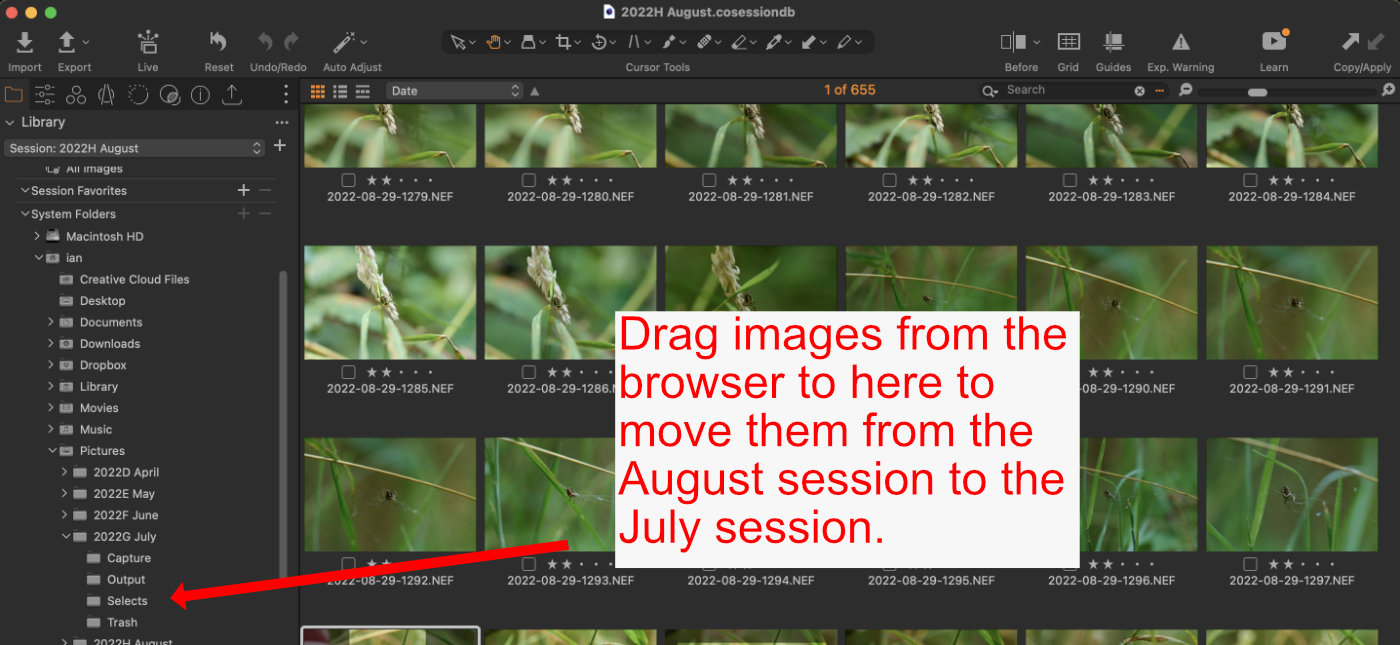
There really is a simpler way of doing this. If you have Session A open, there is no need to open Session B. In Session A, use the Library tool and find the Session B folder you want (Selects, Capture, etc) then drag the images to it. Capture One will move the edits along with them. See screenshot, where I could move images from my August session to my July session.
Ian
 0
0 -
@Ian: Hey Ian, never thought about this way to do it :-) And this works like a charme. Thank you.
@Gerald: This is really interresting, nevertheless. Again I've tried it with no success. And from its behaviour it really does not look like a bug but rather an implemented feature. The photo, which I am visually dragging "runs back" and stops at its origion as soon as it touches the border of the window. I logged on and off, but no change.
.... And now its getting weired: Just during typing this mail I tried it another time. No changes done to the setup. And now it works as expected. I can move the pictures forth and back.!?!?!
Not really knowing what to do with this. As long as it works know: Thanks to both of you for helping me and even find an alternative way if "my" method stops working again
0

Post ist für Kommentare geschlossen.
Kommentare
5 Kommentare