Updated C1 and it doesn´t work with OSX 10.14 >> how can I reuse the updated catalog with the older C1

hello guys,
have a big problem. I updated to the newset version of C1 which is (I saw to late) not compartible with my Mac OSX 10.14. Now C1 is crashing during the workflow : (
The catalog with all my picutes in it, is also updated to the newest version of C1 and isn't compartible with my olver version (which is runnig on my OSX).
Is there any option to redo this without updating my OSX and using the catalog in the older C1-Version.
Thank you soo much for helping me out!
Greetings from Germany
Patrick
-
When you updated the catalog, Capture One should have automatically created a backup of the existing (old format) catalog. Find the current catalog in Finder, looking something like this.

Right click it and choose Show Package Contents, and you will see something like this.
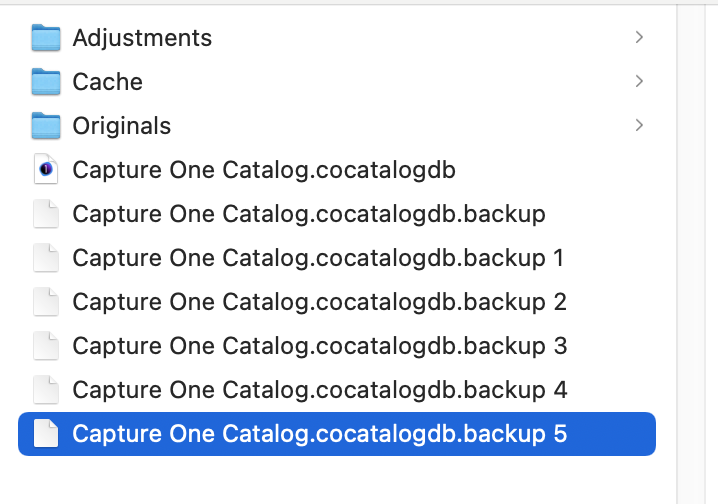
In my case the one labelled backup 5 is the most recent backup of the catalog. You can rename that to something like Old version.cocatalogdb and you have your previous catalog back.
Ian
1 -
hey Ian,
tried that already with no sucess. The "backup-catalog" before the update has only 90MB. So I think there are just informations about the library in it (datebase or something like that).
How do I have to load the library with the backuped file in the old C1-Version ? can´t load just the xx.cocatalogdb.backup
THANK YOU so much!
0 -
update ...
so in your case I have to delete "Capture One Catalog.cocatalogdb" and rename "Capture One Catalog.cocatalogdb.backup 5" to the new "Capture One Catalog.cocatalogdb" right?
>>> it worked!! Thank you so much again!
1

Post ist für Kommentare geschlossen.
Kommentare
3 Kommentare