delete layer/s from multiple images

How can I delete/remove layer/s on multiple images?
Alternatively, how can I replace existing layer setting with a new one (by copy/paste settings)?
Thanks,
-
If you want to remove all the layers from the images, it is very easy - select all the images in question and use the reset button on the layers tool.
Deleting just one layer from multiple images would be harder.
Ian
0 -
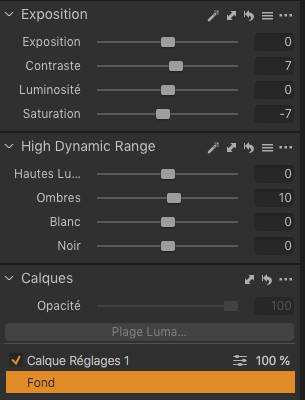
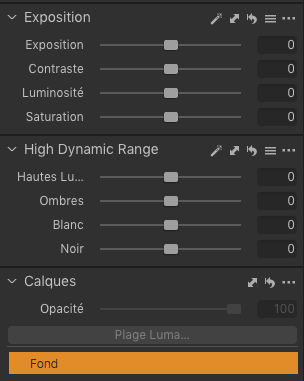
thanks but this option resets the background layer too...
0 -
No, it doesn't! This is the reset button I meant - just the one on the layers tool, not the general one on the toolbar.
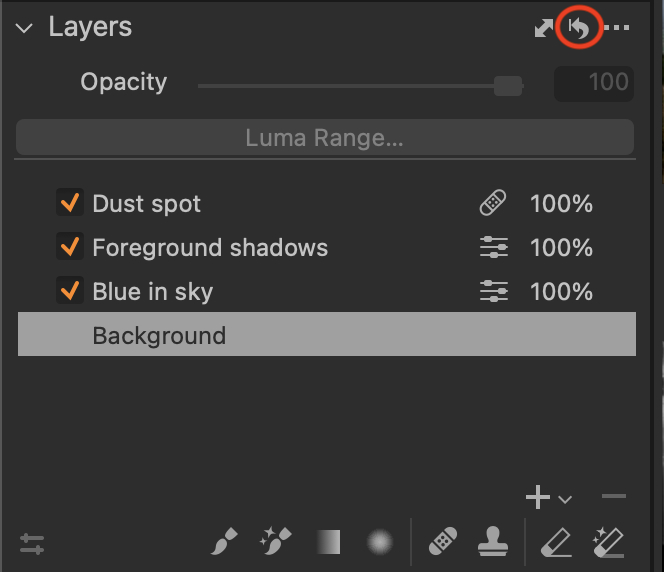
Ian
0 -
Thanks but in my case it does (see encl.)
 0
0 -
That's very odd - I tried again on the image from which I got my screenshot above and it didn't do that!
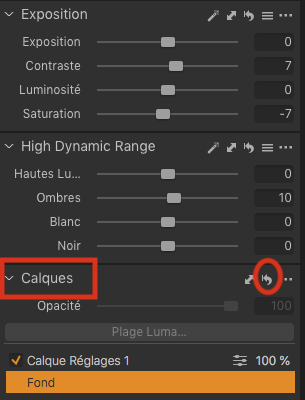
Are you sure you are using the correct reset button (the one on the Calques tool)?
 0
0 -
yep, that's the button I'm using... strange...
 0
0

Post ist für Kommentare geschlossen.
Kommentare
6 Kommentare