Color gradient point.

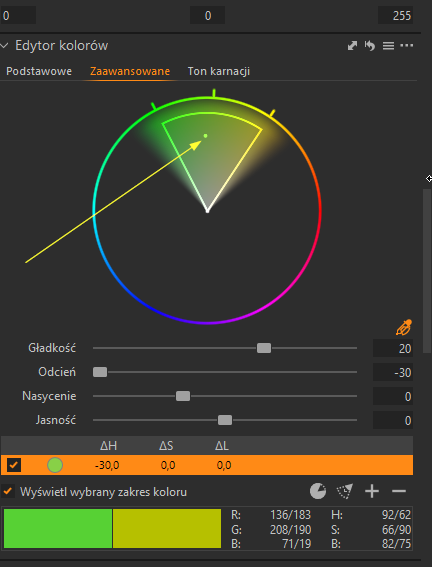
Could You explaine me, or give some link/tutorial/quide what is it this some dot on the color gradient panel? What can I do with this dot, what this dot give me more / some improvment?
Maby this is ony to some view ?
On the screensthot I select yellow arrow this dot.
-
When you use the picker to choose a colour range to work with in the colour editor, the white dot represents the actual colour you clicked on.
If you were using the skin tone (ton karnacji) section of the tool, you also have the uniformity sliders to affect the result. They affect how close other tones get to the colour where the white dot is. If you want you can move the white dot to change the target colour.
Ian
0 -
SFA - I can't work out why the answer I gave to this 2 hours ago is still Pending Approval. I can't see that I have used any naughty words or anything!
Ian
0 -
Thanks for answer.
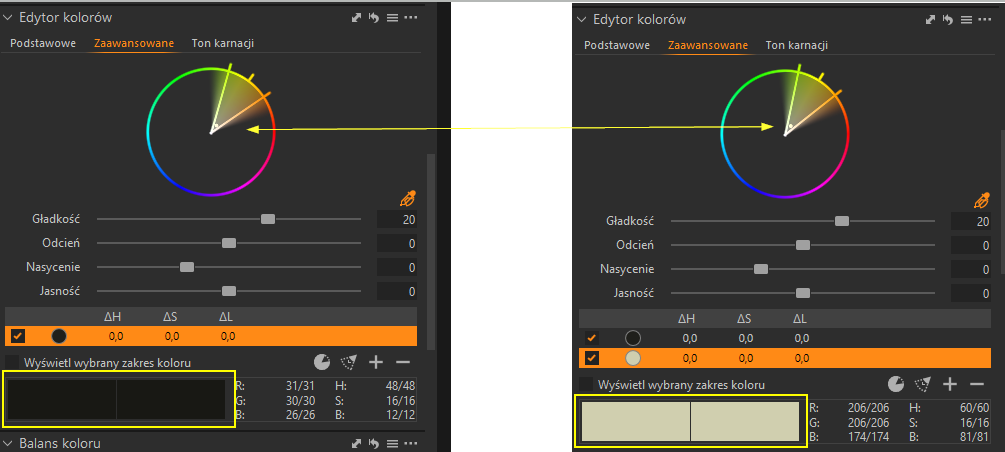
I saw the problem here. Look to my screen shot.
I tried copy from same preset color adjustment,,, and i did i see like this below.
Look, doot is the same point but give us another colours (look yellow border)On the left side colour is realy dark, and i can't do lightner (dot is almost on lithner place).
On the right side colour is realy light and i CAN do darkner and lightner.So, for me this is incomprehensible.
 0
0 -
My answer is still pending approval!
Ian
0

Post ist für Kommentare geschlossen.
Kommentare
4 Kommentare