Export JPG to folder without Capture Overhead (Capture Folder w/Cache & Settings Folders)

I'm trying to create an export routine that will export JPG files to a folder but I only want the images in the folder and not the Capture One folder with the cache and settings)
The folder name is set using the Image Folder Name token, (which happens to be the name of the person in the photos). I want to drag and drop the folder onto a flash drive and hand it to them. Obviously, I don't want to include all the Capture One overhead.
Any ideas?
-

Can you share a screen shot of the export settings you are currently using?
0 -
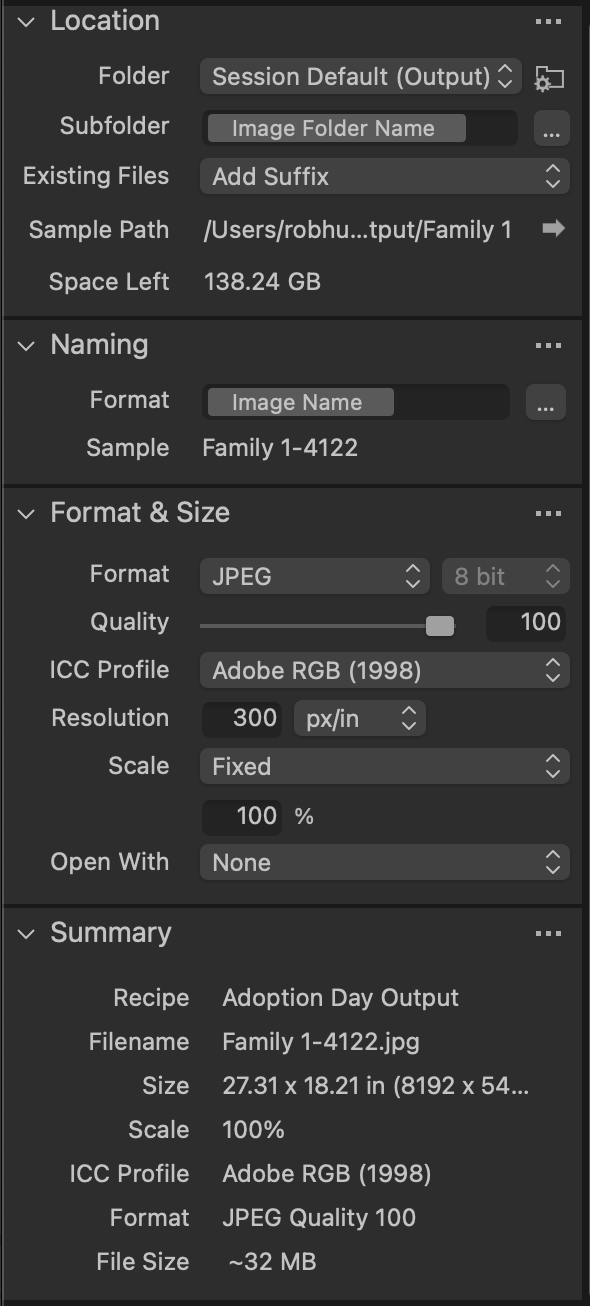 0
0 -
SFA, Thank you for the insight. I may be able to simply grab the folder before I open it in Capture One.
Also, I am tethered to a C1 Session.
0 -
What SFA said....LOL
My export settings look exactly as yours, the only difference is that I export to the desktop rather than the session output folder so Capture One no longer can find them.0
Post ist für Kommentare geschlossen.
Kommentare
4 Kommentare