How do you archive photos in catalog

I'd like to keep the high-quality originals, along with their adjustments in C1 catalog forever, organized in folders and albums: "People", "Landscapes", "Dogs", etc.
I couldn't find an easy way to do that:
- When I move an image to an album, and then delete it from "Recent imports" - it disappears from the album and it is physically deleted from the catalog.
- When I remove an image from all albums, it still remains in the catalog. I have to go to "In Catalog" folder, find it there and remove it.
Basically, I don't want to keep the images I reject in the catalog. I understand that I could not import the unwanted images, but when I import from a memory card I often don't know which images I want to keep.
Thank you for your help!
-
You are misunderstanding how Recent Imports works. It is just a convenient way of finding images you imported recently. It is not the physical location of the images - they are either in folders on your file system, or inside the catalog, depending on where you chose to have them at the time of import. (It sounds as though yours are in the catalog, from your mention of the In Catalog folder.)
Albums (including Recent Imports) are virtual collections. Moving an image to an album doesn't physically move anything, and doesn't create an extra copy of the image file. (One of the advantages of that is that an image can be in more than one album - so if you have an image of a friend and his dog, you could if you like add the image to both the People album and to the Dogs album. There is still just the one image, but two ways of classifying it and finding it.)
Recent Imports is just another virtual collection. Your image of the friend and his dog will also be in recent Imports because you recently imported it. If you find it there and delete it, the image itself is deleted. But there is no need to do that. It does no harm at all being there too. In fact it could be helpful - you have a third way of finding that image - the People album, the Dogs album, and photos you took last Wednesday.
An approach you could take to deleting images you don't want to keep would be to tag them, perhaps with 1 star, or with a red colour tag. Then go to the All Images collection, use the Filter tool to show you just the 1 star (or red tag) images, then select all of those and delete. It might be a bit of work to start with, but if you got into the habit of assigning 1 star to reject an image as soon as you decide you don't want it, it would become a fast process for the future.
Ian
1 -
Thank you so much, Ian, for taking the time for this thoughtful and detailed explanation! This makes sense to me now, and I think I have a method to accomplish what I want.
I'm trying to accomplish the following:
- Store photos inside the Catalog, not as references to the file system externally to Catalog. This way, I can handle the catalog as a single file on a Mac: I can move it to an external drive, back it up, etc. Also, I could have multiple catalogs: one for every year, for example.
- Delete all rejected photos from Catalog to reclaim the disk space.
- Only keep the best photos in C1 catalog long term. Other "good" photos: export as JPEG and upload to Google Photos, and delete the original files from the C1 Catalog.
Yesterday, I managed to do just that: using tagging and "smart albums" in C1. I created a smart album named "Ok to delete" with the following filters:
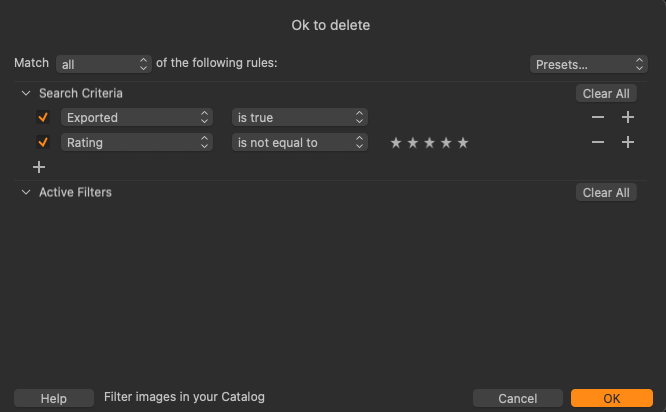
This works, but I wish C1 had a filter like "in folder" or "in collection", where I could select all photos that are not in a specific folder (or any subfolders).
For example, I would love to be able to exclude any photos that are in my "Portfolio" folder:

Thanks again! The solution I have now works.
0

Post ist für Kommentare geschlossen.
Kommentare
2 Kommentare