Exporting scale

Hi there,
I will need to print some images ta 400mm x 400 mm and 1000mm x 2000mm
As I've shot wide and have to crop in that reduces the size of the images.
If I process my images at 200% scale will that reduce the quality of the images?
-
If you process at 200%, Capture One has to effectively interpolate (fill in) to produce enough pixels. The main thing that could be unwanted is that the image looks softer. This is where export sharpening can be used to counteract it.
In the Export recipe look for this section
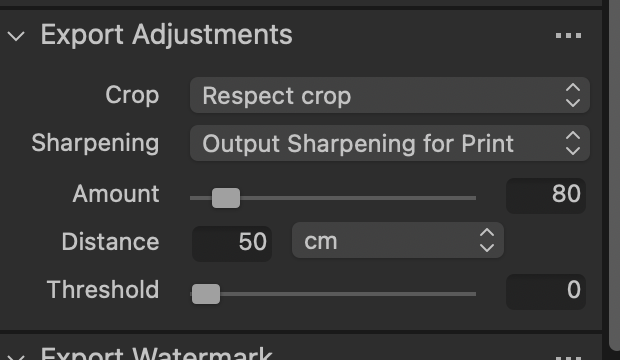
Choose Sharpening for Print as shown. The amount you can vary as you see fit. Distance can be in cm, inches or % of diagonal. It represents the distance at which the print is likely to be viewed. So a print viewed on the wall in a gallery at a distance of say 100 cm might need quite a lot of sharpening that would look too much if the print were to be held in the hand at a distance of 40 cm. You may want to experiment and read the online help here.
https://support.captureone.com/hc/en-us/articles/360020904857-Adjustments-tool-
Ian
0

Post ist für Kommentare geschlossen.
Kommentare
1 Kommentar