Merging sessions with images stored outside capture folder

I have a few sessions which I would like to combine into one session while keeping the original images in the folders in which I imported them, which is not in the capture folder.
Can I do this and how?
Thanks
-
Straightforward. In the session where you want the images to appear, navigate to the folder where the images are, right click it, and choose to add to session favourites.
Ian
0 -
Does this keep all the adjustments and ratings?
0 -
Yes.
Ian
0 -
Thanks Ian, I'll give it a try. I always thought the metadata was stored in the C1 .cosessiondb and not in the files or folder.
On a related note: can I rename a session?
And can one rename a folder which is outside of C1 in which images are stored. ?
0 -
In a session, metadata including ratings etc, is stored in the .cos files. These are effectively "sidecar" files in subfolders within the Capture One subfolders in the actual image folders.
Yes, you can rename a session. Do it with Capture One closed. Here's how.
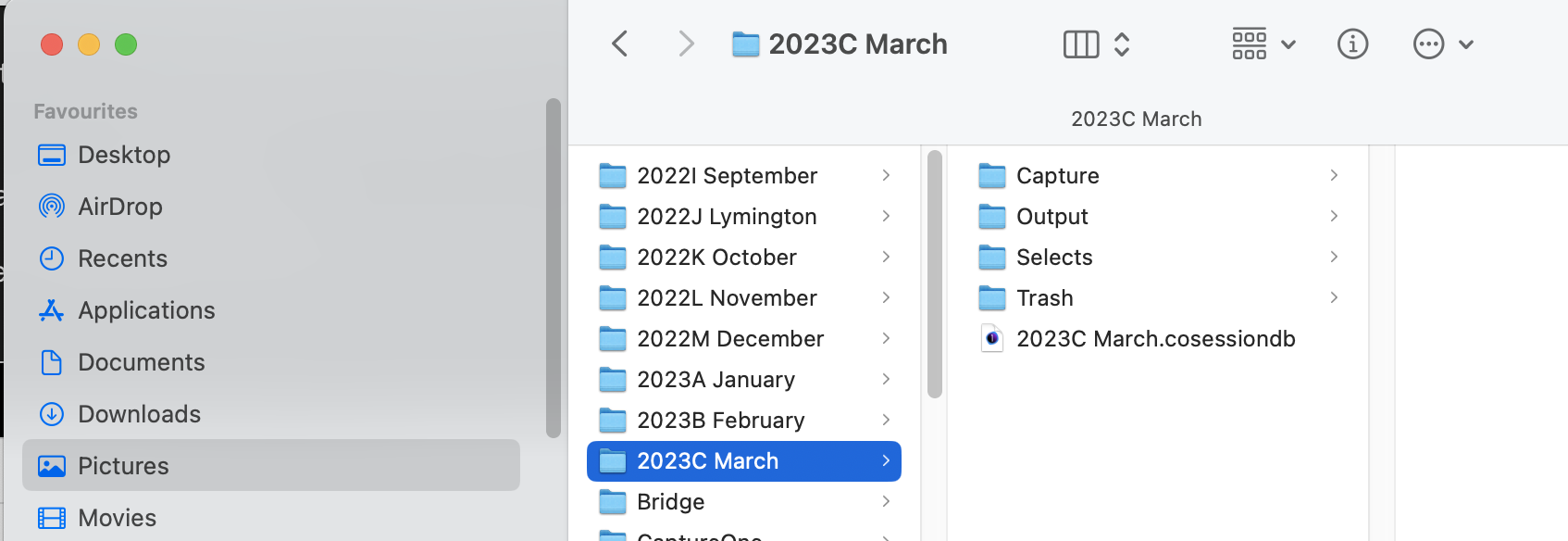
If I wanted to rename the session highlighted in my screen shot - perhaps changing 2023C March to 2023C March Vacation
- rename the folder from 2023C March to 2023C March Vacation
- also rename the session file from 2023C March.cosessiondb to 2023C March Vacation.cosessiondb
Of course when you open Capture One it won't know where the renamed session is, at first, but just go to File>Open and select newly renamed .cosessiondb file, and you are good to go.
Ian
0 -
And can one rename a folder which is outside of C1 in which images are stored.?
Yes you can do that with Finder but you have to add it to the Favorites again if the old folder name was a Favorite. You can also do this with the library tool in the session then you're good.
Adding toooo many folders as favorites can slow the session down though, more than a catalog with the same number of images.
If you don't have to search in the collection "All images" over all your favorites then you don't need favorites at all, just locate the folder you want to work with with the library tool, system folders.You can have one session with all folders added to favorites (slow but can search over all images) and one session without (fast) and work with one or the other depending on what you're doing.
0 -
Hi Ian,
I am circling back on this question as I prepare to merge some sessions and feel I could use some clarification.
I have a number of sessions. Some sessions include images from multiple folders. For instance there might be a folder that has a session I would like to combine but there are folders from that session that just have the Captureone folder with the Cache and the Settings141 folders. Will this process pick up all the images from all the folders incorporated in the second Captureone session I am trying to add?
To combine these sessions I should:
Open one session.
Navigate to the folder that I want to add using the capture one library tool and with the top level of the folder selected click "add to favorite" and it will fetch all the data for the session I want to add, including those form the other folders?
This work if there is no actual session in the folder, just the capture one folder and the cache and the settings141 folder?
Is there any instances where I have possibly gotten images into a session but there are no captureone files in the folder? Or is that impossible?
Finally: what is this about adding to session favorites (or not) and the speed of the session as a result.
Sorry for my lack of understanding!
Many Thanks, Bryan
0 -
If you add a folder to Session Favourites, all it does is
- adds it to the list of session favourites so that it is easier and quicker to find;
- includes it when you choose the All Images collection in that session.
Any folder that has images in it that you have worked on (or even looked at) using a Capture One session will gain a Capture One subfolder, which in turn has further subfolders for Cache and Settings. (The number added on the end of the Settings folder name depends on the version of Capture One.)
Capture One doesn't have to do any fetching of data as such when you add a folder to session favourites. The data is not stored in the session database - it is held in the Cache and Settings subfolders, so if you go to the images, the data is just there.
You are not obliged to add folders to session favourites, you can just navigate to the folder and view and edit the images in it. But if you have an extensive file system on your computer, that can get tedious.
It is perfectly possible for there to be a folder of images with no Capture One session in it - as soon as you use Capture One to look at images anywhere, it will create the Capture One subfolder and the Cache and Settings sub-subfolders.
Ian
0 -
Will this process pick up all the images from all the folders incorporated in the second Captureone session I am trying to add?
Which process exactly?
0


Post ist für Kommentare geschlossen.
Kommentare
9 Kommentare