Can't crop outside of image area

Unable to move crop area outside of image dimensions. The relevant box is ticked (crop outside of image), but still constrained to image area. Any ideas?
-

Show us a screenshot of what you're trying to do.
I'm guessing you might be trying to move into the Viewer background area, but I don't believe that's it's purpose.
It can be used when you, for example, have applied Keystone adjustments (if anyone is aware of other situations please enlighten us).
In this example, if "Crop Outside Image" was not enabled, the vertical boundaries are restricted by the bottom corners, as on the left side of this image, but with it enabled, you can move the boundary beyond that as on the right side. It means you will end up with grey areas in your image but you can then use the Healing or Clone tools to fill those areas.
Alternatively, you wouldn't be able to move the top horizontal boundary upward unless you narrow the vertical boundaries or enable "Crop Outside Image"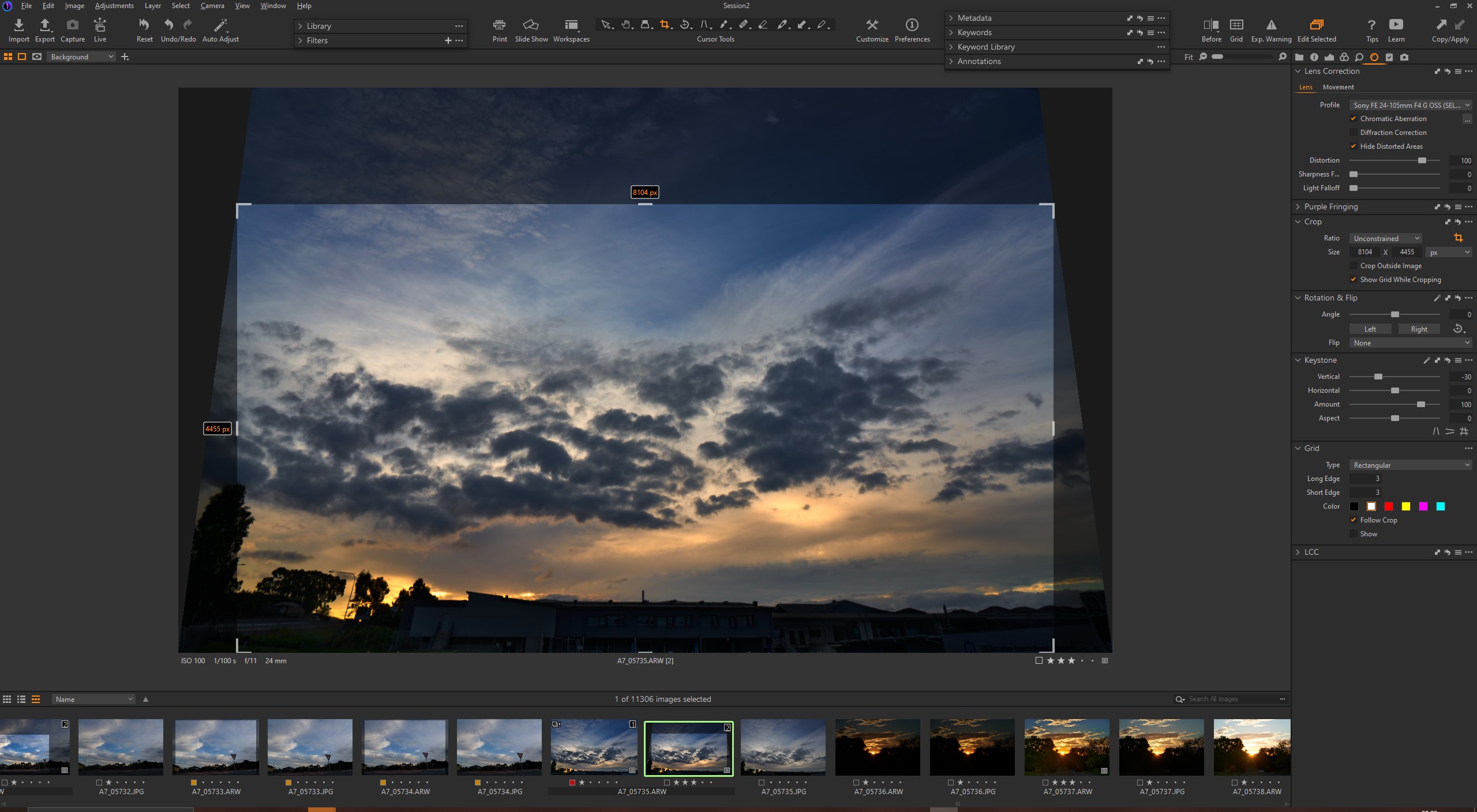 0
0 -
Boris is right. Besides keystone, rotation is another tool which restricts the cropping area to the resulting pixels, if you don't enable this checkbox, but you cannot go beyond the original image area.
Do I sometimes wish the image area in C1 could be enlarged into the canvas? Yes, e.g. when I want the sky a little bit wider. I would like to use the clone or heal tool in C1 then. But you have to export the image and use another tool to change the image area, unfortunately, e.g. a tif, and then fill the area in C1 of that tif (or use the external tool to fill it).
0 -
Thanks for the replies. I'm sure, with previous versions, I have been able to expand the crop beyond the image itself without keystone or rotating the image (I don't think it was a different application I used). It seems ridiculous that such a simple function isn't available. I'm retouching around 1000 cut outs, and need to crop them as squares. It would much quicker to crop them in CO rather than in Photoshop
1 -

The error message "Can't crop outside of image area" typically indicates that the user attempted to crop an image beyond its boundaries. Cropping allows you to select a specific portion of an image, but it is limited to the area contained within the image itself. Trying to crop beyond these boundaries would result in this error message. To resolve this issue, ensure that your selection stays within the image's dimensions, allowing you to successfully crop the desired area.
-1

La publicación no admite más comentarios.
Comentarios
4 comentarios