Change units of measure from inch to centimetres

How can I change the unit of measure from inch to centimetres in the summary tool of the export?
My goal is to quickly find out how large (in centimetres) I could print an image for a given DPI setting. Maybe there is a better way to do this in Capture One?

-
There should be a section in the Export tool tab for Export Format and Size. It has a drop down control for the units used. But that only works when your output is specified for a certain size.
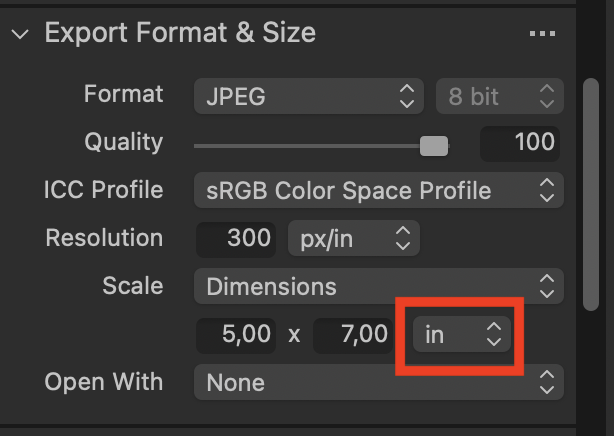
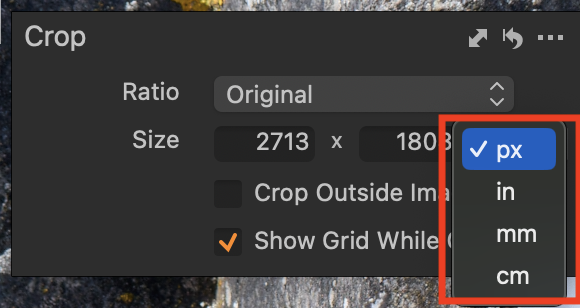
Your recipe, however, is set for 100% scaling, and the units shown here will therefore depend on the units used in the crop tool. Mine is set to pixels, but you could change it to inches, cm, or mm.
Or you can calculate the size. An image that is, say, 5568 x 3712 pixels at 300 dpi will print out at
5568/300 = 18.56 inches, or in cm 18.56 x 2.54 = 47.14 cm.
Ian
0 -
Thanks, changing the unit it the crop tool also changed the unit in the summary tool of the export.
This is kind of a weird workflow to me.0 -
But if you don't tell Capture One what you want, how will it know? You might be aiming to put your image online, in which case you most likely want to see its size in pixels, or you might want to print it, in which case you will want to see it in inches, cm, or mm.
Ian
0 -
I would have expected a global setting where I could set the default units of measure or something.
I was a bit surprised to learn there is some tight coupling between the the crop tool and the export window when it comes to the unit of measure.
I think it would be nice if Capture One would have a feature that can quickly tell me how large an image will become for a given DPI and resolution and let me quickly choose the unit.
0

La publicación no admite más comentarios.
Comentarios
4 comentarios