Fibonacci Spiral

How do you change the grid overlay to a Fibonacci Spiral? The user's guide is useless.
-

Here is an article from the user guide that should help: https://support.captureone.com/hc/en-us/articles/360002587158-Adding-a-Grid
Look at the numbered steps. It's found in the Grid tool under the Type dropdown menu.
0 -
Thanks for the reply but I've already tried that. I don't see that option:
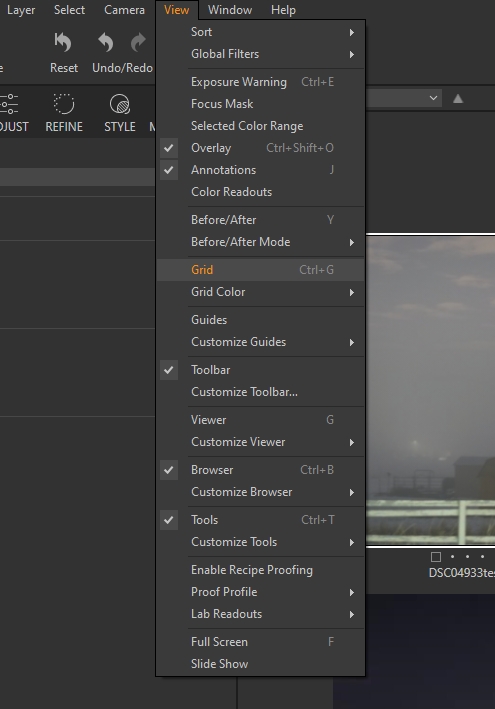 0
0 -
You can't change the type from the View menu - all you can do there is turn the grid on and off, and change the grid colour. If you want to change the type, you can only do it using the grid tool.
Do you have the grid tool on one of your tool tabs? By default, it's on the Shape tool tab, but if you have customised your workspace you may have put it somewhere else or you may need to add the tool to one of your tool tabs.
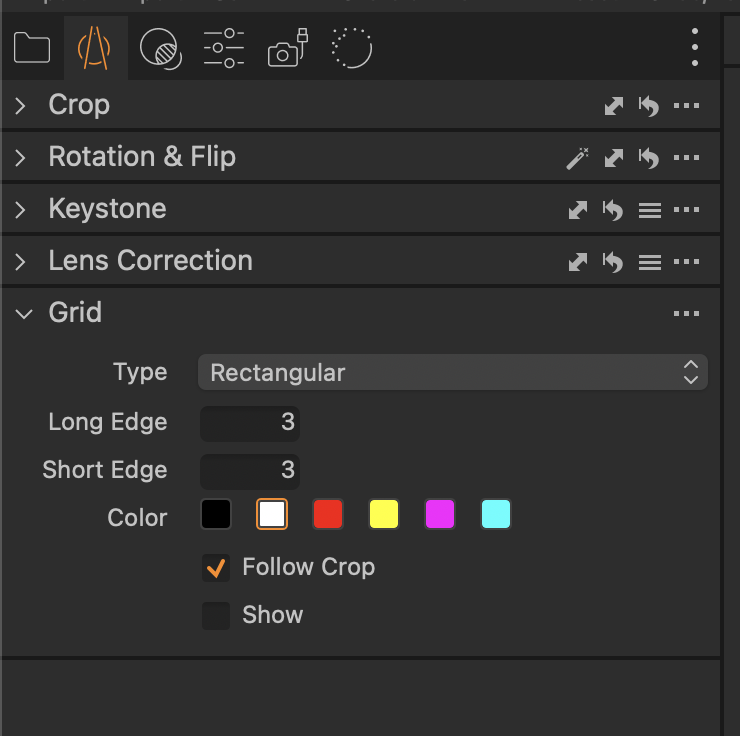
Ian
0 -
Thanks for the explanation.
Frankly, it's a ridiculous implementation!
0

La publicación no admite más comentarios.
Comentarios
4 comentarios