replacing the data source

my external hard drive crashed
C1 has lost contact with the data
I have a backup external drive with a copy of the data
how to change the source so that C1 gets the data
-
Imagine you had a folder on the external drive called Raw Images. If that folder also exists on your backup drive, then
- connect the backup drive
- find the Raw Images folder in the Capture One library tool
- right click it and choose Locate... then navigate to the folder of that name on the external drive.
Alternatively, as you are on a Mac, you MIGHT find that you can rename the backup drive itself to exactly the same name as the old drive had, and Capture One would think it was the same drive.
Ian
0 -

I had a similar problem and ran into an issue where locating the referenced images sometimes leaves relocated folders with no image files.
For reasons I cannot determine, my referenced RAW files became disconnected from my external SSD where they are located even though the name of the SSD and that shown in Capture One were identical. Indeed you can rename the drive to match the name Capture One shows it to be if they are different. In my case that was not the issue.
Since some of us refer to groups as folders, I am referring to folders on the hard drive/SSD that Capture One refers to in the section below the User Collections (the example below has no connection problems). The disconnected drive and folders showed the warning triangle, not shown, here.
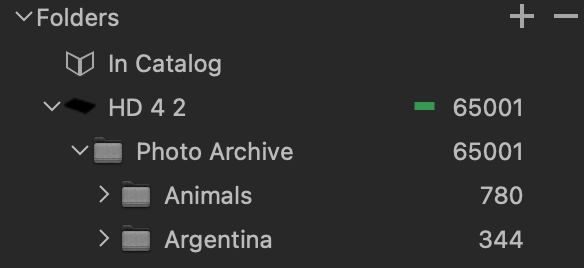
I used the locate function to relocate all of the folders/files on the SSD. The first time, Capture One quit before finishing locating, but the second time it mostly worked except that a few dozen folders and subfolders out of hundreds had no files in them. The empty Capture Oner folders on the drive were correctly located as indicated by the absence of a warning triangle and the fact that "Show In Finder" showed them in their location on the SSD with all of the expected files in them. However, right clicking on the empty folders and selecting locate did nothing. I was only able to relocate each image's RAW file one at a time.
Relocating folders with over 65000 raw files seems to be an iffy process. I tried this locating one folder at a time and it and its subfolders were correctly relocated. Capture One apparently is not able to reliable relocate a large collection. When this happens, it locates the flowers, but thinks they are empty. Further, even when located, the question mark icon on the thumbnails some times does not disappear until you click on the thumbnail. Sometimes entire projects do not show this. All of the relocated files with question marks are shown as on line and can be shown in the finder, so it is a minor bug.
So, is there a way to make Capture One bring the raw image files into an empty relocated folder? After a lot of attempts to find a way to do this, I gave up and opened a copy and renamed the SSD to match what Capture One wanted it to be, which worked, except for the odd persistence of the question mark icons.
0 -
Capture One is a good program until the data drive fails. Unfortunately, from this point on, problems with restoring access to data begin, despite the fact that you have a backup disk. The arguments that in the event of a problem you should change the name of the backup disk to the same name as the disk that failed come from the period of operation of the MS Dos system and early versions. That's not what data recovery is about.
1. The problem is that C1 does not have its own directory structure to which you can connect any directory from any source by simply changing the path. And that would solve so many problems. Unfortunately, now when an SSD with data fails, the entire directory structure, often consisting of many hundreds of items, disappears. It is impossible to reproduce because it was created for many years.
2. In addition, access to session albums in which there were photos from multiple directories disappears. If someone creates an album for printing and creates it for several years, it's safe to start from scratch. Wonderfully.
3. And life could be so beautiful, it was enough for C1 to have its own directory structure on which Session Albums are based. Of course, provided that you can change the access path to the directory structure. In this case, the failure of the ssd causes only the need to change the access path to the internal directory structure and nothing else. Why didn't someone come up with this, but force the solution from before the flood?
After the failure of my ssd and many days spent manually transferring photos and playing albums, I consider C1 to be a very dangerous program. It's better to carry out serious tasks elsewhere because you can get serious problems.0 -
Amen! This is why I copy my catalog often in addition to doing backups when anything is added. This is not just a lack of functionality, relocating all of the referenced files even on a single drive has bugs (see the stared paragraph, below).
It would be nice if when you replace an old drive containing your referenced files with a new drive with a different name, replacing the original drive name (that goes in the space to the left of the red dash, below, would actually let Capture One connect to that drive. Instead you get the message, below. For example, an attempt to rename the drive location for "Referenced images" (the old drive) to "Reference Images Backup (the new drive with an identical referenced file structure) doesn't work. You get this message (my actual drive is backed out):
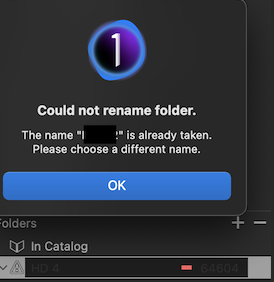
Of course, you could rename the "Referenced Images Backup" duplicate drive to "Referenced Images," and Capture One would treat it as if it were the original drive that you replaced. This is fine for backup drives you have with you that have an identical path to the referenced files, but not practical for network or cloud drives with a different path.
Also, if you type in a drive's name that is not already taken, you get the same message.
*If all else fails, or you want to rename the referenced file's drive (Capture One doesn't have a simple way to do this), you can Relocate the files, but this is slow and as I mentioned before, while Capture One is great at reconnecting to the folders with referenced files, it is not so great at finding their files. Dozens of relocated folders with images may appear to Capture One to have no images. If this happens, there in no way to get Capture One to see those files except by locating them one by one in the thumbnail view.
So you can't change a drive's name from within Capture One and if you do it in Finder, Capture One's access to the reference files is lost.
You can't tell Capture One how to find the top level folder or a drive with that top level folder in the event you have to connect a backup drive.
For these reasons, if I were a pro, I would be worried about using catalogs, even though they are a boon for searching and using smart folders. Backup lans are essential, but when you have to relocate files, it can be time consuming.
So what is this function of entering a new drive name in the space?
0 -
You got to the heart of the problem, I just don't know if anyone from C1 reads this correspondence and does anything with it? To be honest, until C1 does not improve this solution, I will advise my fellow photographers against buying this program. Very often people call me or write to me asking how it is to work in C1 because they are a bit fed up with LR and have heard a lot of good things about C1. For now, I'm going to tell them my SSD failure story and how I sat day and night transferring files from my backup drive to C1. (I haven't done everything to this day and the losses are hard to define) People are scratching their heads, because how can you seriously think about photographers without providing appropriate tools for returning to work after a failure. To tell the truth, I started looking for an option myself because I can't afford another slip-up and loss of a client. Regards.
0

La publicación no admite más comentarios.
Comentarios
5 comentarios