Constant requirement for Engine upgrade when working with adjustment layers. Using Mac OS Monterey Version 12.6.7. Have to go to Base Characteristics to upgrade for every layer!

Which device are you using?
Let us know whether you are using the mobile application on an iPad or iPhone, and which specific device you you are using, e.g. iPhone 14 Pro
What problem do you see this solving?
Describe the problem or issue you are having in Capture One mobile.
Think about what it is that you're trying to achieve, and the reason why you are trying to do it.
When was the last time you were affected by this lack of functionality, or specific tool?
If your feedback is more general, simply let us know how much your workflow is affected.
Are you using any workarounds or other solutions to achieve your goals?
This is so we have a greater understanding of how your workflow is affected, and how we can improve the existing tools and functionality.
Are you happy to be contacted further about this suggestion or request?
Let us know with a simple “Yes” or “No” – we will contact you with the email address used in your Capture One profile.
-
Graham - you need to actually fill these parts of the template in. And it's not at all clear from your title what the problem is or why it arises. Without a clearer explanation you won't get help!
I wouldn't expect to have to update the engine layer by layer, so maybe it's not clear what is going on. A screen shot or two might make it clearer.
Ian
0 -
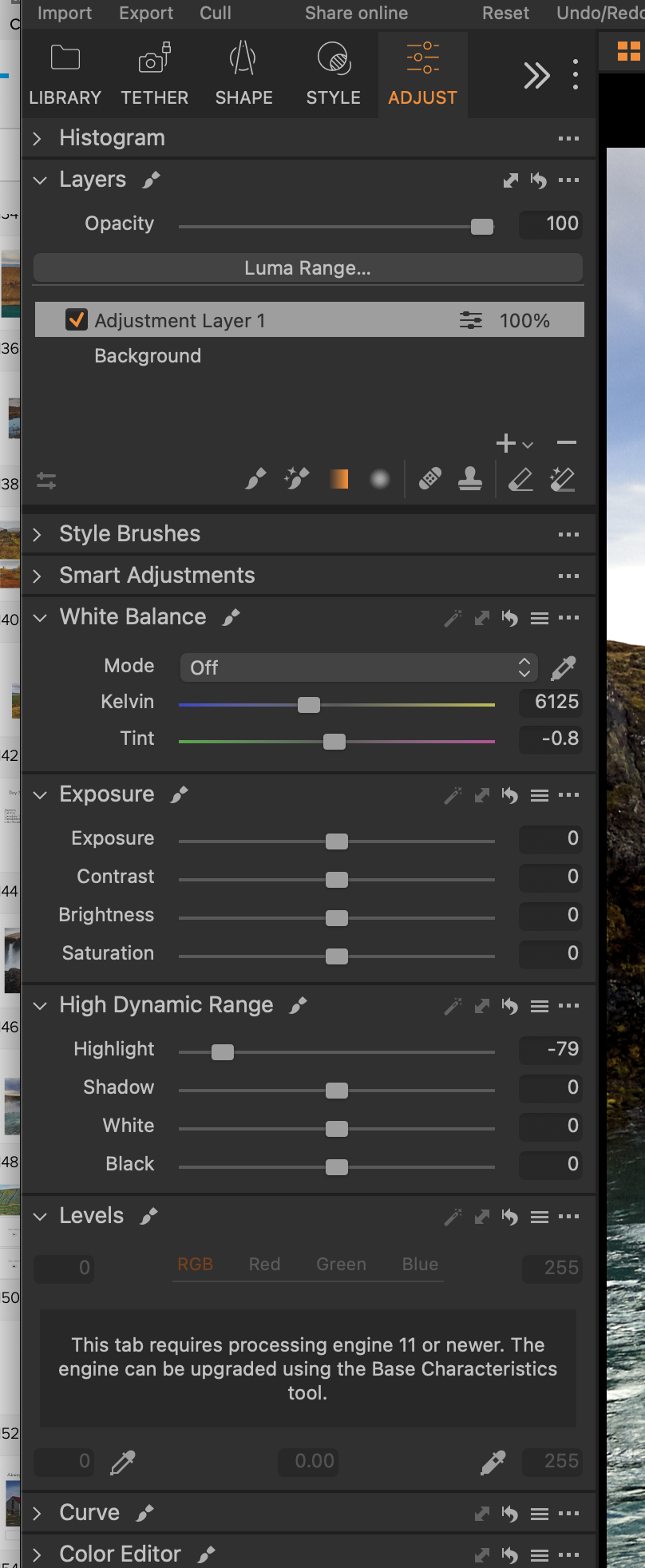
Thank you Ian.When I want to change levels for example, on a gradient adjustment layer, I am told 'the tab requires processing engine 11 or newer', and that I can upgrade the engine using Base Characteristics. This I do, then the levels appear and all is well. But when I am literally working on hundreds of photos, this becomes rather annoying having to repeat the process as you may appreciate.I don’t understand what “processing engine 11” is? Or if it can be “upgraded” permanently. I do have the latest version of Capture 1.Just thought you might be able to explain. Thanks.Jo
 0
0 -
OK, I understand the issue now.
Before version 11 of Capture One, the Levels tool could only be applied to the whole image, on the background layer. The same goes for some other tools. So to use the tool on a layer, like you want to do, requires an update of the processing "engine" applied to that image. (Don't ask me to explain in detail what the "engine" means!)
You can upgrade a whole bunch of images at once.
- Ensure that Edit All Selected Variants is checked on, on the Image menu.
- Select all the images you want to upgrade the engine for.
- Click the Update button in the Base Characteristics tool.
Ian
0 -
Excellent Ian - thanks for your help. Obvious now as are most things when they are pointed out!!
Cheers Graham
0

La publicación no admite más comentarios.
Comentarios
4 comentarios