Rebuilding catalog after HDD crash

Hi, I had a capture one catalogue in Capture one 22 on a windows PC. The files were stored on a NAS and I have backups of the catalogue. The NAS suffered a series of failures (across multiple drives) so unfortunately it failed and had to be rebuilt from backups.
In rebuilding my photo library, I have bought a new PC (with faster local SSD storage that I would like to store my images for working on (much quicker than working from the NAS). I also now have Capture one 23. However, I am really struggling to rebuild/open the catalogue from the backup and 'point' it at the new folder location on the PC.
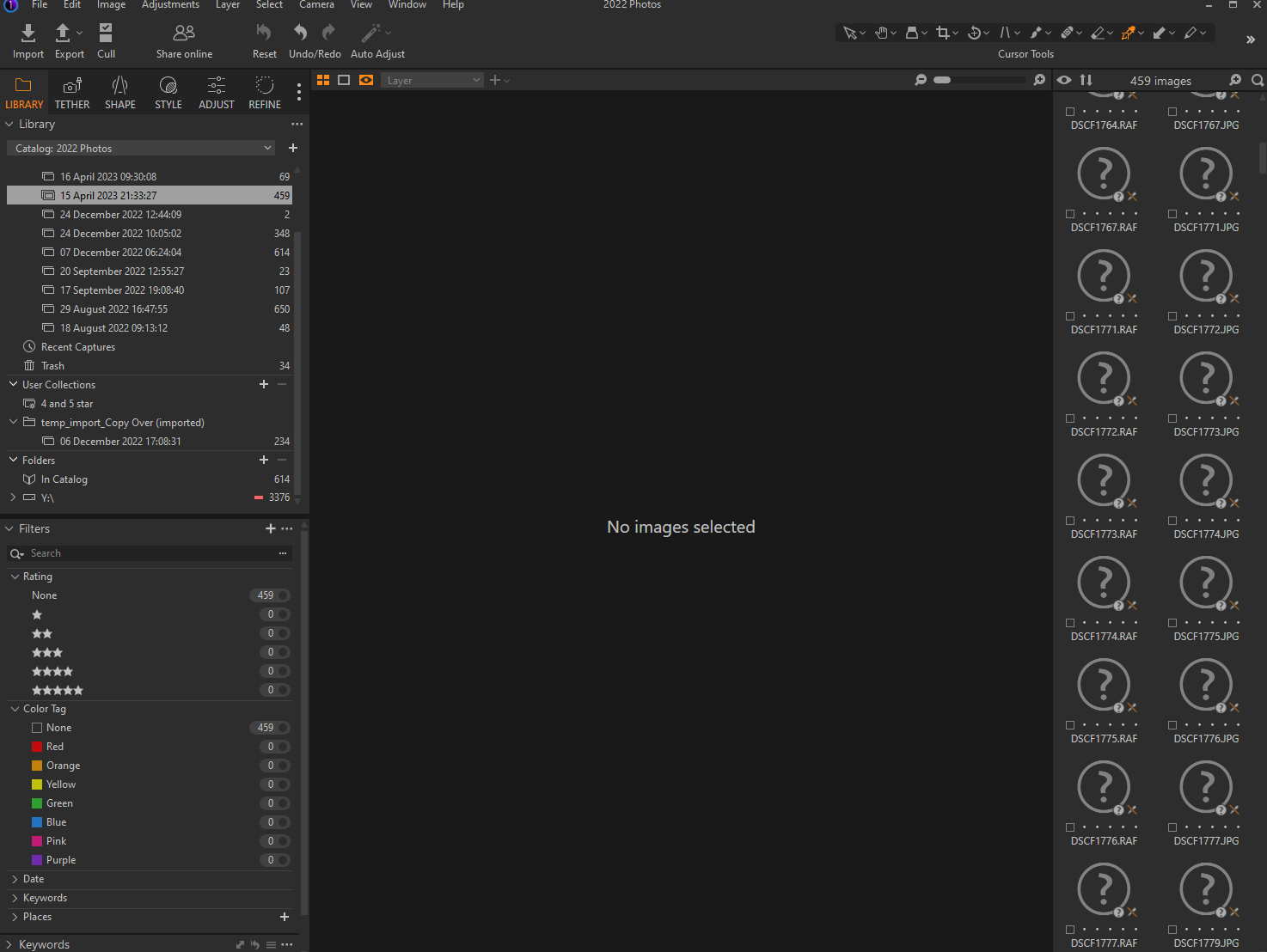
Can you tell me how to do this? I have managed to open the backup catalogue and 'locate' the files (by clicking on 'folders/D/2022 and right clicking on the red '-' sign that was there and locate.). Strangely, if I go to recent imports, those images can be found, but nothing is in Catalogue (All images). Is there a guide to rebuilding a capture one catalogue on different hardware/folder locations? Or I guess importing/moving the edits into a new catalogue would work too...
-
 0
0 -
above is a screen shot of what i have, I can right click on the 'red arrow' to locate the files, but when I do the catalogue still is not the same as I left it (though it seems to find images. Any help would be really appreciated.
0 -
Timothy, can you post a screenshot of the state after you clicked 'red arrow' on drive Y to locate the files?
What came to my mind in addition is that maybe it is better to locate the images (or the new drive) using version 22 and only after that works upgrade to version 23. Too many variables now if you ask me.
Another idea: Does you new PC has multiple drives so that you can give one of them the drive letter "Y" and put your images there? Or can you create a partition (virtual drive) and leave one as C and name the other as Y?
0 -
Thank you both so much!!! Really, really appreciated
@SFA, thanks yes, the 'Y' was the NAS and as a hobby photographer, I don't have many images, so most are in the same folder. I will have to look how some are in the 'catalog' not the 'Y' folder, as I thought I imported all on the the NAS. Is it therefore possible to have files stored in the folder structure of the catalog, and not a different folder?
I could 'locate' the folder (and in which case the red '-' turned green. I could then see the files, but they were listed as 'offline' (top centre of the photo).
@BeO, I think you might be right, in some stages I had ignored the update for 23, and it did a slightly better job when I did upgrade. I do still have 22 so can install this along side.
What I think I will do:
-I will try both suggestions, and particularly BeO's suggestion of going back to 22 first and then SFA's, plus checking I have the images stored in the catalog.
- I none of that works fully, I don't have that many photos (and it is not for work). so I am going to try open up the old catalogue and copy across my 'star' rating, create a blank catalog and reimport everything afresh in 23! I can then redo the edits if I need to, though I have all the exported jpegs I ever printed/shared, so reproducing from RAW isn't too bad (I should be better at this now anyhow).
- Are there any best practises for folder/catalog structures. I am intending to keep both raw files and catalog in the same directory/folder structure now (previously I didn't have space for the raw files on my laptop, but the new PC solved this (write to/from the NAS was painfully slow anyhow)?
0 -
It is probably faster to relocate every single image than to copy metadata (like rating, maybe keywords or capture location etc) and to do redo edits of a subset of images, which can be tedious and not always give you the same result.
I don't know if is best practise but I have a hierarchy basically like this
YYYY
YYYYMMDD event short description
RAW
JPGe.g.
2023
20230000 Diverse shots *)
20230000 Train project ****)
20230500 Street shots May *)
20230719 Birthday party John **)
20220801 Vacation in Spain ***)
`*) note the 00 if the folder spans over several days (or months) unless the date is important in your folder name for you
**) specific event and date
***) The date is the start date of the vacation, I could also have used 20220800 if it is in August or starts in August
****) all my images of trains in 2023 if I had a project photographing trainsSomething along those lines...
1 -
btw, offline image can be achieved by moviing images with Windows Explorer, don't do that. Always move (drag&drop) within C1.
1

La publicación no admite más comentarios.
Comentarios
6 comentarios