Packing as EIP loses all image adjustments?

Hello,
I'm just organising a job to be delivered to a client & taking files as EIP the way I have done for years. For some reason, its removing all of the adjustments I have on there, leaving an unadjusted file when its unpacked.
I'm shooting on a canon R5 & preparing CR3 files as I have always done. Can anyone suggest anything I can try to resolve this?
Thanks!
-
I don't know whether you are working in a catalog or a session. If it's a catalog, you can't do it directly so you have to export originals and c heck the appropriate boxes. Are you sure that the include adjustments option is checked in the export dialog?
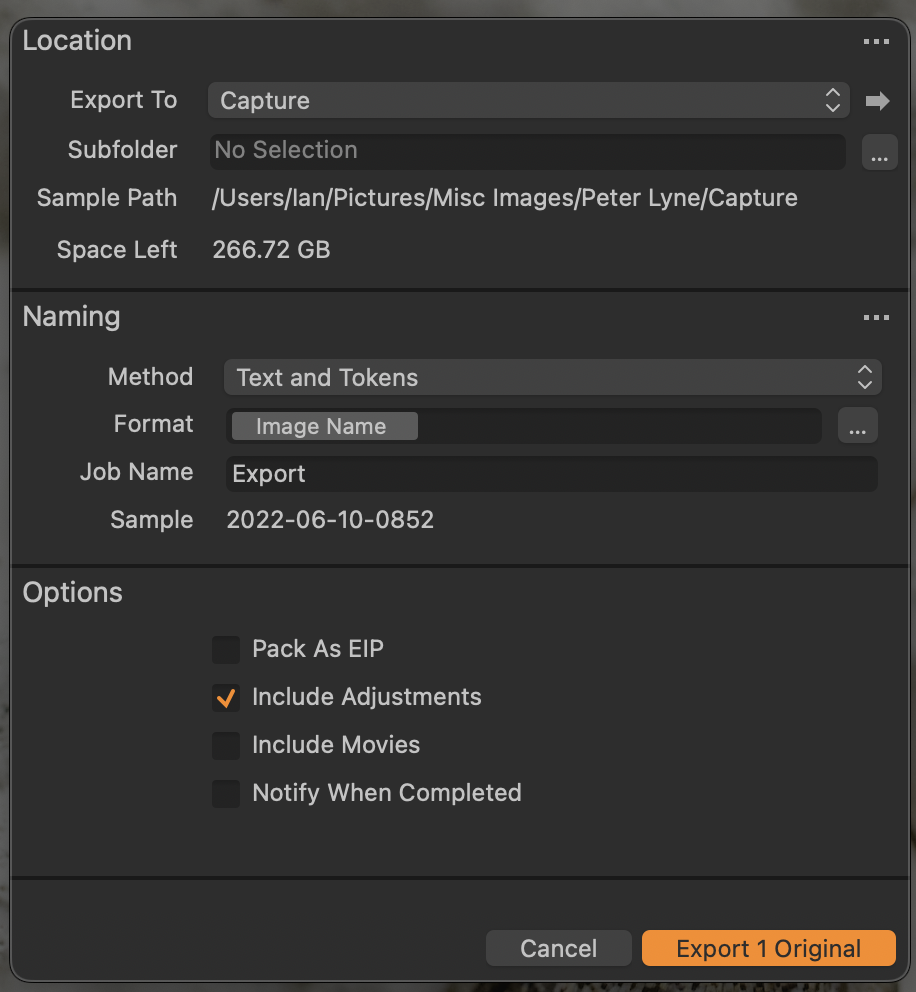
Ian
0 -
Hi Ian
Thanks for your reply.
So I'm working in a session as I always do, with a new session for each job.
The way I normally do this, is to pack the files I want to supply as EIP, separate these into a selects folder & then send this to my client. They then have all of my settings, crops & correction to be able to process at whatever size they need. This normally creates no issue, but for some reason, when I pack as EIP all of the settings are removed & I'm left with a flat, unadjusted raw file.
The work around I have found is to re-apply the EIP settings once they are packed, which works... Strange that the Pack as EIP function seems to be removing the settings. Nothing has changed with my camera & laptop setup & it works on a shoot from last week.
Thanks for highlighting this route, I will give that a try & its super helpful to have a backup option.
Best,
Paul
0

La publicación no admite más comentarios.
Comentarios
2 comentarios