Sessions sub folders “untitled”

Hi, I have watched the live video on sub folders when imparting to a session. I have added a name and token “Protest March (image date)” in the sub folder section of the importer, however after importing the folder is “Untitled”. I’m unsure why this is. Further sub folders are given the name “untitled 1” etc
I have a session called News Images, and in that I want to create sub folders based on the event title and date of image capture. Any ideas please.
-
A screenshot of current import settings would be the most valuable for now, I think. Then C1P and OS versions.
0 -
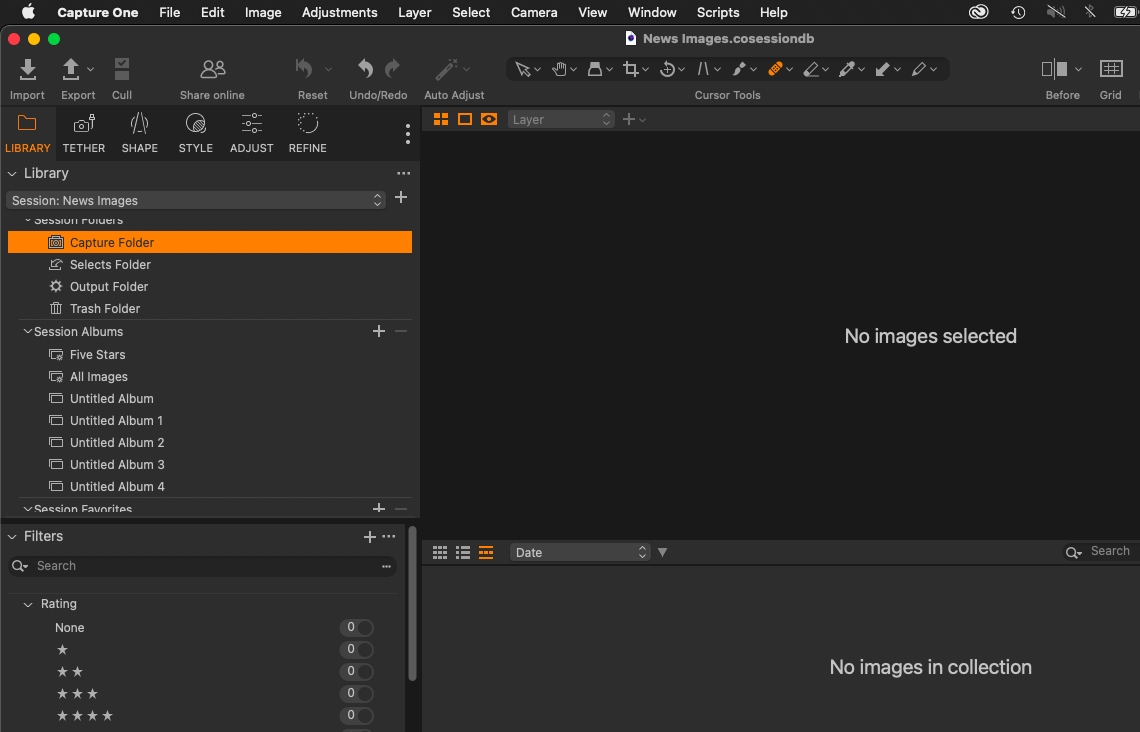
Below is a screenshot of the import settings and the untitled folders in the sessions. Also note that images go into the "Untitled Album" and not the "Capture Folder" which remains empty. This is on a Mac running Big Sur 11.7, and Capture One Pro version 16.3.1.23.
Thanks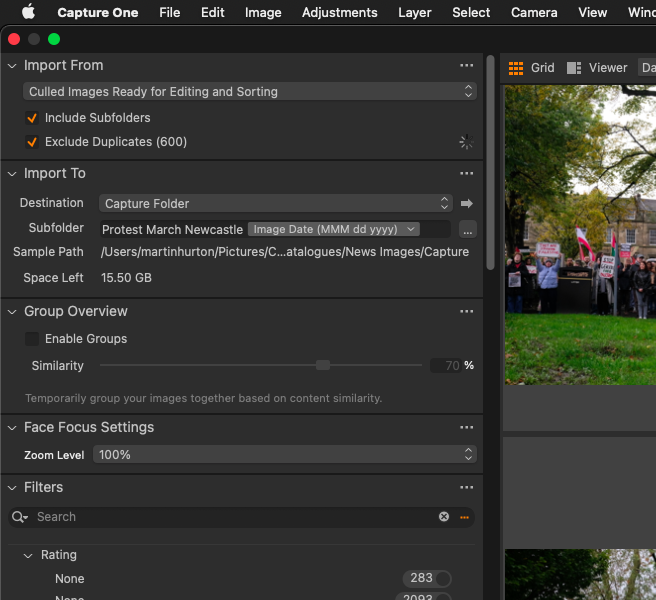
 1
1 -
Getting one problem out of the window: according to https://support.captureone.com/hc/en-us/articles/360002466277-Capture-One-system-requirements-and-OS-support , you have a mismatch and should either upgrade your computer to 12.6 or later, or downgrade Capture One to 16.2.6 or earlier. As a Windows user I don't care that much for compatibility (even though I still have it), but numerous Mac users report crazy stories about even basic things not working.
Check if your Capture folders are not backed up using Cloud, that is a common cause of problems.
If that will not help, maybe add a note about image format (RAW?) and camera, so that others might have an idea on a possible resolution.
0 -
Thanks. I shall see if I can update my OS. I thought my OS updated automatically so so it may be the highest for this computer. I shall take a look.
No idea about the cloud for the Capture folders. I shall do some more research.
1 -
Also be mindful that subfolders of the primary folders (Capture, Selects, Output, Trash) are not visible in Sessions. You have to add these subfolders to the Session Favorites to see them.
1 -
Also be mindful that subfolders of the primary folders (Capture, Selects, Output, Trash) are not visible in Sessions. You have to add these subfolders to the Session Favorites to see them.
Hi Walter,
This is interesting and I think the answer to my problem.
I have clicked on + session favourite and indeed, the folders I have named (name and dated) are in the finder window under the capture folders. So Capture One has created them, it just hasn't shown them within Capture One. Which I expected it to do.
I am not sure why it has created an equal number of untitled albums but that's not much of a concern.
So is there anything I am doing wrong or that can be done, to have these subfolders automatically appear under the Capture Folder (or in session favourites) on import? Or do we have to manually add them everytime?
I am glad it has actually created the folders as this was my biggest concern when using Finder to browse my files/folders outside of Capture One.
Thank you.0 -
Martin,
The folders should appear in Session Favourites (below the Session Albums window) if you created them as part of an import.
The Album naming is a different matter. If you have chosen to create an album from the imported images from a specific folder but have not added your own name for the Album, C1 will issue a name for you, the default being Untitled Album. To avoid duplication subsequent album creations left untitled would be allocated a number automatically.
Might this explain what you are seeing?
SFA - thanks for the reply, I think this ties in with Walter's reply above, in that it has created the folders in my Finder (on the hard drive outside of Capture One) but it hasn't automatically added them to Session Favourites.
I am not sure about the album part, as I didn't want to create an album, just a folder on import based on my title and the date of the image (which it has done n the hard drive but not populated in session favourites).
As albums are virtual and not taking up space on my hard drive I'm happy to ignore those for the moment. Although it is annoying and makes no sense that the Capture Folder is not populated and I have to add the session favourites manually.
Thanks.0 -
Marcin,
I have updated my OS but it won't update to the latest s my Mac is too old I think.
My Capture folder is located under "Pictures" on my Mac, and I think that this is automatically saved to the cloud to optimise space on my hard drive. I am going to have to look into this in more detail, possibly getting an external hard drive for all of my photos, that I can work off just for Capture One.
I shall continue to investigate this as I admit I am a bit lost with all of my files and what is actually where anymore.
Thank you.1


La publicación no admite más comentarios.
Comentarios
8 comentarios