Moving files into different folders (selects, trash, etc.. etc..) has bugged out.

Moving files to the trash folder has been bugging out for me lately, initially it will work halfway, id select all that I want to trash and use the shortcuts or drag and drop it into the trash folder but it only moves a small portion there and when I try it again with the rest of the trash files it shows the notification that its moving the files and the process bar shows its completed but the trash folder will be empty and all the trash files would still be in the capture folder. same thing happens if I drag and drop the files to any other folder too. ive already submitted a bug report but im reaching out the forum just to see if theres anyone else that has this problem or if they've solved it somehow, Housekeeping my disk space is near impossible at the moment.
Cheers!
-
Tell us more. Mac or Windows, and version? Version of Capture One? Session or Catalog? Does it happen with just one particular session or catalog, or all of them - is it OK on a new one? Where are the images stored?
Ian
0 -
Mac 2.4 GHz 8-Core Intel Core i9, Sonoma 14.3.1
Multiple Sessions all behave the same way, I dont personally use Catalogs
I store them on the onboard ssd for current projects and an external hd for the archives before I do housekeeping on them for deep storage
ive just tried the last three versions of CapOne, all behave the same way.
also just tested it on my most recent Session and it behaves a little strangely, some files will move while others won't
Thanks for responding! Cheers!
0 -
What version of Capture One?
0 -
ive tested 16.4.3, 16.4.2, 16.4.1, 16.4.0.48
0 -
I suppose it's worth checking that the session is set up as it should be. If you look in the System Folders section of the Library tool, do the physical session folders all have the icons next to them that they should have, like these?
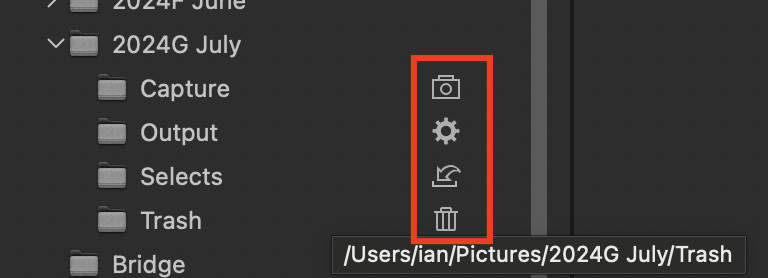
Ian
0 -
yup, all the Sessions folders have those icons next to them
0 -
How many files are you trying to move to trash at once?
And have you checked that Capture One has all the permissions it needs in System Settings >Privacy & Security >Files and Folders (or System Settings >Privacy & Security >Full Disk Access)?
Are you running any virus checker, or any syncing software, that might be snarling up the process?
Ian
0 -
Have you emptied the trash to free space? Do you have other sessions that have trash items that need emptying? Capture One does not use the system trash. It only uses its own trash so files stay around until the trash is emptied.
0 -
I have full disk access selected and yes all my trash folders are empty
0 -

I am having the same problem on my laptop but not on my desktop
0 -
so far my issues have disappeared as of the latest update! update if you haven't!
0


La publicación no admite más comentarios.
Comentarios
11 comentarios