how to apply 1 adjestment only to all photo,not all adjestment.

dear all:
I got a lot photo,different photo got different setting.
I need apply 1 adjestment to all my photo,but I want keep different setting in each photo.
(for example,I want all the photo +0.03 R in Level,but keeping other setting the same.)
is it possible?or I need to +0.03 R by myself in each photo only?
-
You can use the copy button on the particular tool.
For instance this one
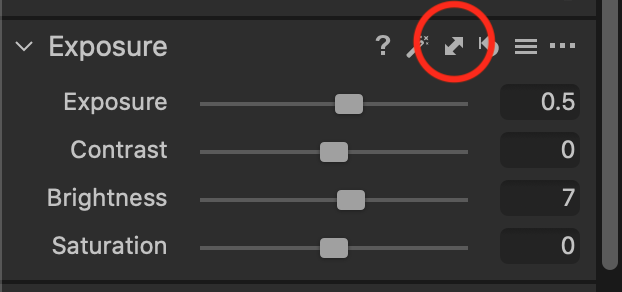
However, that would in my example copy both the 0.5 exposure and the +7 brightness. There is no easy way of copying just the brightness without the exposure, for example.
Ian
0 -

Have a look at the Keyboard Shortcuts that are available for levels. There may be something there that will work for you.
0 -

@Ian3
When you click the double arrow icon you are presented with a selection to choose the values you want to copy. So, you can copy/apply Exposure only and discard Brightness
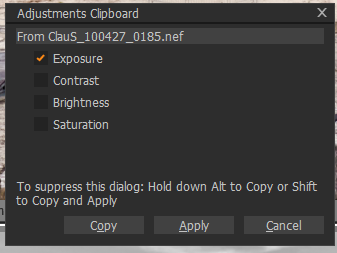 0
0 -
Ah, yes. My mistake. (I usually just hold Shift while I click it, which suppresses the dialog box.)
Ian
0 -
I may be wrong but I think the OP is looking for something to add a fixed amount of adjustment (0.03) to all existing values as previously adjusted rather than set a new value for all images (which I what I thing copy and paste would do, right?)
The shortcut key option, as I understand it, allows the "add this amount of adjustment to existing values" option but whether the amount of adjustment is what the OP is seeking I am not sure.
The OP asks for +/- .03R for example.
The Shortcut method seems to suggest it offers +/- 1 change or +/- 0.00390625 in the mid tones.
I will leave it to those who have a need for such an adjustment to investigate to see what it does. It may be the same adjustment value just expressed in a different way?
Grant
0

La publicación no admite más comentarios.
Comentarios
5 comentarios