Sony A6400 tethering issue

Hi everybody,
The A6400 looks and operates fine in Liveview but when I take the shot all I see is a completely blown out image - just almost pure white. The image actually shows correctly for a fraction of a second and then goes totally crazy. I shoot RAW. When I have switched to JPG for a test it works. All my settings are pretty standard for stills.
I also have the A6000 shooting in RAW and no problem at all!
Hope somebody may have have some feedback and help. Thanks!
-

What exposure values are you seeing for the file?
What mode is the camera using?
Is your Live View compensating in any way for ambient light levels?
0 -
Hi SFA,
Thank you for your reply!
The exposure file values reflect the setting in the camera. Capute One does not affect those. JPG's look fine, problem is just when in RAW.
I am in Manual mode, basic "still" Sony photo profile,
Liveview mirrors the exposure correctly so far. Everything looks good. It just after the shot. What I get is a blown out mess. The A6000 in RAW works well. I have this issue just with the A64000
0 -
OK.
I don't have Sony so there may ba some differences in what is available in tethering. And from camera model to camera model.
However the next things to check would be the Values for "Next Capture Adjustments" and "Camera Settings".
For example are there any settings in camera that are making the internally processed jpg look significantly different to the interpreted RAW file.
Were you using any in camera options that are not supported in C1?
If you open the RAW file in another application's viewer what does it look like?
Check the C1 "Exposure Evaluation" tool. How does the histogram look? What is the tool's assessment of the exposure of the RAW file data?
Are any of the C1 tools set as defaults for the camera when editing and possibly affecting the presentation of the RAW interpretation as loaded?
Are you using a Output Recipe? Are you viewing with Proofing turned on?
So many questions but then there are a number of things to check as a way to narrow down the potential problems.
I am assuming you always see this reault with that camera and have tried basic things like restarting C1 and perhaps as far as rebooting the computer?
0 -
Hi SFA,
Thanks again, all good points.
Sony A6400 RAW is set on "profile off", there is no customization. It is exactly as the A6000 codec. It is as basic as it can be.
The Camera Setting reflects the settings of the camera. The exposure looks fine in Liveview and matches the LCD display on the A6400. I don't notice anything weird at this stage. I've tried to disable DRO - which was in Auto - but not change.
Camera Adjustments are all in default - no Style applied. Also the Tools are default, there is no adjustment applied to the file.
The Histograms of the file is indeed all pushed on the highlights - there is nothing else. It is like snow.
All the Tools are flat. Camera profile is correct. Again, when i swap on the fly to the A6000 - same Sony RAW - the file looks just fine! Also shooting with a Nikon D810 and D700 and no problem as well.
I am just looking at the files in the Viewer and Browser. No Proofing.
Yes, good one! the RAW looks fine when I export Original and it opens correctly in other application - Affinity Photo.
If I am dragging the file back in Capture One it goes nuts again.I did clean up the Capture One Core Sony A6400 folder and my computer cache, no effect. I have also just updated Capture One to 13.1.1. 24. Nada. Periodic maintenance and rebooting - checked.
As the RAW files are actually fine it seems like it is just the way Capture One shows them...The A6000 and all other cameras do well tough. It just does this to the A6400 RAW
Thanks again!
0 -
That sounds really strange.
It still suggests to me that for some reason not yet identified the interpretation is being changed to make it over exposed by something somewhere in the process pipeline.
If you change the profile to A6000 in the Base Characteristics it looks OK? (I think that is what you were describing ...)
If so it sort of suggests that the ICC profile associated with the A6400 might be "bad" in some way - or that some other part of that stage of the process is throwing out some bad numbers.
Is it all the A6400 RAW files you shoot? Or just some of them?
If you set the Copy to Clipboard option to "Select Adjusted" and then copy are any of the settings selected?
Have you tried regenerating the preview and thumbnails? A long shot but there has to be something going in the interpretation process so it's a matter of discovering what that thing is. And why it is specific to the A6400.
It might well be worth asking the C1 Support Team for suggestions if you have not already done so.
Use the "Submit a request" option.
https://support.captureone.com/hc/en-us/requests/new
0 -
Yes, narrowing down to the decoding in Capture One or maybe that camera feed.
Nothing changes switching to A6000 in Base Characteristics, still overexposed.
Yes, anything RAW out of this A6400 gets that treatment.
Not sure about those last two but I will contact C1 support, hopefully they can help.
Really appreciate your time and help! i will keep you posted if you like.
Thank you!
0 -
Giovanni,
This is a rather long shot for the problem as described but I guess it has to be tried.
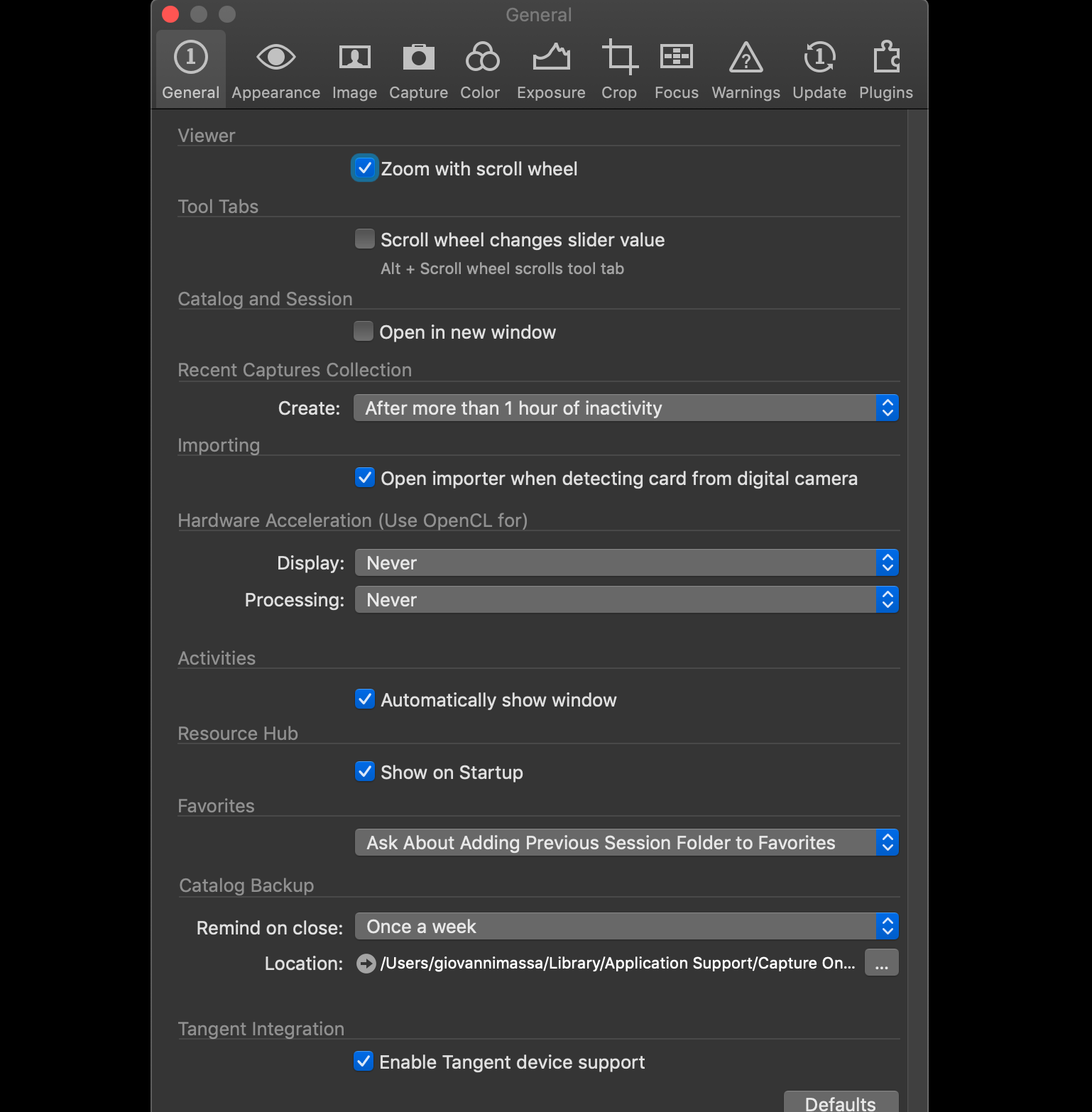
Turn off the Hardware Acceleration in the preferences (assuming it is turned on!) and then see what happens.
What you have described is not painting a picture of a typical GPU associated glitch BUT it might be a factor as it's in the chain if processing is active and so it needs testing - which only takes a minute or so.
0 -
Ok, I've tried - like this? please see pic. No changes.
 0
0 -
Yep, like that.
One more thing checked and seemingly can be eliminated.
Lets go back to the Base Characteristics tool.
Did I understand correctly that if you change just the ICC profile in that tool you see an image that is displayed with pretty much the correct appearance? But go back to A6400 and it shows as as blown out once again?
0 -
Hi,
No, if I change the ICC profile on the Sony A6400 Raw to A6000 ICC profile, or anything else for that matters there are no changes.It sill overexposed.
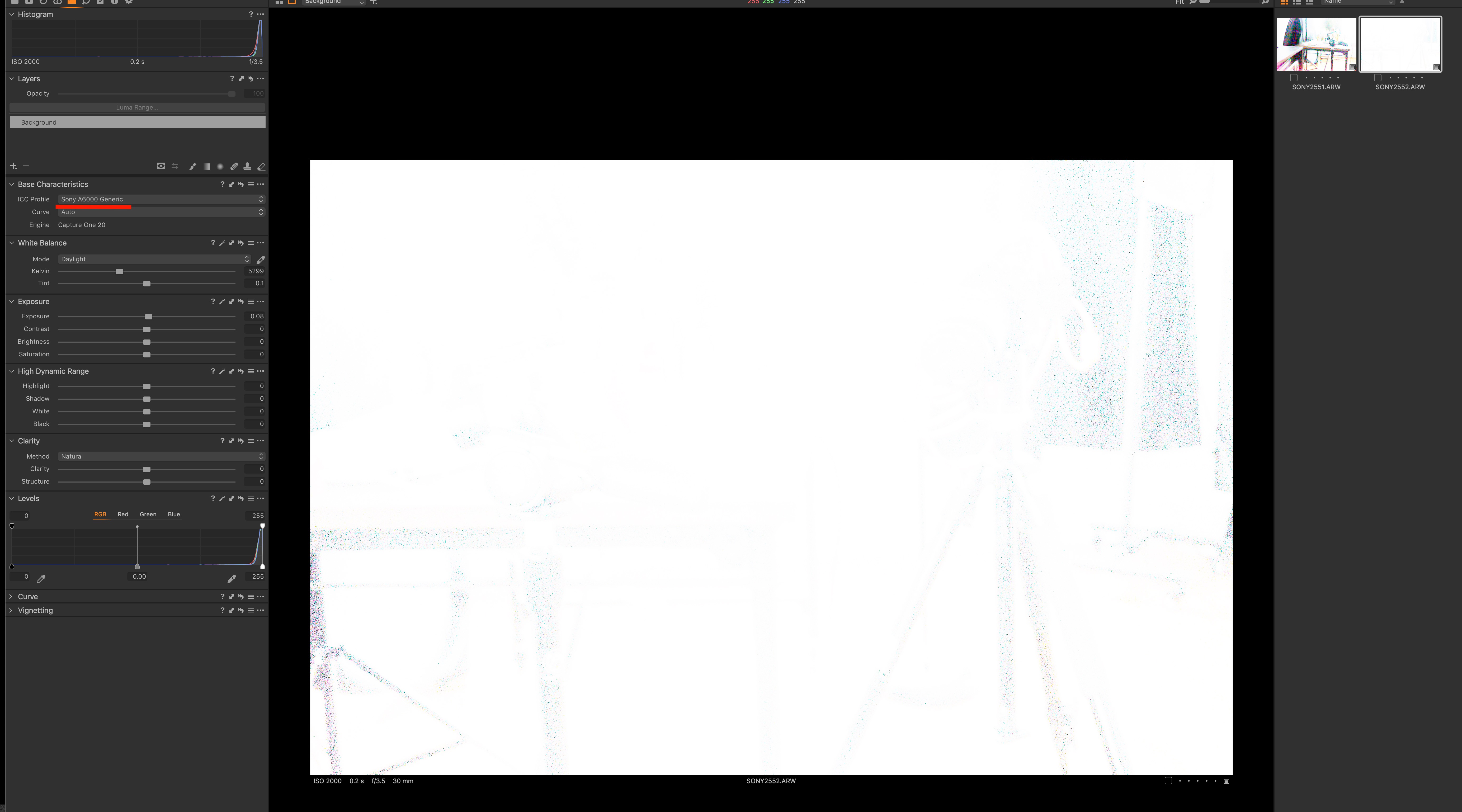
I did contact C1 support. Ler;s see what they say
0 -
Giovanni,
One other thought occurs to me for this strange behaviour but its a camera feature that I don't have on my Canons (or if I do I have never experimented with it) and it relates to seeing an enhanced image (I think in poor light conditions) on a mirrorless camera with no lens wide open option, just always stopped down.
From memory of other reports this can make the Live view (i.e. normal mode for a mirrorless camera) brighter in dark conditions to aid framing, etc. and the settings are applied to the in camera jpg and therefore also the regular "preview" embedded jpg in the RAW file. But they will no be applied to the RAW itself. As I remember things (probably wrongly) this leads to a dark RAW output but I guess there is no reason it could not also lead to light RAW output as well?
I'm way out of my hands on experience range with this but a quick look at the A6400 User Guide suggests that AUTO HDR could have a similar sort of effect to what I an trying to describe. Not sure if it can be deployed in Manual mode.
In addition there is something called D-Range Optimiser that looks slightly suspicious in terms of the description of what it sets out to do
I'm probably a long way of target again but could either of these in-camera tools somehow come into play here and provide a way for RAW files and the out of camera jpgs (actual and the embedded preview files in the RAW file) to appear as completely different in C1?
0 -
Just zoomed in to your screen shot.
ISO 2000 and .2 of a second at f3.5 in what looks like a well lit area (is the first thumbnail representative? Too small to see in detail) looks a bit ambitious.
You could hit the Auto adjustments option for Exposure and Levels to see what happens.
The Histogram suggests C1 "sees" the RAW image as very overexposed.
0 -
Hi SFA,
It does not matter what exposure settings, the picture is always showing overexposed.
That shot was taken last night just to show a sample of the Camera profile and the white image and did not care for the pic itself. Please keep in mind that the actual RAW files are fine when out of C1 or in camera, as we discovered.
The Sony A6000 shoots with exactly the same settings and there are no problems.
Auto HDR is off and if that would create a problem it would show up on camera file or in the C1 file.
Auto Adjust does no do much. The Histogram reflects the picture in the viewer so yes it is correct.thank you!
0 -
Very strange.
The RAW opened in a viewer may be showing the embedded jpg but if you have opened it for RAW conversion in another editor and it looks as expected that would be odd.
If the Exposure Evaluation tool Histogram shows the same as the others then there is certainly something odd in the initial interpretation.
If you can share a file through a sharing service I will take a look to see what my system does with it. That's the last thing I can think of to try to pin down the nature of the problem.
Either way I think you need to pursue this with the C1 support team!
0 -
Hi SFA,
Thank you for your attention and dedication to troubleshoot this issue. I appreciate you sharing your expertise in C1.
You are definitely a big asset to this board. The Sony RAW files don't show up properly in C1 but they are actually fine.
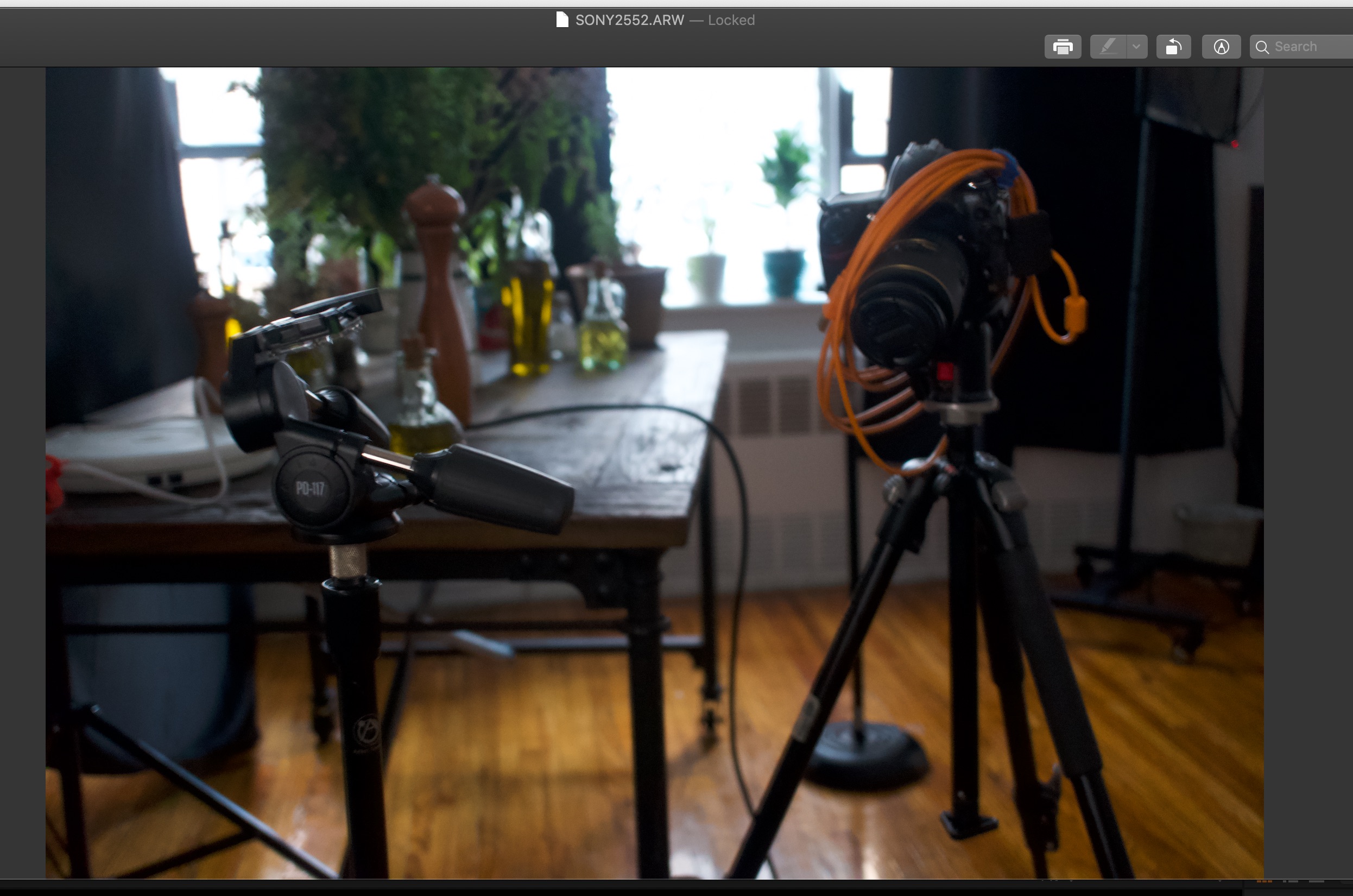
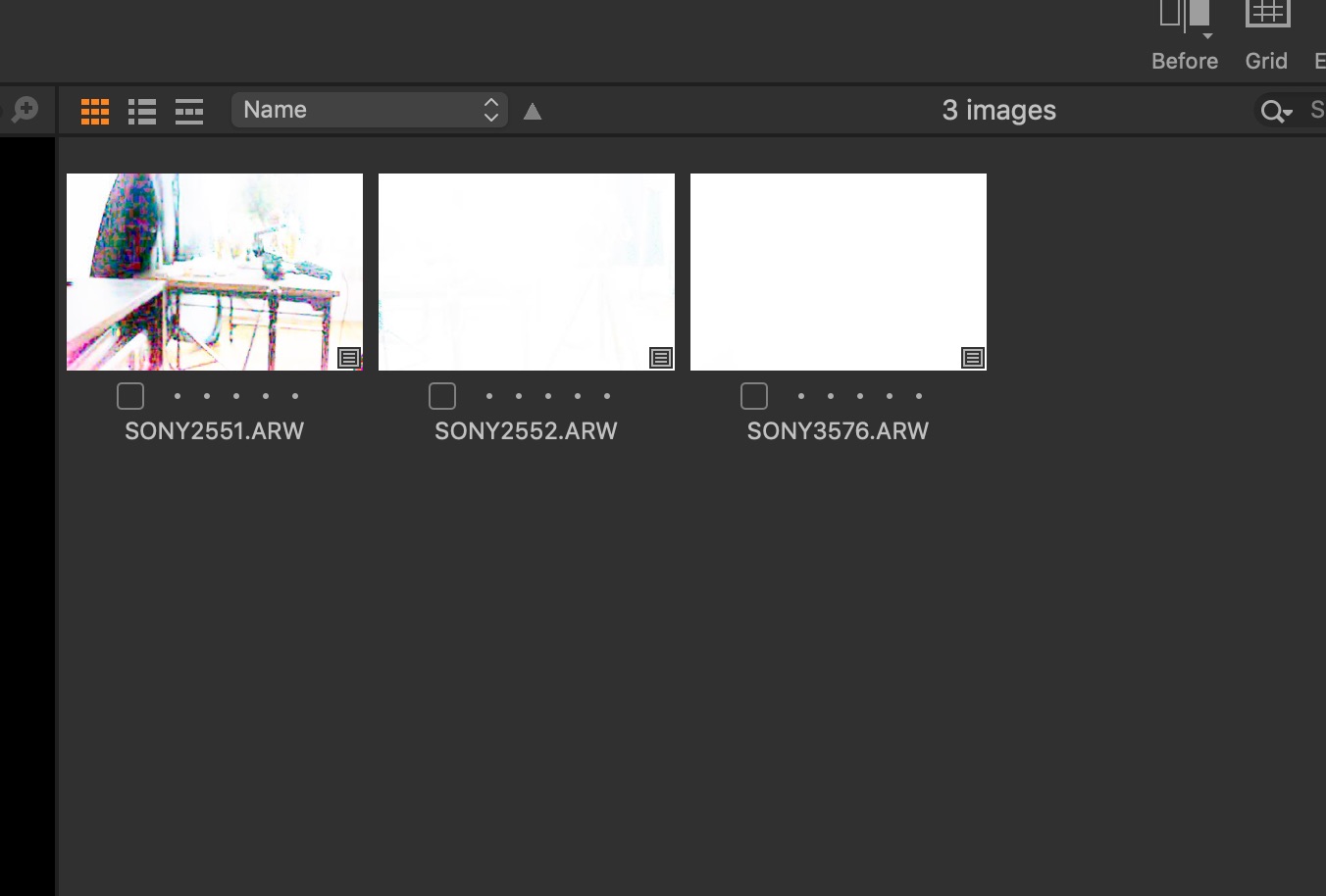
Shot of RAW files as they appear in the C1 browser and actually one the pic exported Originals, opened in Preview.
Please again disregard quality and ridiculous exposure settings. I did not put much into it. I am just "focusing" on the issue.C1 support is on the case. I will follow up with you.
Ciao!
 0
0
La publicación no admite más comentarios.
Comentarios
15 comentarios