Capture One and Affinity Photo files won't load.

After exporting photos to affinity photo as a tiff. file everything works fine. However once the edit within affinity photo is completed and the file is saved and "exported" back to capture one, nothing loads. The file that was worked on within affinity photo never gets generated in c1 20.
-
Are you working in a session or a catalog? If it's a catalog, have you tried synchronising the folder the TIFF is in? Also, when you have finished in Affinity, what are you doing? Just saving the TIFF, or re-exporting it?
Ian
0 -

I had a similar problem. When I am finished with Affinity, if I just quit and tell Affinity to save the image the image is not imported back to CO. If I save first then quit the image is imported to CO.
0 -

C1 will be aware of the first TIFF it created.
If you save the external edits back to that file (flattened only as I recall) C1 will still be aware of it.
If you save the file as a new file C1 will need to "discover" it either by synching (as Ian proposed) or perhaps importing just that image or, for a session, forcing a read activity on the folder from within the session. (That can be a achieved in a number of ways.)
The "round trip" concept is based on Saving the external edits back to the same file but if you prefer creating a new image file an extra step to let Cq know what your intentions are will be required.
0 -
When in capture one I have been using sessions and not the catalogue. I've tried two separate methods saving in affinity without consistent results.
The first method I would close the program and select the "save with layers" option. I would then go back into C1 and wait for the export to load. On some occasions, it would load after several minutes, and others it doesn't load at all.
The second method was similar to the first, but instead, in affinity, I saved the photo, selected "save with layers" but instead I kept affinity open. This gave similar results except I had the option to make further edits in affinity and save to have the results appear in C1.
Overall I'm experiencing my tiff. varients not loading into capture one consistently. Sometimes the photos appear and other times they never load.
0 -
I checked to be sure my recollection was correct, and this is what happens for me (with a session).
- Select the image in Capture One.
- Right-click it in the browser, and choose Edit with... Affinity Photo. (Or choose Edit with from the Image menu). I chose TIFF for the format.
- The TIFF is created and appears in the browser in Capture One.
- Affinity Photo opens and loads the image.
- Do my work in Affinity Photo (in this case cloning out something, using an added pixel layer to make it non-destructive).
- Choose Save in Affinity Photo, which gives me a dialog box including the option to save with layers, which I choose.
- Back in Capture One, after a few seconds, the TIFF in the Capture One browser updates to reflect the changes I made in Affinity. If it didn't update, I would ensure that the image in question was selected in the browser and then go for Regenerate Previews.
- Close Affinity Photo.
By the way, if I want to go back into Affinity to do more work on the layered TIFF, I would use Open with ... next time (not Edit with...) as I would be opening the TIFF, not preparing a new TIFF to edit in Affinity. It should make no difference whether I had closed Affinity or not.
EDITED to add another thought... Are you sure you are using Save in Affinity, not Save As? If you use Save As, it will save a .afphoto file, which won't show up in Capture One, because Capture One doesn't support .afphoto files. (I and others hope that one day it will.)
Ian
0 -
Thanks for the quick response!
Unfortunately, that is the same as my first method, yet the tiff. files do not appear within my sessions albums at all.
I've selected save with layers each time. I'm not sure where my tiff goes but it doesn't actually appear within C1. I have been able to locate the file in the folder in which the session is located in, so I know the photo is being exported by AP. The fault is with C1 because the tiff. exists but it doesn't appear within my session.
The tiff. doesnt appear below the original photo as a variant should, its as if I hadn't done a thing. There is no option to regenerate a preview when the actual file is not there.
0 -
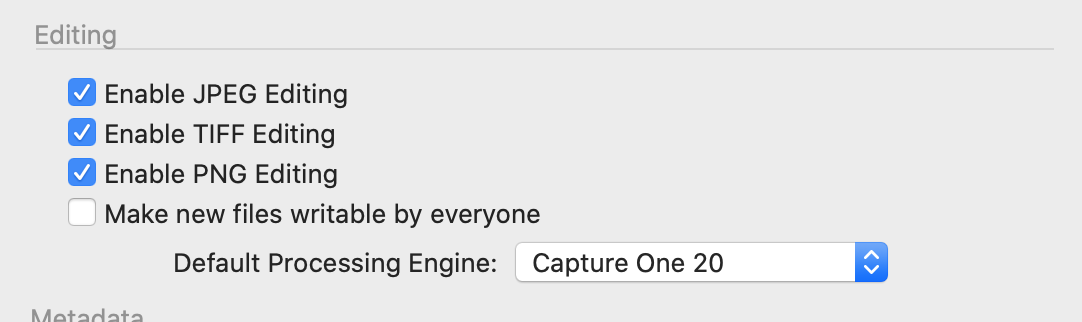
So are you sure that TIFF editing is enabled in the Image section of Preferences, like this.
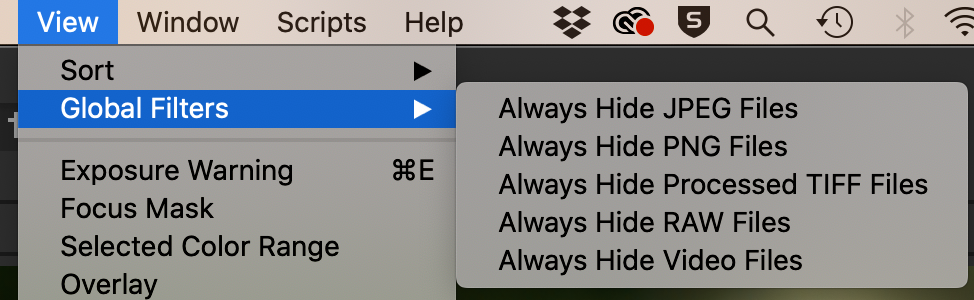
... and are you sure that on the View menu, under Global Filters, it isn't set to hide TIFFs?
Ian
0 -
Yes, I have the same settings as those. I currently have tiff files that have managed to export back into C1 for the same session.
The main issue is that if I edit with affinity photo there is a chance that a tiff file will not be displayed in my session albums. There are times when this process works however for the most part the tiff file either takes a significant amount of time to appear, or no file appears at all.
C1 seems to be lagging to display the images. The reason I say this is because on numerous occasions I've edited the same photo multiple times in AP because the tiff did not generate in C1 and I had thought I must have made a mistake. None of the exports would generate in C1, but when I would finally get a tiff export to show up within C1, I would notice that all the previous edits would suddenly be there as well. So all the previous exports were not being displayed for whatever reason.
0 -
I see that you refer to C1 albums. Do you mean that (not folders)? If you create an album with some raw files in it, I am not sure that Capture One would add the TIFF you generated to that album. If you had a smart album (say all 3-star images) and the TIFF also gained 3 stars, you would hope to see it in the smart album. too
But if you are looking in the actual folder, not an album, I would expect the TIFF to show up - except that sometimes (not recently) I have had issues with C1 not updating the contents of folders, often solved by moving to another folder (perhaps from Selects to Capture) and back again, which seemed to force it to have another look.
Ian
0 -
Funny you say that because I also have a smart folder just for tiff. exports and also another for 5 star and red label.
I found that clicking into the selects folder (just like you mentioned) have managed to get the files to load one by one. So I'm unsure whether it's entended on performing that way, but I am grateful for a solution.
Thanks for the help.
0

La publicación no admite más comentarios.
Comentarios
10 comentarios