Output Location tab - Destination - I can not reset to default

I'm using latest Capture One 20 13.1.2.37. and Sessions and in my Output Location tab the 'Destination' is stuck on a folder I created and won't change. (It is stuck itself to all my different Process Recipes)
The reset button doesn't reset.
I need processed files to go to their respective Output Folders for each session as they use to, is there and answer to this problem?
Thanks
-

It is the "Output Location Toll" that you may place under any tab
of your choice.- Click the three dot (tool options) and reset. This will clear
the actual destinations except Desktop.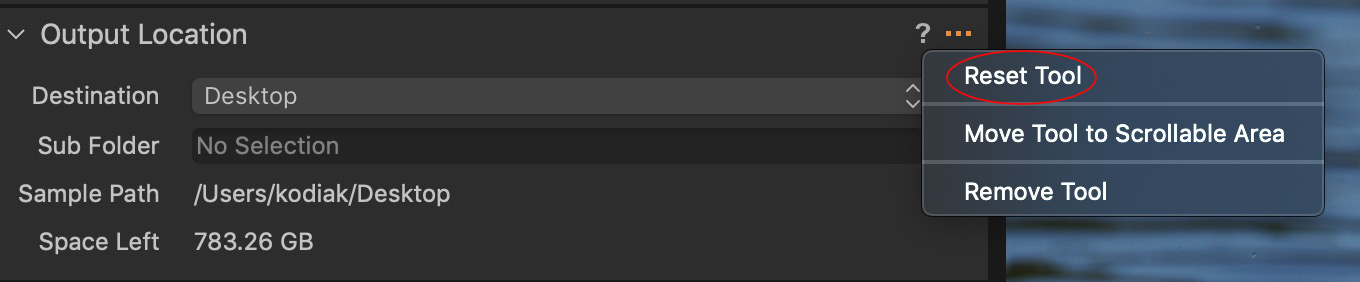
- Choose the destinations you need and they will add to the
list in the "Destination" drop down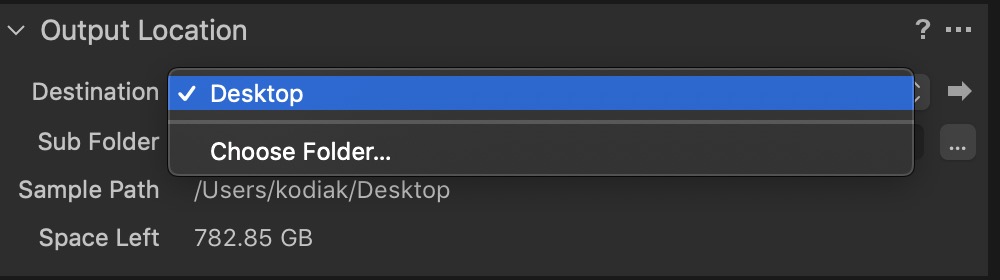
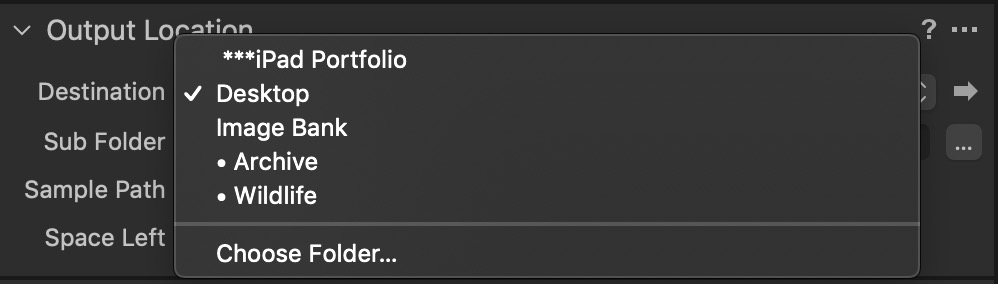
HTH
0 - Click the three dot (tool options) and reset. This will clear
-
Sorry - I did not explain it correctly, I know where the Rest Tool is - but clicking it does not work, it does not reset.
I also know how to set the destination, but I need the default setting which will automatically send processed images to the 'Output' folder of the Session I'm working on.
If I have to constantly change the output folder when working on different jobs simultaneously it hampers the workflow and the default setting was perfect!
0 -
— Sorry - I did not explain it correctly…
You did, Paula… I believe I misunderstood you and got it wrong, sorry!0 -

Hey Paula I figured it out I was having the same problem. When you export from your selected images, when the dialog box comes up, you've got your "export location" export naming" and 'export recipe" fields. Change export location to "session output folder" which I'm sure you already have. THEN, go to the file tab under export recipe and change the root folder to "output location". Hope that solves it and I apologize in advance if that was a little confusing. haha
0
La publicación no admite más comentarios.
Comentarios
4 comentarios