Problems with Capture One and Nik Collection

Changes I make into Nik filters do not appear later in Capture One 20. I open the filter using "Edit with"...-

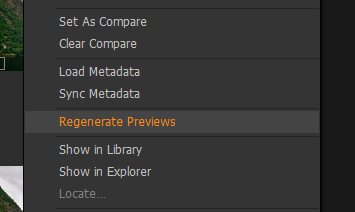
I presume the file is there, just the changes are not represented in the thumbnail? I think read somewhere that when showing a file to Fit screen, C1 uses the preview file, but when zooming, for example to 100% then C1 then uses the image file itself to generate the screen view. Try zooming and see if the changed from Nik are shown. If so then it looks like the preview is not being updated. I am not sure if C1 automatically regenerates previews once the file is zooms or only when changes are made in C1. You could try regenerate previews.
 0
0 -

Alvaro,
If you use an external program you would have created a new file of some sort - perhaps a tiff file? - for that program to use for the edits. Capture One will know the file exists.
You would then "save" that file, flattened if necessary, and C1 should be able to see it complete with the edits embedded in it. If it does not look any different you could try regenerating the preview.
If you use "save as" you will have another version of the file that you would need to view to see the Nik edits. A "save as" created file may need to be "imported" to become visible to a Catalog or the folder might need to be re-read for content discovery before the new file will become known to a session.
0
La publicación no admite más comentarios.
Comentarios
2 comentarios