how do i merge 2 catalogs?

I'm in the process of migrating from Aperture, and creating a managed library in CO 21 Pro.
I've migrated in 2 stages so far, and have ended up with 2 catalogs. I want to combine these, making one catalog (called 'former Aperture libraries') and then make sure future imports from Aperture go into this single catalog as well. Can someone tell me how to do this?
-
Let's say that two catalogs are A and B.
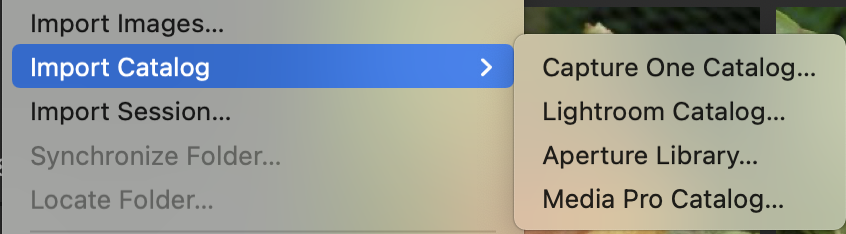
You can open catalog A, then on the File menu go to Import Catalog... choose Capture One catalog, and select catalog B to be imported.
Ian
 0
0 -
thanks Ian - really helpful > i'm still very new to CO, and was expecting to find a way to drag and drop. Now I've merged the 2 catalogs, can i now delete the catalog (B) I've just imported 1) in the catalog menu, and 2) the '.cocatalogdb' file?
0 -
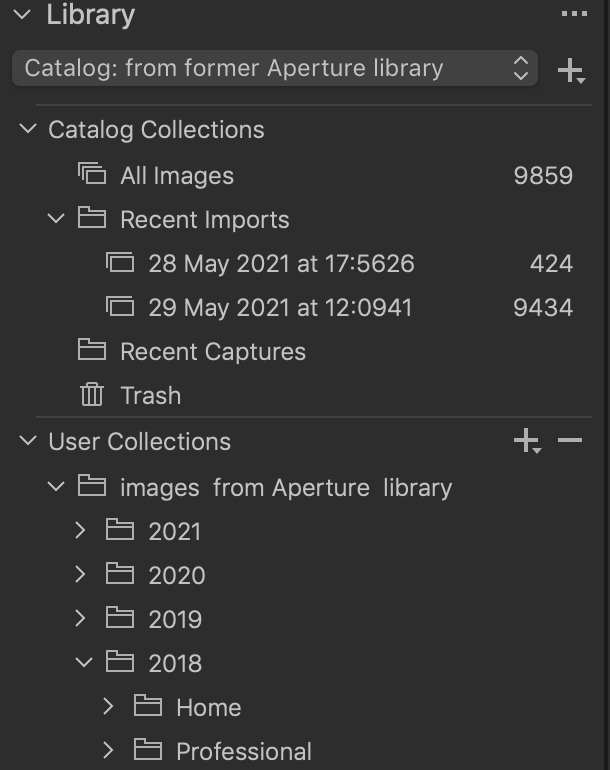 i've just discovered that the newly added (i.e. merged) user collection (2018) has no images, even though the hierarchy is complete. They're still in the folder structure of the original 'B' catalog. What do I need to do to fix this?0
 -

First, I’d strongly encourage you to change to a referenced library. In the long term I think you’ll save yourself a world of hurt. It’s important to understand that in managed libraries (both Aperture and C1), your original files are stored inside a package (a special kind of folder). Each managed C1 and Aperture library contains whatever originals were originally stored in it AND they can’t look into other managed libraries.
With Referenced libraries, your image files reside in a regular folder structure that any app can see into. Thus, Aperture and C1 could both reference the same set of folders for their respective catalogs.
It’s extremely easy to convert from managed to referenced. Do this in C1 and NOT in Aperture, because if I remember correctly, Aperture’s integration with macOS will automatically update image locations, whereas Capture One is only aware of file moves that are done within Capture one. This is really important to remember: NEVER move files directly in Finder or you’ll have to tell C1 to Locate them later. Moving them only in C1 works great.
You mentioned future Aperture imports. It’s OK to continue importing in Aperture, but then you’ll have to open Capture One and tell it that you’ve imported something in Aperture. One way to do this is to have Aperture always import into one folder, say “New Images”. After that import’s done, open C1 and tell it to Synchronize the New Images folder. This will update C1’s catalog with your images, but of course won’t import Aperture adjustments or metadata (unless you told Aperture to embed the IPTC metadata into the original file).
Unless you have a very good reason for using Aperture’s import dialog over C1’s, I’d suggest that you forget Aperture going forward and concentrate on proficiency with C1’s importer. It’s not as nice as Aperture’s, but it works. Also, some day Aperture will stop working for you, either because an OS update killed it, or you bought a new camera that Aperture doesn’t understand. Example: Aperture doesn’t understand Canon .CR3 files.
0 -

Sadly, Aperture does not operate on Big Sur, so that day has come. I abandoned Aperture after I moved to Capture One 8 and would also advise putting Aperture on the shelf, whittle humming the theme from "The Way We Were."
I still miss the speed and asset management of Aperture, but the power of newer computers has allowed Capture One to perform acceptably well. Part of the problem in comparing Aperture to Capture One is the size of images to be processed has vastly increased so my Aperture library of 20,000 lower resolution images cannon be compared meaningfully with my Capture One catalog with over 60,000 images at 2-4 times the resolution.
0 -
if you look again at my original query, you'll see that i'm in the process of migrating from Aperture > Capture One...
0 -
Indeed. I admit to waxing sentimental about Aperture and opining about the difficulties of making a head to head comparison with Capture One, which is in its 7th version since Apple abandoned Aperture. Mostly, I was reinforcing Abbot's suggestion about removing Aperture from your workflow.
My point is, I would not incorporate any part of Aperture in your workflow, as it has not just been deprecated with respect to MacOS 11, it is now completely incompatible. To use it in your workflow, you would be restricted to OS 10.
Good luck in importing your Library.
0

La publicación no admite más comentarios.
Comentarios
7 comentarios