Can we get the frequency of the focal lengths we used?

Hello Capturers! (just made this up)
I am a new user - for Fuji and using the free EXPRESS version. I wonder which focal length I use the most frequently - so from each photo taken we've got the focal length used - so, OVERALL, is that possible to get the distribution (frequency) of the focal lengths used?
Say, for all pictures in the Capture One library - or more accurately for all the pictures I took with a specific lens? (in that case my 16-55mm f2.8)
If not, is there a way to work it out?
Cheers
Erwan
-
You can use the Filters tool. For instance...
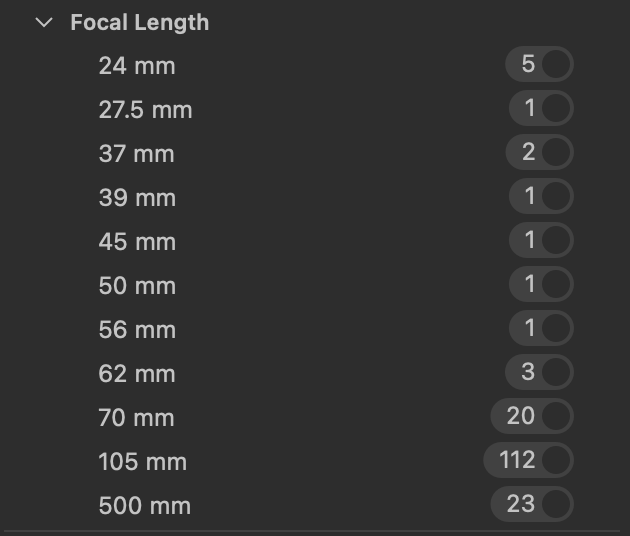
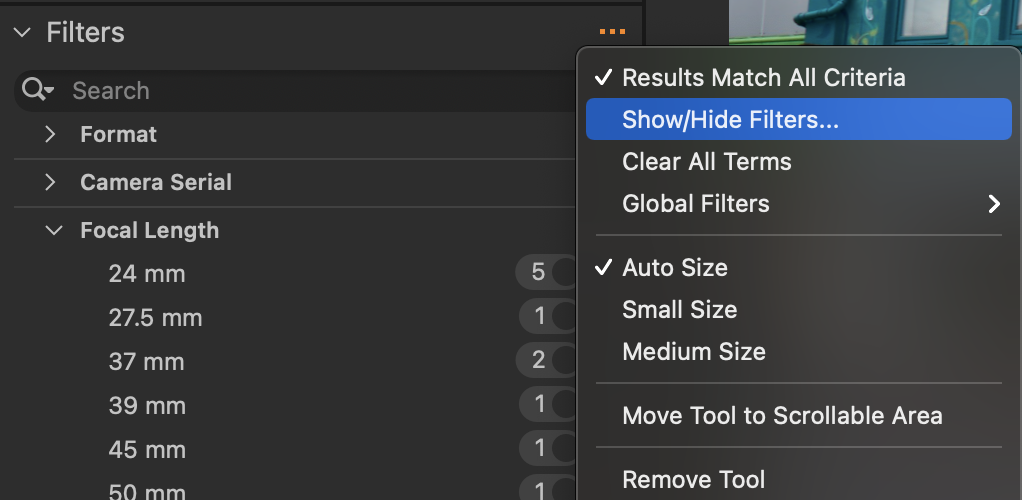
You probably don't have Focal Length set as one of your filters, but you can choose to have it by clicking the ... button on the Filters tool, then choosing Show/Hide filters.
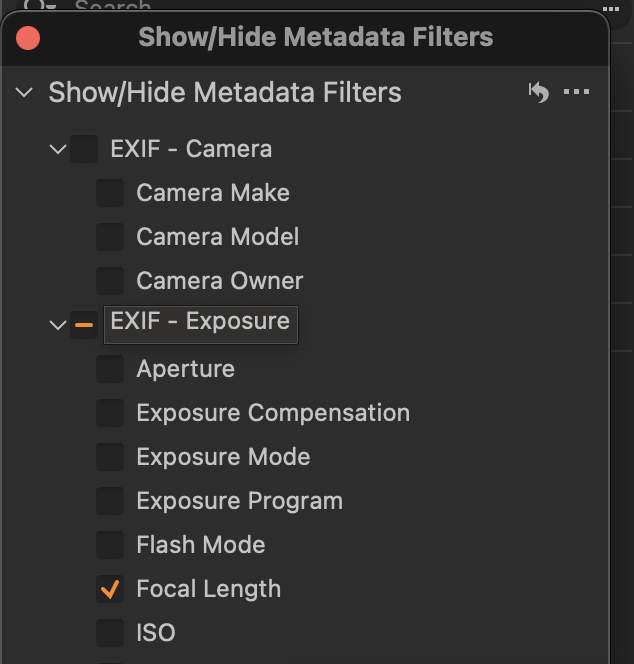
Focal length is one of the options you can choose to have displayed.
Ian
1 -
Thanks Ian! very interesting.
I have a sort option in my EXPRESS version I just activated yesterday - but not sure about the filters tool... It might not be something available in EXPRESS?
Is there a functionality to EXPORT the METADATA attached to each picture? ( all the data around lens, focal length, f stop, ISO etc... for each picture)
I almost want to analyse that metadata to find what my style is - to kinda see what this metadata got to say! I am very curious.
Let me know if I am missing something - thanks a lot!
Erwan
0 -
The article here https://support.captureone.com/hc/en-us/articles/360003502857 seems to suggest that filtering is available in the Express version too. (See Search and Filtering - the sixth item down in the table under the Organise and Select section.) It should be the tool at the bottom of the Library tab.
Ian
1 -

I don't know if Express can do it, but Pro lets you "sync" metadata meaning it creates an XMP file for each image. I suppose you could get the data from that. But I'd use a different tool.
If you are comfortable using the command line Exiftool can do what you want. It is a free download from exiftool.org.
Example: say I went to get the ISO, Aperture, and Shutter Speed, Camera Model, and Focal length of all images rooted at the folder "photos". To make it easy to import into a spreadsheet I want the output in CSV format. I'll open a terminal window and enter this command:
exiftool -r -csv -ISO -Aperture -Shutter -Model -FocalLength /path/to/photos > metadata
-r says to look for all images under photos
-csv is the desired output format
-ISO, -Aperture, -Shutter, -Model, and -FocalLength are the desired fields
> metadata says to write the output to a file named metadata in the terminal window current folder.
1 -
@ Ian - thank you! I did persevere a bit and as you said I found that filter in the menu - I still have some getting used to to go through with the software! It looks promising so far!
@ Marco - Amazing suggestion! I used to be a bit of a geek but it seems I have lost my mojo with this one ha! Do you think EXIFTOOL works when we point it onto a Capture One catalog? (that is just one file...).
Also my C One 'catalog' is on an external drive - password protected... maybe that does not help!...
I installed the tool and I tried to adapt the code you gave me above, but no luck so far ....
0 -
Do you think EXIFTOOL works when we point it onto a Capture One catalog?
If you store your images in the Catalog it probably would. But... you'll get triple output as Capture One also stores previews and thumbnails in catalogs which exiftool would find.
Ahh... if you store your images inside the catalog you can use the path
/path/to/your/catalog.cocatalog/Originals
Original files are stored in sub directories in that folder. Good luck.
0 -
Thanks! ha! It did work - and as for the path on my external drive - dragging the catalog onto the Terminal did the trick.
Now I am onto trying to tweak what I want to pull - it turns out that Model just gives me X-S10, not quite the lens.
I will go onto the EXIFTOOL website to find out more ;)
I like this little tool!
0 -
Yeah, I should have mentioned dragging a file onto a terminal window to get its path. As for the tag names -- welcome to that rabbit hole. What I often do is use exiftool to dump the all the metadata from an image "exiftool /path/to/image" then pick and chose from the available tags.
Not every camera uses the same tags.
0 -
Gidday Erwan
If like me, you lack Marco's IT knowledge or (also like me) you're bone idle, you can use the app PhotoStatistica - see https://www.bristolbaycodefactory.com
It's a download from the Apple App Store. I don't recall what I paid for it, but it wasn't much. It can interrogate your image files and produce all sorts of pretty graphs. :-)
Regards
Shane
0

La publicación no admite más comentarios.
Comentarios
9 comentarios