Barrel and pincushion not available for generic profile

I have COP 20 (Build 13.1.3.9) for Mac. I'm trying to do barrel correction following the directions at https://support.captureone.com/hc/en-us/articles/360002583378-Distortion-correction. When I go into the Lens correction tab, there's no Generic profile available. It only lists "None" for profiles.
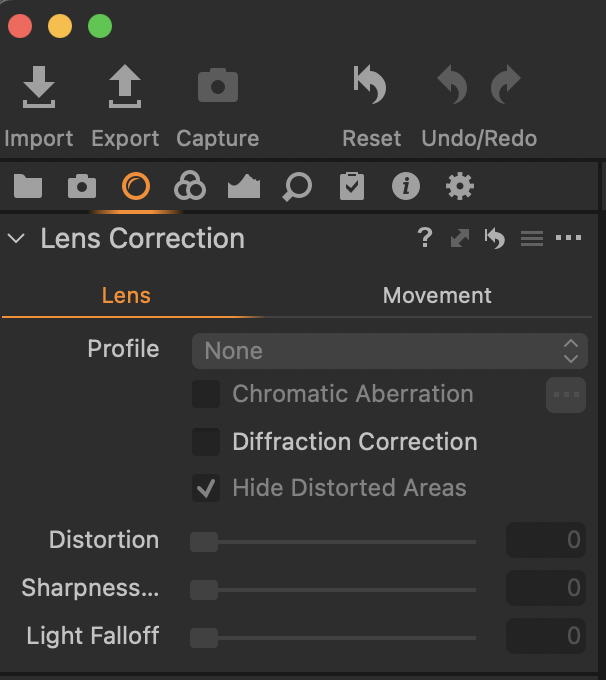
-

You should at least be able to choose a Generic profile, if that is not offered you might have a scan maybe?
0 -
The image I was working on was a downloaded copy of
https://upload.wikimedia.org/wikipedia/commons/archive/5/51/20210726123327%21%D0%94%D0%BE%D0%BC_%D1%81_%D1%81%D0%BE%D0%B2%D0%BE%D0%B9_-_%D0%BE%D1%81%D0%BE%D0%B1%D0%BD%D1%8F%D0%BA_%D0%B2_%D0%B2%D0%B8%D0%BA%D1%82%D0%BE%D1%80%D0%B8%D0%B0%D0%BD%D1%81%D0%BA%D0%BE%D0%BC_%D1%81%D1%82%D0%B8%D0%BB%D0%B5_01.jpg The metadata says it's from a Canon PowerShot S100.
0 -
There is any failure with the link, I can't download the file but anyway the Canon PowerShot S100 is not on the list of supported cameras, guess that's the reason:
0 -

From the link path the image you are working with is a jpg. Any lens correction that may be possible is adjustable for a RAW file but a jpg has all edits, such as lens correction if any, "burned in". Therefore the C1 Lens correction tool has no adjustable lens data to work with to apply corrections.
0

La publicación no admite más comentarios.
Comentarios
4 comentarios