Why are you asking for us to pre-order an upgrade when the last one caused serious performance issues?

I was one of the customers who preordered version 21 last year, and I'm somewhat sorry I did. V21 bought significant performance issues (documented all over this forum), including lags of 5-7s when adjusting sliders around. CaptureOne has failed to actually address any of these issues, and now I'm getting emails to pre-order the upgrade to 22. Why? The last one did not go well for me and I had no recourse. I think CaptureOne owes it to their customers to either FIX version 21 first before asking for more money, or offer v22 for free to any customers who have maintained longstanding support threads regarding these performance issues.
-
Sorry Kaveh, but I wasn't faced with any issue when using Capture One 21. It works quite well and I don't have any lag when adjusting sliders. Are you sure your system is clean enough and your computer powerful enough to make C1 working ? I have an old MacBook Pro 15" (late 2013) with "only" 16GB RAM and an old Intel processor (i7 2.3 GHz), working under Mojave, and everything works fine.
That said, I am not sure I will pre-order version 22 before I know it will work with my old MBP.
0 -
I have a 2019 MacBook Pro 16” with a 5600m and 32GB of RAM. It’s pretty much a top of the line model, and I’m not the only one who’s been exhibiting such issues with more-than-capable hardware.
0 -
Permanently deleted user
Why are you asking for us to pre-order an upgrade..?
The key word there is "asking".
Nobody - least of all Capture One - is forcing you to do anything.
I’m not the only one who’s been exhibiting such issues with more-than-capable hardware.
A statement which does absolutely nothing to rule out the possibility (likelihood, in my experience) that the problem is still local to your machine, rather than something specific to the software.
Seen it so many times...
0 -
I'm not sure why people are rushing to defend a lack-of-support around a critical issue in C1P. Everyone should want this to be fixed or made better.
I know you want to dismiss this as something specific to my particular machine. The problem happens on an absolutely fresh and virgin install of macOS Big Sur as well as Monterey on my 16" Macbook Pro (with core i9, 32GB RAM, and an AMD 5600M). I'm not sure how that would make it specific to my install.
0 -
For those of you who think there's no issues with hardware acceleration in C1P 21, go to your settings and try turning off Hardware Acceleration for "Display" and see how much snappier and more responsive the sliders actually get. It's unacceptable to have Undo/Redo actions take 5-7 seconds on modern hardware. They really need to figure this out.
0 -

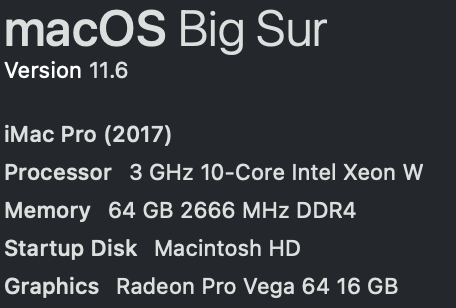
Since the 14.4.1.16 update, with hardware acceleration on, the slider lag and time to show a full resolution image has improved quite a bit for me (see specs for my iMac Pro, below). If I turn off hardware acceleration for the display, there is a lag, but it is a fraction of a second. Turning off processing results in a very slight lag. This observation was for Canon R5 ~50MP images.
So, although I really want C1 to develop Metal for Intel Macs, the performance on my iMac Pro is quite acceptable, though not as smooth as with version 20.
 0
0 -
Yes, I'm working with similarly sized files, 50MP from a Sony A1. I just updated to 14.4.1 today (curiously the program wasn't notifying me of this update) and you're right, performance has been noticeably improved, though turning hardware acceleration on for display still introduces noticeable lag.
I'm curious what you have your screen resolution set to. When I'm at my desk, my 16" is plugged into an LG ultrafine 5k (so similar resolution to your iMac Pro) on the 2880x1620 setting (this is one of the reasons I sprung for the most powerful GPU in the 16").
0 -
I have my preview image size set to 3840. I have set it higher and lower and have not found the setting to make much difference. The higher you set it, the bigger the Preview file. Regardless of the setting, if C1's viewer size does not match your Preview window size, C1 has to recalculate the display. If the image file is 50MP displayed at full screen, this is going to slow things down more than 20MP, for example. Also, if you reduce the viewer window, things, like slider bar performance will greatly improve.
0 -
Yeah, but what's the point of a 27" monitor if you can't use the entire screen to edit photos? If the app can't keep up with that, there's a problem, especially when previous versions had no issues and other apps like Lightroom similarly don't exhibit similar issues.
0 -
True, and it is not so great to say, C1 is really not that bad at full screen for 50 MP images, but if you want to see detail for editing, a slightly smaller windows + zoom works well. Comparing C1 to LR is not exactly a fair head to head comparison. The coding C1 uses to produce better images than LR might be more complex and therefore, less efficient. Who knows? They are not going to let us compare codes, nor is LR going to say, "We're faster, but not as good," and C1 is not going to say, "We do a lot more calculations to give you a better image, so we are not so fast," even if both are true. Again, who knows? So, I think one has to decide what is most important, image quality, or other things and go with the software that delivers you priorities with limitations you can tolerate. Even so, it is reasonable to pressure C1 to improve its performance.
0 -
I think it's perfectly reasonable to expect better performance when their prior versions delivered that and v21 was a performance regression. It's more than just photo editing apps though. On the same machine with the same monitor, I can color grade 4k video (similar edits to what you might do in C1P) from my DJI Mavic in Final Cut Pro and play it back *in real time*. The CPU/GPU combo on this laptop is the most powerful ever made on the Intel Mac side of the lineup. It should be able to handle color grading a static RAW photo without multiple seconds of lag.
And yes yes I'm itching to try an M1 Max with C1P, but that's not a fair comparison since C1P is (thankfully) using Metal on those.
0 -
I'm using C1 (14.4.1) on an M1 iMac and experiencing the same performance issues, several second delays.
0 -
The interesting thing is how widely variable the reported delays are, ranging from quite minor to crippling. This implies Capture One plays well with some systems hardware and software and poorly with others. Without a valid survey of users experiences not dependent on reports to the Forum, tracing down the problem is unlikely.
My healthcare system sends a questioner to every patient after each visit. How hard would it be for Capture One to send a questionnaire to all users about performance issues and aggregate the data? They do have our contact information and have no trouble sending promotions. On line survey tools are readily available. User computer data is not hard to harvest. With a comprehensive database of performance data, tracing down the choke points should be straightforward.
Right now we are looking only at a limited number of anecdotes. As they say, the plural of anecdote is not data. C1 needs data, assuming they want to fix the reliability issues.
0
La publicación no admite más comentarios.
Comentarios
13 comentarios