Capture One Cross Loading Images From Another Session

I have downloaded and installed C1 version 15.1.2.1 for Mac and I am still having the same ole issues.
Here is what is happening. I am working in one session and I complete my edits in that session so I go File->Open Recent and select a previous session. So the session that I had been working in closes and the Session dialog box opens and I select a previous session that I have worked in. That Session opens but it has none of the photos that were previously in that session in it. Instead C1 is now loading all the photos from the session that I just closed. All the edits in that session are lost.
-
Where exactly do you see the wrong images?
0 -
When I wish to switch Sessions. When I close the session that I was working in and choose a previous Session it opens and loads with the images from the Session that I just closed and all the images that were previously there and their edits are all gone.
0 -
You are repeating yourself but if you don't provide add. information. Then chances are not good for a helping hand. Details and screenshots of your library tool and collections might shed some light on it...
0 -
I appreciate that you are trying to help but I repeated my issues because you asked me, "Where exactly do you see the wrong images?" I tried to explain that to you but I guess you did not understand.
I don't see how a screen shot of my Library tool is gong to be of any help. But here it is:
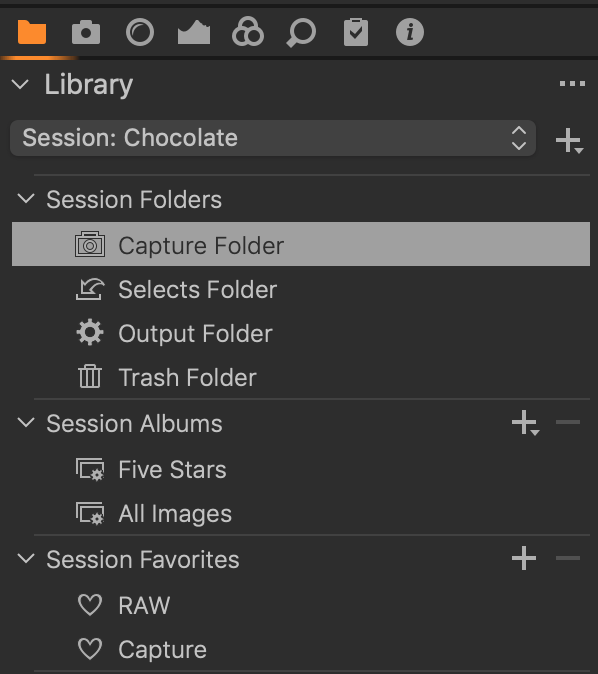
I'm not using Collections to my knowledge.
0 -
I used collection as the generic term for the 4 session folders, the 2 albums and the 2 session favorites.
It is rather unlikely that your problem is a bug in C1 (I would not say this for C1 catalogs but for sessions it is hard to imagine), rather possible that you mixed something up which doesn't play in favor of how sessions work.
And I think your collection "Capture" under favorites is probably pointing to another session's Capture folder (otherwise your Capture Folder in Session Folders would have an additional heart icon:
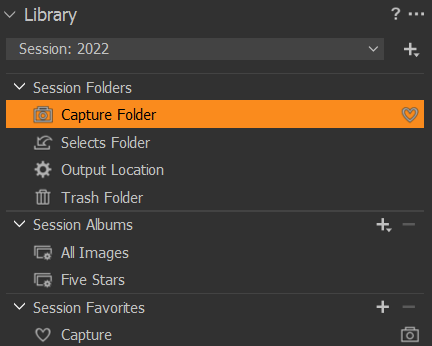
(above screenshot is just to illustrate the heart icon for the Capture Folder. You shoiuld not set this up in this way either)
So, if your Capture favorite points to the other sessions natural Capture Folder (that is the "Capture" folder in the folder where your session file is located, then this explains this issue
When I close the session that I was working in and choose a previous Session it opens and loads with the images from the Session that I just closed and all the images that were previously there
It does not easily explain why your edits of these images are gone because they are stored in the .cos file, but maybe the two sessions keep edits in their cache and that causes some sync issues.
So, what to do with this?
I recommend to separate your sessions.
- Ensure that in each folder in your file system, there is only one session ( .cosessiondb file). In other words, have every session in its own folder, each session having it own subfolders Capture, Selects, Output, Trash.
- You check every collection in all of your sessions by right-clicking on the collection and say "Show in library". Remove all collections under Session Favorites which point to folders from another session.
- Use each session separately. Or, as I replied in your other thread, use one master session using the System Folders in the library tool. Maybe you can add each Capture folder as a favorite there, and work with the collection "All Images".
You could not imagine but the info I requested helped me to understand.
0 -
Use sessions as they are intended to (to my knowledge) and that is they are separate image containers, cross linking them and having more than one session open at any time calls for troubles. Same if you have a master session used as an image browser, don't open this master session and your small sessions at the same time.
If you want to cross-link for the reason of having access to all your images at once, defining cross session searches, that's what catalogs are for. Maybe a master catalog is better than separate sessions or a master session. Or, you keep your small sessions (unlinked) and first work on the individual sessions, and once finished with a session you can import the session ( or their images ) including adjustments into this master catalog.
1 -
I see you have first closed the first session and then opened the second, so you did not have two sessions open at the same time. I still have no explanation for the "lost edits" but I account it to the comingling of folders in more than one session ,and it does not change my recommendations.
0 -
Mark,
you replied in your other thread but I think it fits better here.
1. Collection is every item you can click in the library tool and shows a a collection of images, e.g.each the below is a collection:
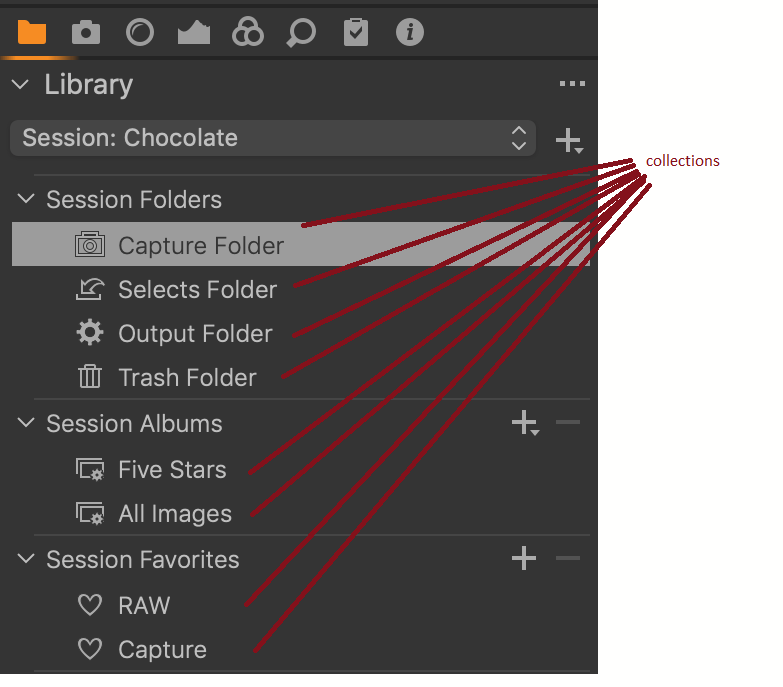
2. I am running WIndows, so there might be a few differences to the Mac, e.g. I don't have a workspace Dual Monitor - Large Browser, but only Dual Monitor - Large Viewer. Also, you said yoiu close the browser and then a open dialog pops up, this is not the case with WIndows C1 20 nor with C1 21. When I "close window "(file menu) or close the actual window by clicking on the x every Windows window has, then C1 shuts down completely. Whether or not this difference has something to do with your problem I don't know.
3. Maybe this id different between Mac and Windows too, but when I add the folder "Capture" (file system level) which belongs to the open session to my favorites, then I see two aditonal icons (below), but I don't see this in your screenshot, which makes me believe you have added the Capture folder from a different session.
After adding the "correct" Capture folder to my favorites:
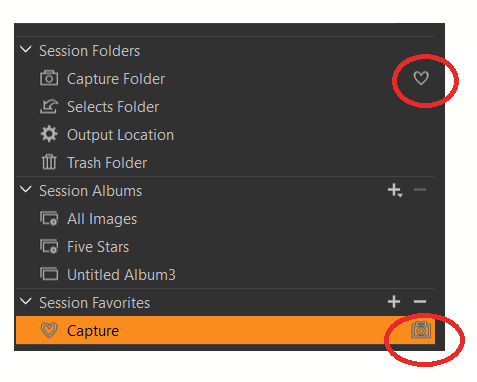
Below, the icons are missing, that is because I added any arbitrary folder with the name "Capture", not the folder "Capture" where my sessiondb file lives:
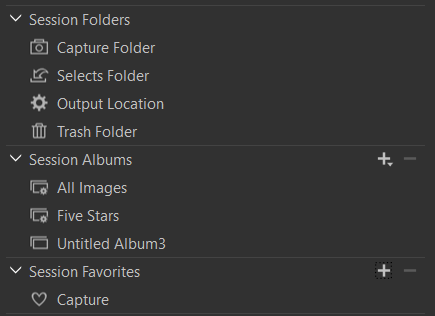
And this looks exactly like yours. Hence I believe you have added the wrong Capture folder. If that is really the case, then the collection "All Images" should show not only your correct Capture Folder, Selects Folder etc. images, but also those which are in the session favorites collection, which in that case are the images from a different session. See my point?
To figure out which folder the sessin favorite collection "Capture " point to, right-click on it and pick "Show in library" or "Show in Explorer (Finder)".
You check every collection in all of your sessions by right-clicking on the collection and say "Show in library". Remove all collections under Session Favorites which point to folders from another session.
In the end, you need to figure that out for yourself, do it or don't, I can only give you a possible direction, this might be the right or the wrong track though.
All the best
BeO1

La publicación no admite más comentarios.
Comentarios
8 comentarios