Copy Layers quickly

I recently switched from Windows to Mac and when I click the double arrow in the layers panel, which brings up the adjustment clipboard with all the layers, they are all selected but there is "deselect all" option.
In Windows all the layers sit below a "parent Layers" with a little arrow pointing down, which I can untick to deselect all the layers at once and then select the ones I want.
Long story short, if I have 15 layers on the mac and let's say I only want to copy 1 of them, I have to untick one by one 14 layers.
Is there a quicker way to do this? The only way I have found is to go to the main adjustments clipboard (not the one with just the layers), click the 3 dots, choose "select none" and then select the layers I want.
-
To copy selected layer(s) to another image, select the source and target image(s). Select the desired layer(s) in the source image and click the Copy/Paste icon.
0 -
They are all preselected though in the layers adjustment clipboard.
Lets say I have 15 layers and I only want to copy the 14th and 15th layer. I have to manually untick/deselect one by one the first 13 layers. Is there a way to do it faster with less button clicks? (There is in Windows, but I haven't found one yet for Mac)
0 -
It looks like there isn't a way to do that. How do you do it in Windows?
0 -
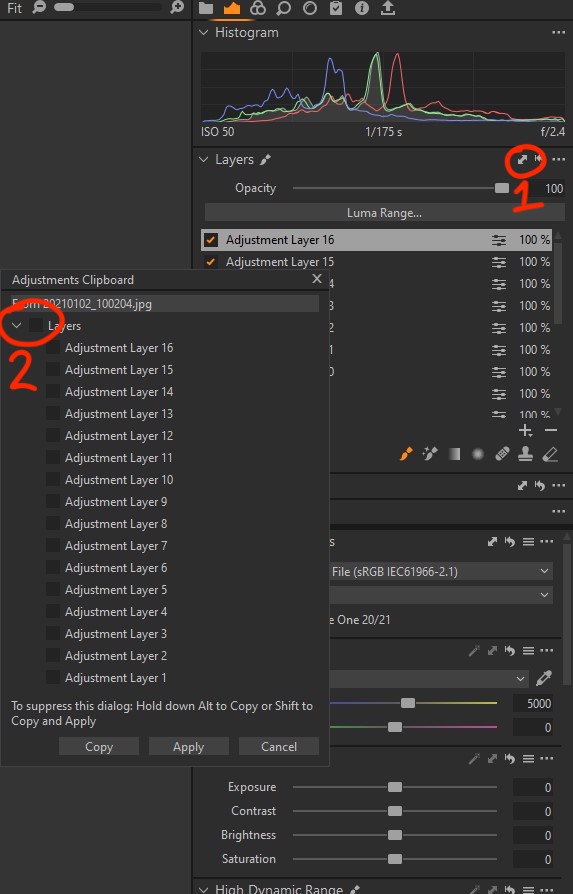
I first click the double arrow (circled with "1") to bring up the layers adjustment clipboard.
I then untick the box next to "Layers" (circled with 2) which deselects all of the layers and select the one I want.
In Mac you only see the names of the layers (all pre-selected), but there is no drop-down menu "Layers" with a box to untick.
 0
0
La publicación no admite más comentarios.
Comentarios
4 comentarios