CO22 isn’t remembering “Recent Catlogues”

I’ve recently migrated from Windows to Mac with CO22, and the migration has gone well, with the catalogs being recognized, and once the image folder locations were updated, all images and their process options have been carried forward successfully.
However, there’s one issue that I’m having in that when I try to use the “Open Recent” command to switch between catalogues, the list of recent catalogues is empty and won’t repopulate with any of the other (many) catalogues that I’ve opened since the migration.
Is there a particular location on a Mac running Monterey where the catalogues should be saved to enable the app to know where the other recently used catalogues are located?
If not, is there a trick to enable Open Recent?
I’m presently set up with the catalogues stored in a CaptureOne folder within the Pictures folder under my user ID folder on the Macintosh HD.
Thanks in advance…
-
Hi there,
I believe it is due to the MacOS integration, this happened to me in MacOS Catalina and did the following and seems to work fine to me.
In your mac
- open your MacOS System Preferences panel
- Click General icon

- I guess you have "None" in the Recent items option, if so, try to select a number instead
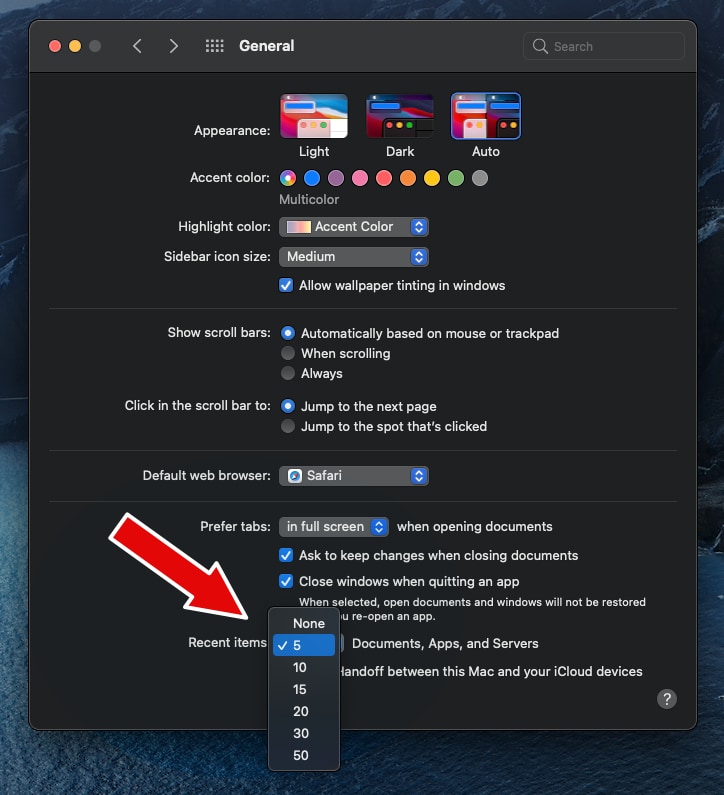
hope it helps!
regards.
0 -
Thank you!!! Worked perfectly.
I'd never have thought there'd be such tight linkage/control between the OS system preferences for recent items and CO and other apps.
...another Mac OS learning, which I very much appreciate your helping me understand.
0
La publicación no admite más comentarios.
Comentarios
2 comentarios