Flexible Space in 2nd screen bug

There seems to be a bug in the latest versions of C1. When using a second screen, it is no longer possible to use the "flexible space" feature (Red arrow), it results in a thin line. A normal "space" (Green arrow) still works a intended. Because of this bug it is impossible to center the Cursor Tools on the 2nd screen in dual screen mode and because of this I can't use my macros in Loupedeck anymore.
Anyone having the same issues?
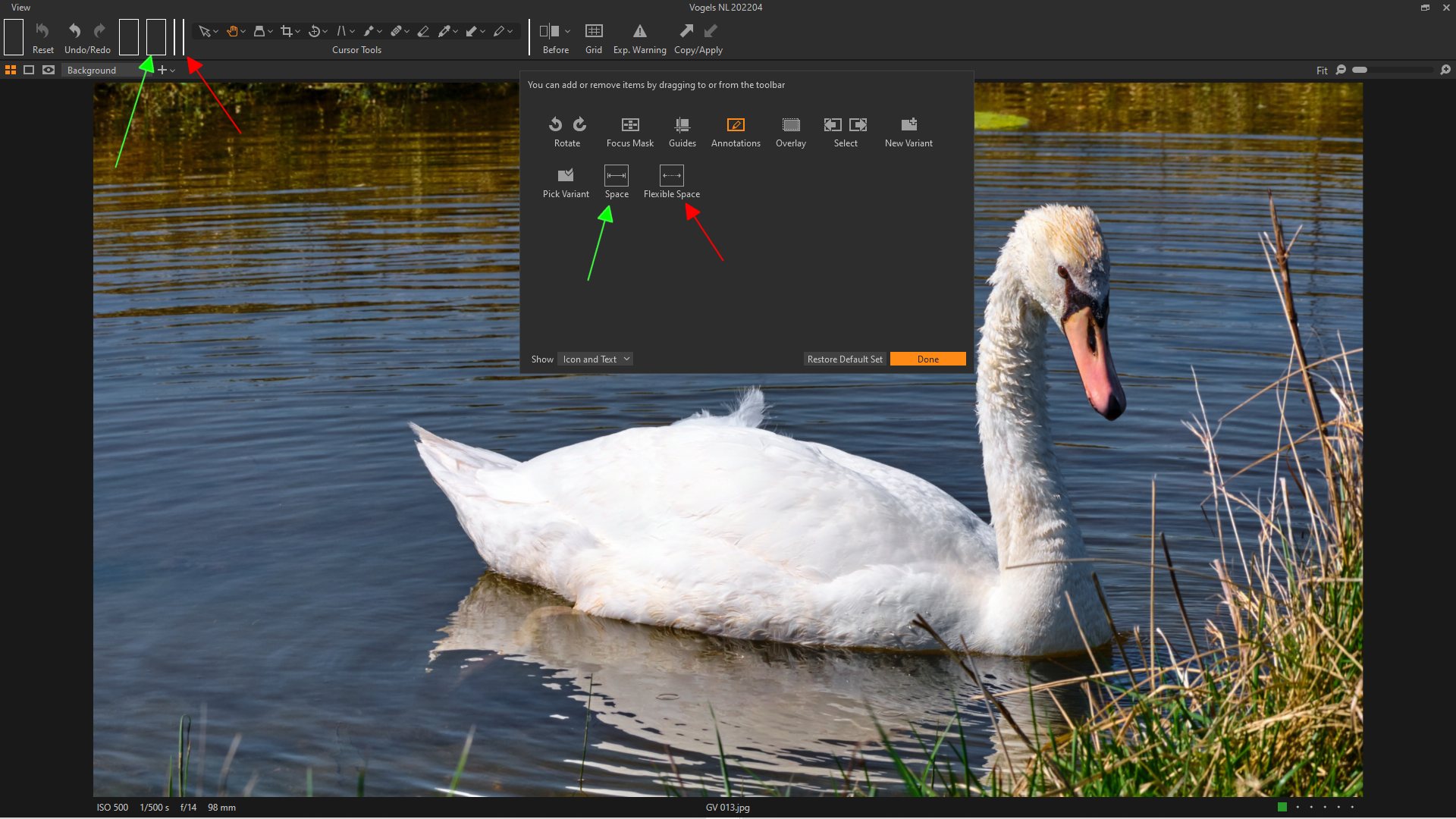
-
I'm having the exact same bug. All flexible spaces are of zero width. Have to position my task-bar items using multiple fixed spaces.
On the main screen it seems alright...0 -
Thanks Klaus, now I know it’s not only in my setup. I find it very annoying as my macros of Stream Deck and Loupedeck expect the toolbar to be exactly in the middle of the screen as I’m using screen position references to pull down menus from it.
I reported it while the beta was still running, pity it wasn’t solved in the release version.
0 -
I reported it right now - so let's hope for the next update.
Currently I use multiple fixed spaces to arrange my tools.... 0
0 -
Thanks. I tried to solve it the way you did but it's not very practical. I also reported the bug but the ticked remains unanswered for weeks now, I guess all programmers are focused on the ipad app right now.
And as you noticed before, the bug only happens on a second screen, the main screen is not affected.
0 -
Today I received a response on my bug-report. It was acknowledged that this is a "known bug" and that it was fixed in the latest release (15.2.1).
So I upgraded (now on 15.2.1.9) but still the bug seems to be there...
Too bad... :-(
0 -
Same here. Strange but I never received a bug report reply, tickets are still open.
0 -
Will be fixed in next release! ;-)
0 -
Finally fixed in Version 15.3.0 ;-))
0
La publicación no admite más comentarios.
Comentarios
8 comentarios