Magic Brush and auto mask accuracy

I wish the magic brush and auto mask were more accurate, what do you think?
I set the tolerance to 1 and turned off the sample for the entire photo, but the extra parts are selected. If I try to use the normal brush, the auto-mask is not accurate enough and the result is disappointing, and if I use the magic eraser to erase the extra areas, it erases more than necessary as well.
When the Magic Brush first came out, I was impressed that it was a game changer, but since then there has been no sign of an update in accuracy, and to be honest, I feel like it has been overtaken by Lightroom's mask function (including auto-masking with a regular brush), which was recently updated.
I wish masking would take into account not only color information but also texture,...
-
Have you tried adjusting the Magic Brush's size and hardness attributes? I find that it's pretty accurate when I use a very small brush. Also, it matters whether you tell it whether or not to select from the entire image. Still not perfect, but awfully good.
0 -
Hello Abbott,
Thank you for your comment.
I did a lot of things like brush size, hardness, density, tolerance and not selecting from the entire photo.
I often get very good results with subjects that have a clear separation of colors, such as landscapes, but if there is a person holding a light-colored poodle, for example, or curtains in the background, all of them are selected even if the brush size and tolerance are reduced and not selected from the entire photo, even if there are a few similar colors adjacent. If you reduce the brush size and allowable area and do not select the entire photo, all of them will be selected.
It may be difficult, but if a person's skintone is selected with the Magic Brush, it would be nice if the dog's hair and other objects with different textures are excluded.0 -
You've got a point. Like Auto Mask, Magic Brush has some limitations that would be nice not to have. This looks like something to as Capture One for directly via a Support Request.
0 -
I very much appreciate and use the new the magic brush and the magic eraser, but I've got the impression, that turning down the "Tolerance" slider to its minimum value 1 still leaves a color range that is much to wide. I think it would be great, if C1 could change the minimum value to select a much more narrow color range, very very close to the selected color(s).
0 -
Hello Jacques.
I was certainly quite impressed with the Magic Brush when it first came out.
But I think it's been a year or two since then. I don't think there has been any update in accuracy. This also applies to the creation of masks from color selections in the color editor.
In the meantime, I have tried and tried, even setting the brush size to 1, the tolerance to 1, and dotting the image instead of tracing it.
It may be hard to see at the small size, but the attached image is the result of unprocessed data, brush size 1 tolerance 1, unchecking the sample of the entire photo, and only dotting the dog's hair. This is a sample of the result that is still quite good. There are many cases where the mask spreads over the entire photo even though the whole photo sample is unchecked.
No, no, no, it's a terrible thing to say that because they are approximate colors and adjacent to each other. I am sure some of you may say, but I don't think so.
I selected dog hair, not human skin, for this layer.
I can't recommend Magic Brush forever without taking into account not only the color but also the texture of what I intended to select.
Currently, the magic eraser is just a grand command + Z for me.
Lightroom's recent update has enhanced its masking capabilities, and Luminarneo has also updated its masking capabilities beyond Lightroom.
I still use Captureone because I like the way it produces images, but that is why I find it frustrating.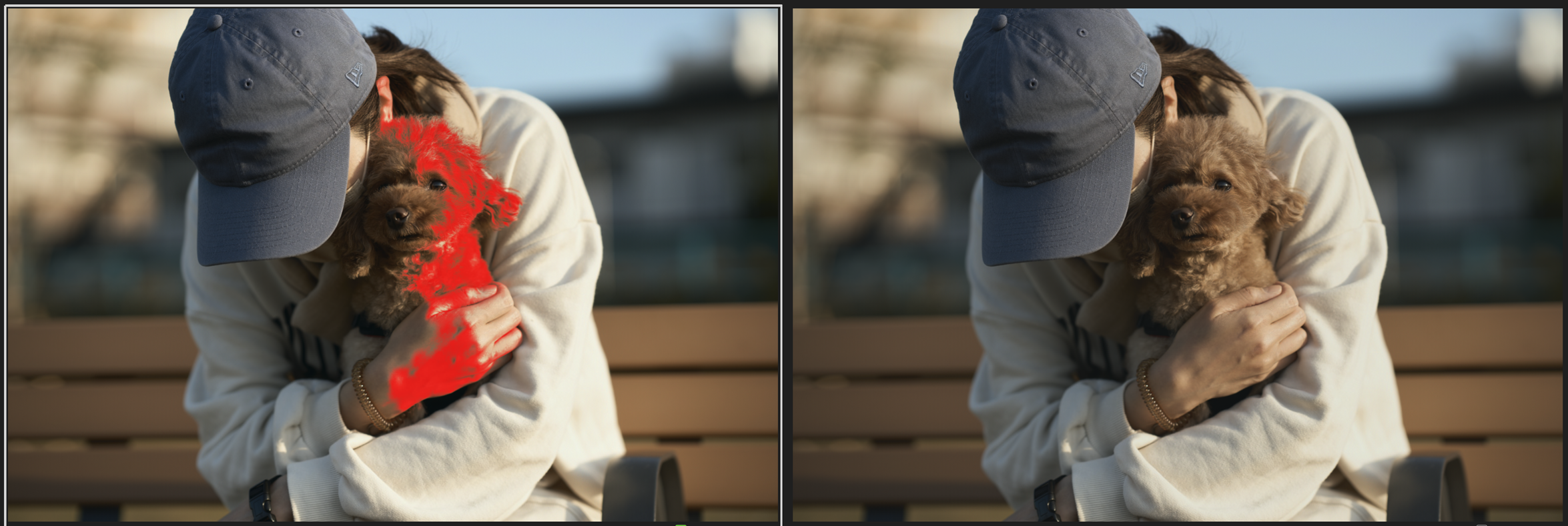 0
0 -
If it is difficult to improve the accuracy of the magic brush, it would be very helpful if I could at least create a layer mask from the selection after erasing the excess selection with the eraser while the color editor "shows the selected color range" in the color range edit.
Attached image is a reference image for masking only the dog.
I have submitted a request to support.
Hopefully the brush will be a little more accurate...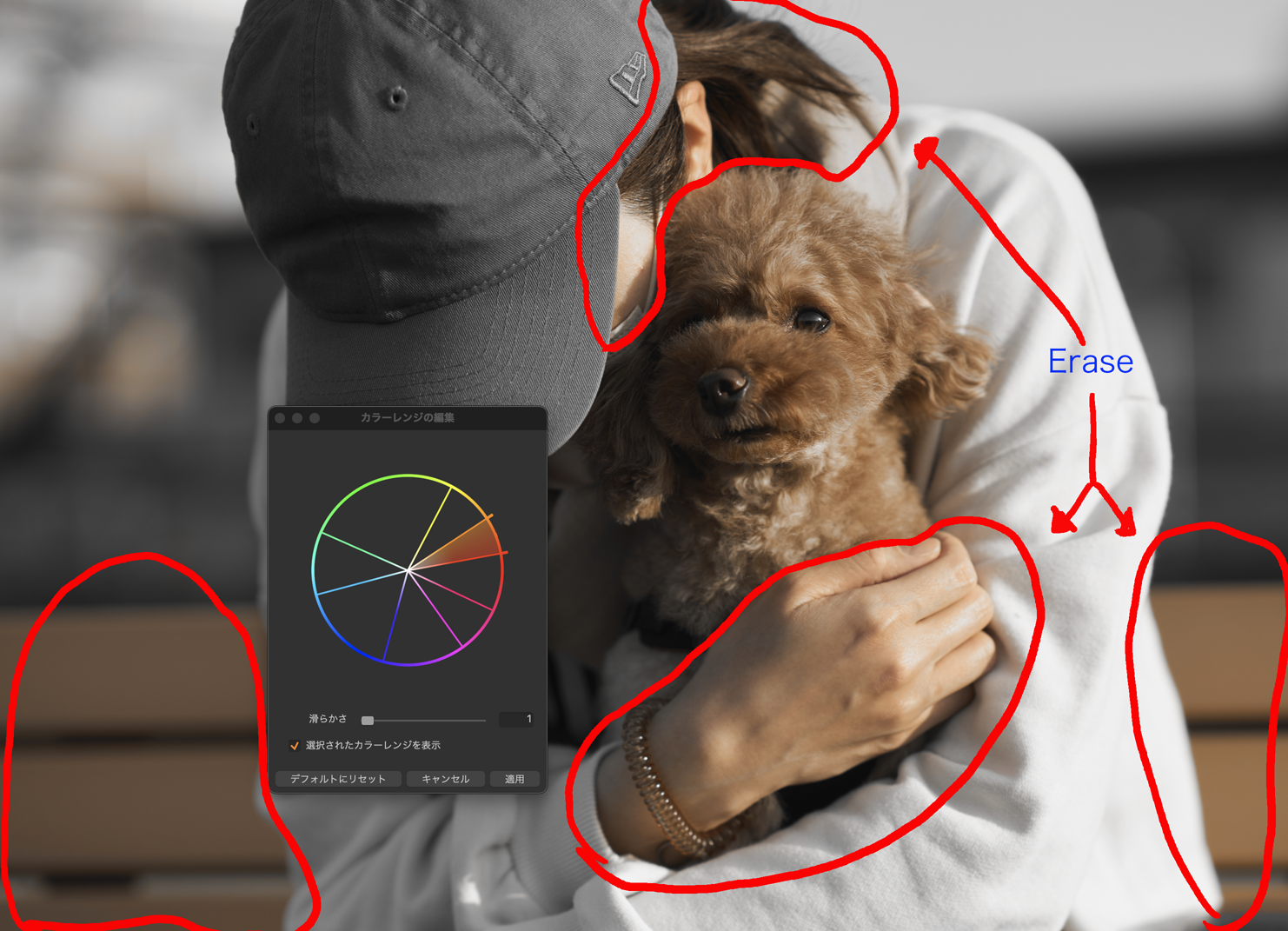 0
0
La publicación no admite más comentarios.
Comentarios
6 comentarios