change default crop ratio from "original" to "unlimited"

Hey,
whenever I want to crop a photo I have to go to the crop tool and set it from "original" to "unlimited" (I'm using the german version, so I don't know the exact translation).
Problem is, it always resets. So for the next photo I, again, have to make the setting again. Is there a way to simply have it set on "unlimited" all the time, right from the beginning without any ratio?
Thanks in advance
-
EITHER
Select all the photos, and on the crop tool in the toolbar, set the crop ratio to Unconstrained (the English version calls it that). You should then find that they are all set to that when you select an image.
OR...
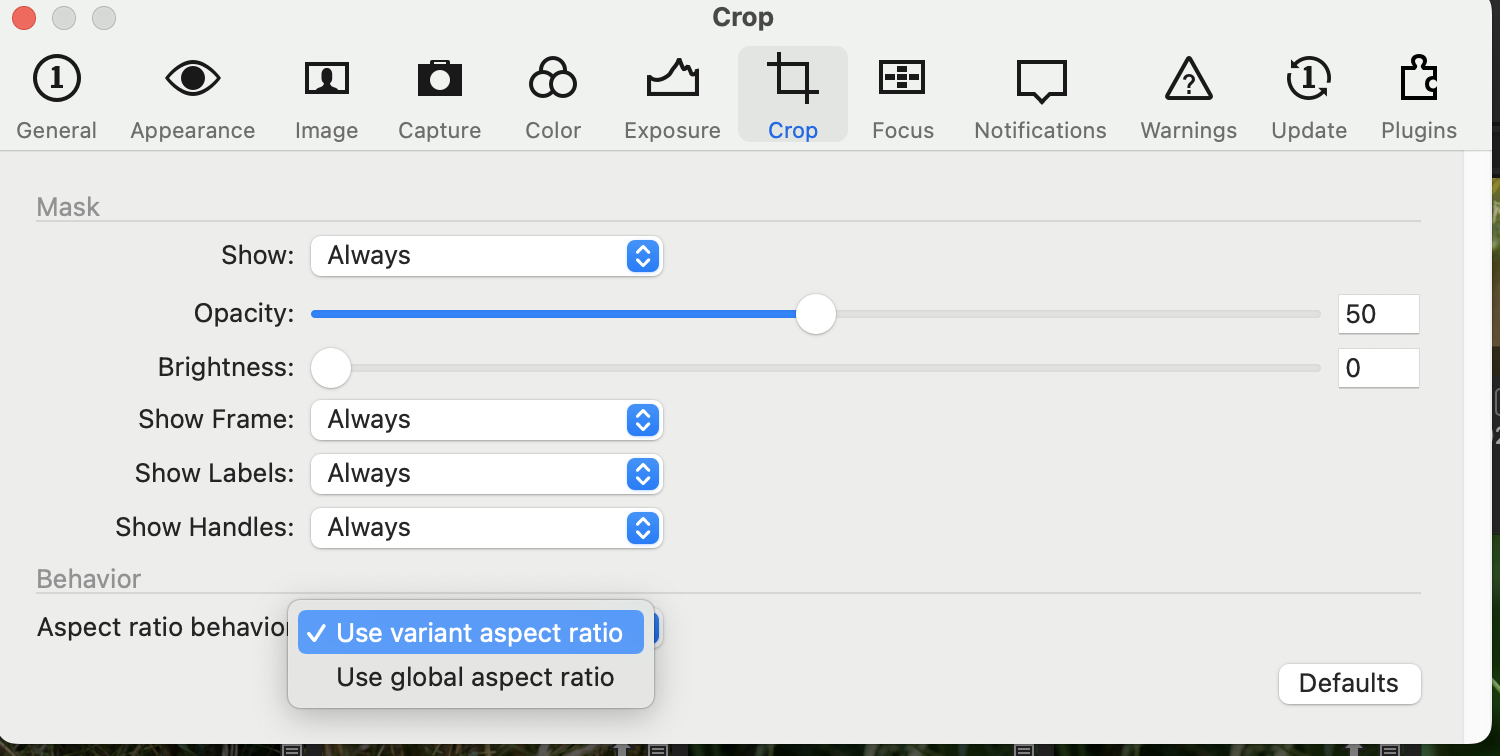
If you have the newest release of Capture One 22, go to Preferences and on the Crop section select Use Global Aspect ratio - that means that if you choose an aspect ratio on image no 1, it will still be the one that applies when you go to image number 2.
Ian
1 -
Thanks so much Ian!
Option two is already selected as on your screenshot, but I simply use method 1 then :)
Have a good day!0 -
My screenshot shows that I have selected Use Variant Aspect Ratio. I prefer that, but my suggestion was that you might prefer the other option, Use Global Aspect Ratio.
Ian
0

La publicación no admite más comentarios.
Comentarios
3 comentarios