Setup of tool registers reset after sotwareupdate

Dear all,
why in the world there is *always* my beloved setup of the registers and tools reset after I start a fresh downloaded update?!?! Actually with going on from CO 15.3.X to 15.4.
This is very annoying, and always after an update I have to spend a good time to tweak it to the accustomed view and order. I *do not need* "theter" or capture, because I do not have a thetering camera. And so on. Furthermore I'm of the opinion that the default setup is not in accordance of the workflow of developing RAW: Why should I first crop pictures (first register "Form"!?), even before I have whitebalance and other applied?
That's very annoying.
Johnannes
-
All you have to do is save your workspace before you do the update. Then you can go back to how you like it very easily afterwards, without having to spend any amount of time doing so. Also Capture One should save your workspace for you before it does the update - that is what the various entries in the menu are here above the Ian one which is my saved workspace.
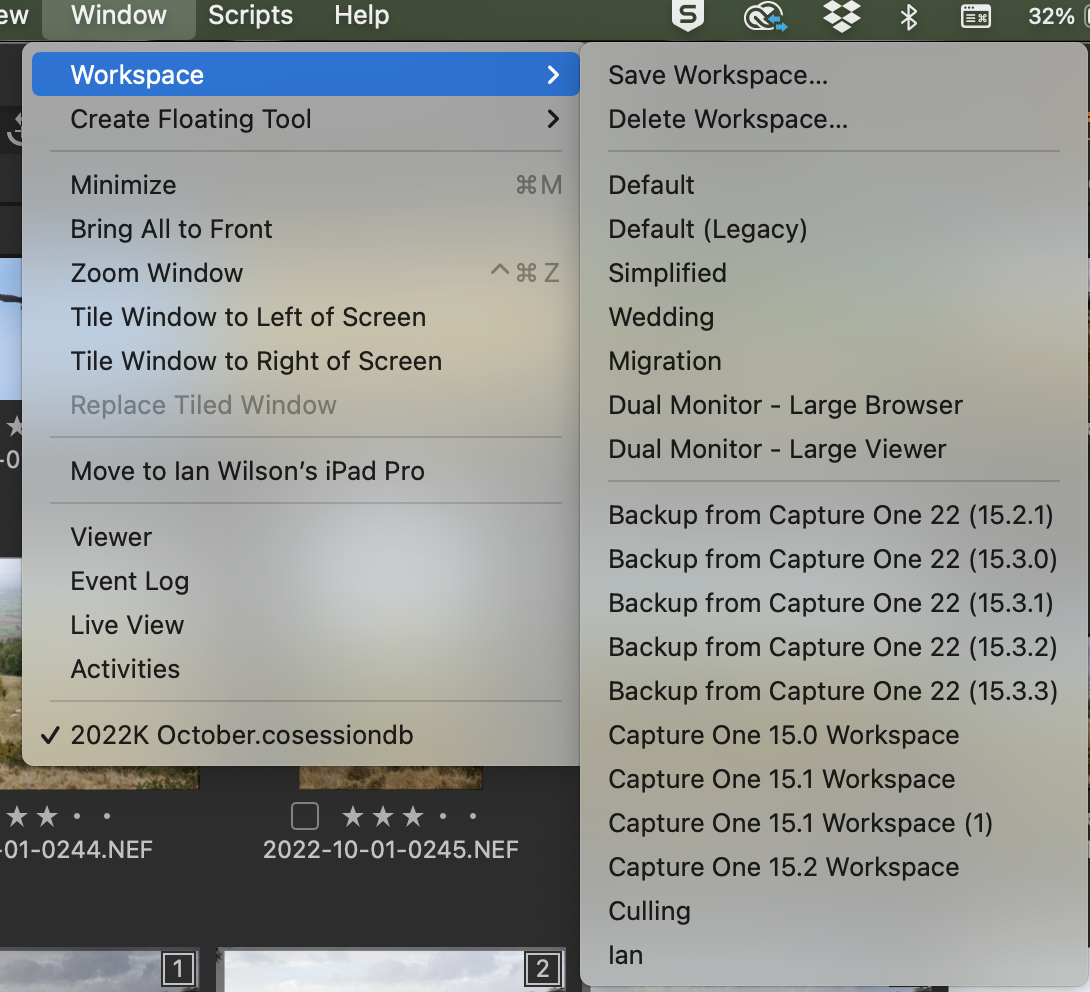
And the reason it reverts to the default workspace is that there may be new features that are not in your saved workspace that are in the default one. For instance I have seen people in
the past complain that they can't see some new feature, and the reason is that it is not in their saved workspace.
Ian
0 -
Many thanks for your kind answer and your informations! Admittedly: That I didn't know.
With that behavior I struggle with CaputerOne since V.6 ... On the other side I want to remark, that such an explanation would be unimaginable in cases with analog complicated softwares like Indesign or the Affinity Suite: After every update their user interface would got to be resetted and the customer has to be aware of that ...Thanks again!
Johannes0

La publicación no admite más comentarios.
Comentarios
2 comentarios