How to Create both Black and White and Colored Sets of the same photos

Thank you for your help. I just did a large shoot of various people and processed them with black and white enabled. There are several hundred photos. The best images sit in a user collection I created.
I'd like to have a second user collection made up of color versions of these same selected images.
Two problems I'm having: 1) It's not intuitive to me how to remove the Enable Black and White for more than one image at a time. 2) How best to create a color collection of these images? If I make virtual copies, removing the Enable Black and White changes both copies to color.
-
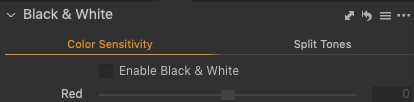
To remove the B&W settings from all the images: select the images, then go into the B&W tool, uncheck the "Enable" box, and finally Shift-click on the Copy/Apply (bidirectional) arrow:
To create the collection, consider making a smart collection and assigning a color tag or star rating to the images you want in the collection. Alternately, you could create a regular collection, manually select the images you want (it's easier if you tag the images and then filter by the tag) and drag them into the collection.
There are probably other ways as well, but these should work.
0 -
Best practice is to make two variants. One for B&W and one for color. Don't touch the original one!. So you get then : the original file, a B&W variant and a coloured one. As Abbot mentioned rate then (or color tag, or use keyword) and work with separate smart collections.
Kassur
0
La publicación no admite más comentarios.
Comentarios
2 comentarios